
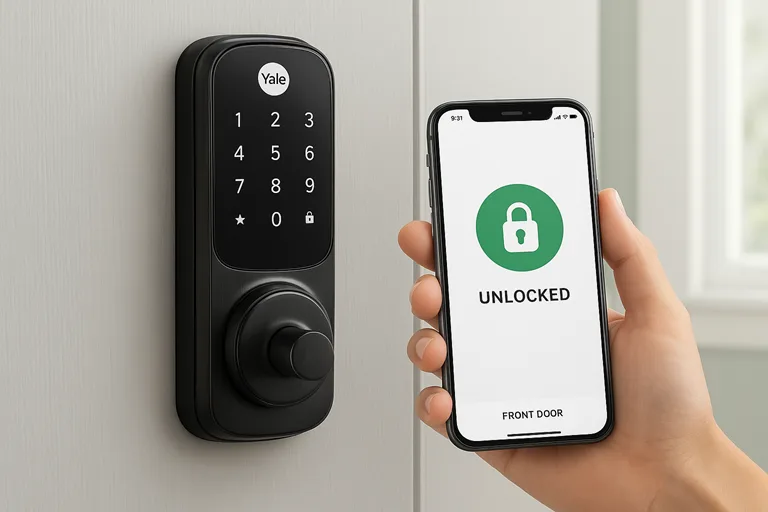
Imagine arriving home after a long day and simply tapping your smart digital lock to let you in – no more fumbling for keys or hiding spares under the mat. A smart digital lock is essentially an electronic keyless entry system for your door, often operated by a smartphone, code, or biometrics. Instead of a traditional metal key, these locks use advanced technology and Internet connectivity to lock or unlock your door. In the past few years, smart locks have gone from niche gadget to mainstream gadget. The global smart lock market alone is projected at $3.23 billion in 2025, driven by rising smart-home adoption (over 70% of U.S. homes now have voice assistants) and new housing trends (Airbnb hosts favor automated guest access).
At their core, smart locks build on standard deadbolt hardware but replace the key with electronics. Think of them as electromechanical locks that unlock when they receive the right digital signal – be it a PIN code, fingerprint, smartphone command, or even a voice prompt. For example, a door fitted with a smart lock might still have a deadbolt, but that bolt is turned by a little motor rather than a key. As one industry guide explains, a smart lock’s control board (its “brain”) handles input from a keypad, app, or sensor and then activates a motorized actuator to move the bolt. Many models still include a hidden physical key cylinder for backup, but under normal use, you never touch it. In short, a smart digital lock is a digital door lock that brings your front door into the Internet-of-Things era – offering keyless convenience and extra security checks while letting you manage entry from anywhere.
How Smart Digital Locks Work
Under the hood, a smart digital lock combines traditional lock hardware with modern electronics and wireless radios. Mechanically, it usually looks like a normal deadbolt on the outside, but on the inside, it has small electric motors or solenoids that physically turn the lock. When the lock receives a valid unlock signal (from your phone, code, or other method), the motor energizes and rotates the bolt latch just like your key would.

Electrically, the key part is the control board – a circuit with a microcontroller and memory. This board runs firmware that checks authentication and handles commands. It is paired with a wireless module (Bluetooth Low Energy, Wi-Fi, Z-Wave, Thread, etc.) that communicates with your devices or network. For example, if you press “Unlock” on a mobile app, your phone sends an encrypted command via Bluetooth to the lock. The lock’s microcontroller verifies the code (using AES encryption for security) and, finding it valid, powers the motor to retract the deadbolt. Likewise, entering a PIN on a keypad sends a digital signal inside the lock’s circuit to do the same thing.
Power and safety: Most smart locks run on batteries – often AA/AAA or CR123A lithium cells. A battery management circuit monitors charge levels and can alert you when power is low. Because locks are critical, many models include a hidden mechanical keyway or even a “plug-in” power port. For instance, several locks hide a traditional key beneath a cover so you can physically unlock it if the batteries die. Likewise, some Wi-Fi locks allow an external USB battery to restore power for a few minutes. This dual setup means you get high-tech features plus the reassurance of good old backup methods.
Wireless connectivity: How the lock connects is a big design choice. Many locks use Bluetooth Low Energy (BLE) to pair directly with your smartphone when you’re near. Others have built‑in Wi-Fi, plugging into your home network to allow remote control from anywhere. Some manufacturers even support both or include a separate bridge. Alternatively, locks can use mesh protocols like Zigbee or Z-Wave, which require a smart home hub (e.g., Samsung SmartThings or Hubitat) but offer long range and low power. The latest models are embracing new standards: Matter (over Thread) and Thread protocols aim to make setup and interoperability smooth. In fact, one leading analyst notes that major brands (Yale, Schlage, Level) are launching Thread/Matter locks to “remove vendor lock-in” and extend battery life.
Security and integration: All communications in a smart lock are typically encrypted (usually 128-bit AES). Locks often update firmware for security, just like any router or smartphone. Many also integrate with broader systems: for instance, a smart lock can work with a smart doorbell camera so you can see a visitor before unlocking. These locks send you notifications whenever the door is used, and some even log each entry in the app. Modern smart locks tie into smart home ecosystems – unlocking via voice with Amazon Alexa or Google Assistant is now common. In short, the lock is not an island; it’s a connected node in your home network, talking to your phone, your hub, or even to cloud servers to extend its capabilities.
Types of Smart Lock Access Methods
Smart digital locks come in several flavors, generally distinguished by how you authenticate and how the lock communicates. Here’s a quick run-through of the main types:
- Keypad Locks: The classic entry-level smart lock. You enter a numeric code on a keypad, and the lock checks it against stored PINs. These were actually the first “smart locks” before smartphones even existed. They work offline (no Wi-Fi needed) and support features like temporary codes and auto-lock timers. Their drawback is that you must touch the keypad, and codes can be shared or snuck. However, they have the advantage of working even if Wi-Fi or phones fail.
- Bluetooth Locks: These use Bluetooth Low Energy (BLE) to talk to nearby key fobs or your phone. Once you’ve paired a phone or keyring, coming within range can trigger an automatic unlock (known as “proximity unlock”). Otherwise, you tap a button in the app to unlock. Bluetooth locks are very battery-friendly (the radio sleeps until needed) and usually don’t require any hub. The limitation is range: your authorized device must be fairly close. But for many homes, that’s plenty.
- Wi-Fi Locks: These connect directly to your home’s Wi-Fi network and talk through the internet. The big benefit is remote access: you can lock or unlock your door from anywhere in the world via an app or web portal. Wi-Fi locks often have more horsepower too – some can stream video (like locks with built-in cameras) or work directly with cloud voice services. Examples include the August Wi-Fi Smart Lock and Schlage Encode. The trade-off is power: a Wi-Fi radio draws more energy, so these locks usually need their own constant power source or bigger batteries. They also rely on having an internet connection, so if your router is down, you might need to use a phone’s Bluetooth or a backup method.
- Z-Wave/Zigbee Locks: These operate on mesh home-automation networks. A Z-Wave lock or Zigbee lock doesn’t connect to Wi-Fi or your phone directly; instead, it talks to a compatible hub or controller. For example, a Samsung SmartThings hub or Wink hub can relay commands from your phone to the lock. The upside is range and battery life: each lock wakes to listen, and nearby devices can pass along messages (self-healing mesh). This is ideal for large homes or multiple locks. The downside is needing a hub (which can be an extra cost). Famous smart locks from Yale, Kwikset, and others often use Z-Wave. Z-Wave’s sub-1GHz network offers “exceptional range” and “military-grade security,” making it great for door locks. Zigbee similarly works well on battery (a single coin cell can last years) but requires a Zigbee hub like Hue Bridge or Echo with Zigbee.
- Biometric Locks: These read a fingerprint, face, or palm vein to unlock. No code to share or forget – you present your registered fingerprint or scan your face, and the lock opens if it recognizes you. This high-end approach offers rapid, touchless entry and is growing in popularity. For example, some new models claim 99.9% accuracy in under 1.5 seconds. Biometric locks still tie into the broader connectivity schemes (many have Wi-Fi or BLE modules), but their authentication method is a scanned body part. This adds convenience (and some people feel more secure, since you can’t copy your fingerprint like you could copy a PIN).
In practice, many smart locks blend these methods. A common retrofit lock will have a keypad and Bluetooth, letting anyone punch in a code or a paired phone unlock it. Others might pair Wi-Fi with plus fingerprint. The mix you choose depends on your needs: keypad-only locks are simpler and cheaper, while locks with Wi-Fi, BLE, and biometrics cover all bases (at a higher cost).
Benefits of a Smart Digital Lock
Why ditch a trusty mechanical deadbolt for a smart lock? The advantages are real:
- Keyless Convenience: No more fumbling with keys or carrying spares. With a smart lock, you unlock your door with your phone, a fingerprint, or a simple code. One reviewer notes that “the need to carry, keep track of, and physically find your key is eliminated” . This is huge when your hands are full, or if you habitually lock yourself out. You can also issue temporary “electronic keys” to guests (their phone or code only works for a set time) – useful for dog walkers, housekeepers, or Airbnb visitors.
- Remote Access and Alerts: If your lock is connected (Wi-Fi or via a hub), you can monitor and control it from anywhere. Forgot to lock the door? Use the app to lock it now. Need to let a friend in while you’re at work? Send them a one-time unlock code. You’ll receive notifications when the door is opened or closed (even who unlocked it, if the lock tracks fingerprints or user codes). As security.org explains, smart locks can “monitor exactly who’s coming and going from your home, and send you instant notifications when someone locks or unlocks the door”. Many also offer auto-lock timers (so the door locks itself at night) or geofencing (it locks when you drive away).
- Enhanced Security: Smart locks often improve security in subtle ways. For instance, you can no longer pick a lock that only exists in firmware. Many have stronger encryption and tamper alarms. Some integrate with cameras or video doorbells: if someone tries a bogus code, the system can snap a photo. Industry research even suggests smart locks can deter burglars; one report notes that 83% of burglars check for security systems, and locks with combined video verification reduce the window for break-ins. Features like auto-lock and forced-entry alerts add protection as well. And because these locks can store many unique codes or fingerprints, you’re not sharing a single copy of your key – you can revoke a lost keycode instantly.
- Integration and Automation: A smart lock is just one node in a smart home network. It can work with lighting, voice assistants, and other devices. For example, an evening routine might lock all doors (via the smart lock), dim the lights, and adjust the thermostat, all at once. Most locks connect to Amazon Alexa, Google Assistant or Apple HomeKit, so you can say “Lock the front door” just like “Turn off the lights”. Many also play well with home security systems and digital assistants; one review highlights how gaining Alexa/Google integration “is a major perk” of modern smart locks.
- Peace of Mind and Savings: Some insurance companies offer discounts for homes with certified smart locks, under the logic that remote monitoring and alerts lower risk. Even though each policy might be different, smart-lock users usually feel they have real control. You’ll always know whether your door is locked, and you can check who entered and when. In fact, Mordor Intelligence says that even green building codes are starting to recognize smart locks, giving credit for touch-free entry and energy efficiency, which shows they are seen as valuable for more than just convenience.
Taken together, these benefits make smart locks a compelling upgrade over metal keys. Of course, they don’t fix every problem – but for most people, the improved convenience and added security checks make them worth considering.
How to Choose the Right Smart Digital Lock
With so many options on the market, choosing a smart digital lock can feel tricky. Here are the key factors to weigh:
- Door Compatibility & Installation: First, determine how you want to mount it. Some smart locks completely replace your existing deadbolt from the outside (keeping your original keys), while others retrofit on top of your interior thumb-turn. If you rent or don’t want to change hardware, a clamp-on retrofit (like the SwitchBot Smart Lock) is an easy choice. For example, the SwitchBot rotates your existing deadbolt’s thumb-turn, and requires no drilling – a budget-friendly, renter-safe solution. If you own your home and want a fully integrated look, consider a full deadbolt replacement lock (brands like August, Schlage, or Yale). Whichever style, check that the lock fits your door thickness (most work on 1¼”–2″ doors) and whether it’s single-cylinder (one side keyed) or double-cylinder. Pay attention to handing (some locks are reversible for left/right doors).
- Connectivity and Protocol: Decide how you want to unlock. Do you want remote access from anywhere? Then a Wi-Fi–enabled lock is ideal (no extra hub needed, but battery life suffers). If you prefer better battery life and have a smart home hub, Z-Wave or Zigbee locks could be better. For example, many Yale and Kwikset locks use Z-Wave, requiring a compatible hub but offering a robust range. If you need local control (say with a Bluetooth smartphone), a BLE-only lock saves power and is simpler (no Wi-Fi router required). The choice also depends on your ecosystem: if you rely on Apple HomeKit, pick a HomeKit-certified lock; if Alexa/Google is your thing, check compatibility (most major locks support these). Note new Thread/Matter locks too – for future-proofing, you might prefer the latest Matter-compatible models, which promise seamless cross-brand integration.
- Features and Security: List your “must-haves.” Do you want a keypad? Bluetooth? Fingerprint? Some locks, like the Lockly Vision, combine a 3D fingerprint sensor with a keypad and camera. If you travel a lot, automatic guest codes or scheduling might be important. Look for ANSI Grade 1 or Grade 2 ratings (Grade 1 is commercial strength) to ensure the deadbolt itself is sturdy. Check if the lock auto-locks after a set time, or if you can remotely trigger an alarm. Importantly, ensure it uses strong encryption and has two-factor options (e.g., code plus fingerprint). If you have pets or kids, see if the auto-unlock feature can be restricted. Also note battery life – many locks advertise around a year of battery, but actual life varies. Good models will warn you well in advance of a low battery, and some allow emergency power (via a USB cable) if needed.
- User Experience and Brand Reliability: You want something easy to use and maintain. Read reviews on the app quality and build. A tricky installation or buggy app can kill the experience. Brands with proven reputations (August, Schlage, Yale, Kwikset) often have more polished software and firmware support. As Tom’s Guide puts it, the August Wi-Fi Smart Lock is a crowd-pleaser because it “lets you use the keys that came with the lock you’re replacing” and works with “all sorts of smart home systems”. August’s also appreciated for easy install. On the other hand, if you want cutting-edge (like video), you might consider something like the Lockly Vision or Ultraloq models, but note that they can cost more.
- Use Case Considerations: Finally, think about who will use it. A property manager or Airbnb host might emphasize guest code generation and multi-user management, while a family might care more about lock activity logs and voice control. For rentals especially, the SwitchBot-type retrofit (no damage to door) or the Airbnb-friendly feature set (temporary PINs) can be important. Also consider surroundings: in a high-crime area, you may want additional security features, whereas in a vacation cabin, you may prefer a simpler weatherproof smart padlock.
In short, there’s no one-size-fits-all. Security, ease of use, and the ability to work with other devices are important things to think about. Check that the lock connects smoothly with your smart home system. EdgeModule’s blog posts about BLE and Wi-Fi/Thread can help you choose the right type of network. Also, ensure that parts inside the lock, like batteries and key backups, are simple to check and replace. When done right, a smart lock upgrade can be smooth – one that literally locks in both convenience and peace of mind.
Smart Lock Brands & Current Trends
Several brands dominate the market today. August (known for retrofit deadbolt kits), Schlage (solid engineering, Wi-Fi models), Yale (long history, now with smart modules), Kwikset (SmartKey tech, Z-Wave and Wi-Fi models) and newer players like Ultraloq and Lockly (often multi-authentication locks) are popular. Tom’s Guide’s 2025 review calls the August Wi-Fi Smart Lock the best overall for most users, praising its easy retrofit installation and wide compatibility. They note that August even offers an optional keypad accessory if you need one. Yale’s Assure lineup and Schlage’s Encode/Camlock are also frequently recommended.
On the high end, locks like Lockly Vision bundle a camera and fingerprint scanner; Ultraloq U-Bolt Pro offers fingerprint + coded entry; Google Nest x Yale (though discontinued) was an early example of a Wi-Fi/HomeKit combo. A notable new entrant is Kwikset Halo Select, which offers dual-band Wi-Fi or Thread/Matter setup – illustrating the shift toward Matter-based smart homes. In fact, Matter technology is hot news: we’re seeing locks (from Yale, Schlage, Level, etc.) that can join Matter ecosystems, promising easier setup and interoperability.
For renters or budget buyers, affordable retrofit options like the SwitchBot Lock or simple Bluetooth locks exist. The SwitchBot Lock clamps onto your thumb-turn and even advertises itself as a “cheap and effective option” for those dipping their toes into home automation.
Adoption is growing fast. Analysts note that 70% of U.S. households have voice assistants nowadays, which goes hand-in-hand with smart locks. Bluetooth locks currently have the largest market share (over 60%) because they’re easy to use without relying on Wi-Fi. But wireless trends are shifting: Zigbee/Thread (Matter) setups are projected to grow rapidly (with lockmakers like Yale adding Matter-over-Thread support). Meanwhile, smart lock credentials (how you unlock them) still favor traditional methods: keypads and codes account for about 42.7% of entries, but biometrics are the fastest-growing segment as costs fall.
All that to say, the technology is maturing. Smart digital locks are no longer a novelty – they’re a mainstream part of home security, with options ranging from simple Bluetooth keyless deadbolts to multi-factor, Matter-compatible access systems. By understanding today’s trends (and citing objective sources above), you can confidently pick a model that fits your lifestyle and stays current with smart home standards.
FAQ
Q: Are smart digital locks secure?
Generally, yes. Reputable smart locks use strong encryption (often AES-128 or 256) for all wireless commands. They require physical possession of a registered device (phone or biometric) or knowledge of a code, so they’re at least as secure as a normal lock – often more, because you can’t pick an encrypted wireless transmission like a simple pin tumbler lock. Of course, no system is hack-proof. Always keep firmware updated and use complex codes or multi-factor options. Many smart locks also include mechanical backup keys and tamper alarms, adding layers of safety.
Q: What if the power or internet goes out?
Most smart locks will still operate with local connectivity. Bluetooth-based locks work entirely offline (you unlock with a nearby phone or keyfob). Wi-Fi locks without internet lose remote control, but usually still work locally via Bluetooth or keypad. Importantly, almost all smart locks have a physical backup method: either an emergency key, a USB battery port, or a mechanical override. For example, if battery power dies, you can slide in a traditional key (which is often hidden under a cover) to unlock. So rest assured: losing Wi-Fi or batteries won’t leave you locked out forever.
Q: Do smart locks really work with existing keys?
Many do. Some retrofit models, like August, are designed to attach to your door’s existing deadbolt. As Tom’s Guide notes, the August Wi-Fi Lock “lets you use the keys that came with the lock you’re replacing”. In that case, your physical key still works (and the auto-lock motor turns the existing bolt). Other designs (like Schlage Encode or Yale Assure) replace the exterior hardware so that you won’t use the old key – instead, the lock itself has a keyway on the outside. Read each lock’s spec: it will say if it’s a “convert existing deadbolt” or “complete deadbolt replacement.” If retaining your original key is important, look for the retrofit models.
Q: What if I have multiple people (family, guests) who need access?
Smart locks are very effective in this setting. You can create unique access codes or fingerprints for each individual. For families, everyone can have their own code or use their phone as the key. In rentals or Airbnb scenarios, you can generate temporary codes that expire after checkout (the report on smart-lock market drivers mentions Airbnb hosts demanding automated guest access). No more copies of the key floating around – you can revoke any digital key instantly if needed.
Q: Can smart locks get hacked?
While no system is 100% impervious, major smart-lock manufacturers build in safeguards. Wireless communications use encryption; apps require login and two-factor authentication options. Any time you connect a device to the internet, there’s a theoretical risk, but these locks are secured with bank-grade encryption in many cases. Regularly updating the lock’s firmware is a good practice. Also, be cautious with third-party add-ons; stick to trusted brands. Note the Mordor report highlights cyber risks in some models, but leading brands respond with patches. In practice, proper setup (strong passwords, updated software) makes smart locks very secure.
Q: Which smart lock should I buy for my home?
That depends on your needs, but for most homeowners, a Wi-Fi or dual-band lock is a safe bet. The August Wi-Fi Smart Lock is a highly regarded choice – it’s easy to install on an existing deadbolt and works with Android, iOS, Alexa, Google, and HomeKit. If you need the highest security rating and are okay buying a new deadbolt, Schlage’s Encode Plus (Wi-Fi + HomeKit) or Yale’s Assure series (modular multi-platform) are excellent. For budget or rental situations, consider a retrofit like the SwitchBot Lock or a simple Bluetooth model from brands like Kuna or Igloohome. Look for one that matches your ecosystem: if you’re deep in Apple’s world, get a HomeKit lock; if Android/Alexa, pick a Google/Alexa-certified one. Our advice: prioritize factors (door fit, power needs, integration) from the section above, and then read recent user reviews and test reports (for example, see which locks “pass muster” on tech sites).
Conclusion
A smart digital lock upgrades your entrance to a high-tech gateway. It is a complete system that includes electronics, software, and strong security, rather than just a traditional lock with an app. You get the best of both worlds: modern features like remote access, activity logs, and voice commands, as well as dependable security measures like encryption and multifactor authentication. With the smart lock market booming (and technologies like Matter making devices work together seamlessly), now is a great time to upgrade your home’s front door.
Ready to ditch your old keys? Start by assessing your needs: do you want Bluetooth simplicity or full Wi-Fi functionality?
A retrofit or full deadbolt replacement? Then pick a reliable model from a well-known brand. For example, we often recommend the August Wi-Fi Smart Lock for its blend of ease-of-use and robust features (and it works with the keys you already have). Whatever you choose, installing a smart lock is a relatively quick project that pays off in everyday peace of mind.
Smart locks turn a door into a digital device – they keep your home safe and your life a little smoother. Leap: research our top picks, check reviews, and when you install one, enjoy the confidence of knowing you control entry to your home intelligently.
