
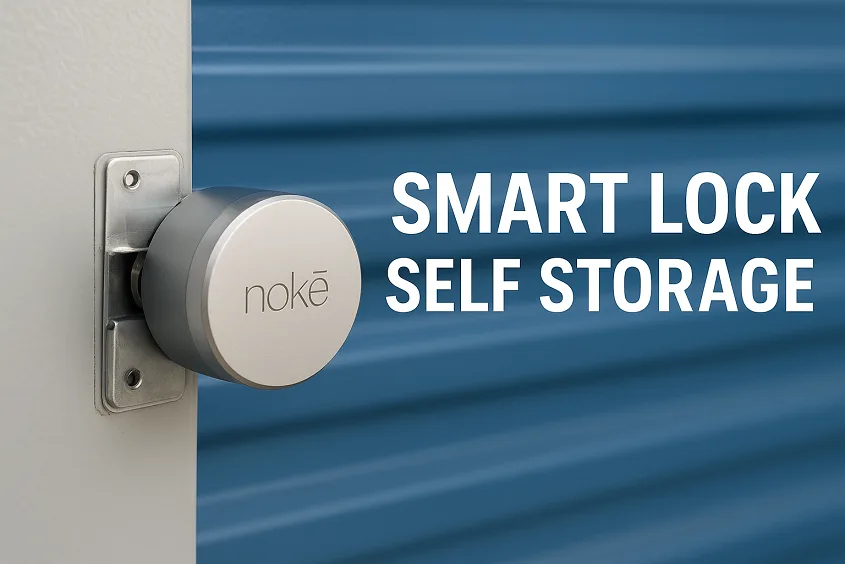
Imagine arriving at your storage unit without fumbling for keys or memorizing a gate code. You pull out your smartphone instead, tap a button, and the door clicks open. That’s the reality of a smart lock self storage system. A new wave of tech-enabled solutions is rapidly overtaking facilities that still rely on traditional padlocks and manual gate codes.
In this guide, we’ll walk through everything you need to know about on-door Bluetooth locks, how they’re transforming self-storage operations, and why both operators and renters are increasingly demanding them. Whether you run a storage facility or you’re a renter seeking convenience and security, this article will give you the knowledge to make informed decisions.
- What Is a Smart Lock and How Does It Work in a Storage Setting?
- Why Self Storage Needs Smart Locks (From Convenience to Control)
- Anatomy of an On-Door Bluetooth Smart Lock
- Types of Smart Locks Used in Self Storage
- Integration with Self Storage Management Software
- Operator Benefits: Business Case & ROI
- Convenience and Control
- Security and Safety Considerations
- Common Challenges and Solutions
- Top Smart Lock Systems for Self Storage
- Installation and Retrofitting Tips
- Pricing Overview & What Affects Cost
- Future of Smart Locks in Self Storage
- Conclusion — The Smart Way Forward for Secure, Contactless Storage
- FAQs
What Is a Smart Lock and How Does It Work in a Storage Setting?
At its core, a smart lock self storage system is an electronic, app-enabled mechanism installed on a storage unit door (or sometimes a facility gate) that replaces the traditional padlock or hasp. These locks use technologies like Bluetooth (common), Wi-Fi, or LoRaWAN to communicate with a mobile device, a central system, or a cloud backend. For example, the Nokē ONE by Nokē (part of Janus International) is specifically marketed as an on-door Bluetooth smart lock for self-storage units.
In a self-storage setting, the difference between a gate-level access system (for facility entry) and a unit-level lock (for individual doors) is key. On-door solutions let you combine facility and unit access in one flow, often integrating with your property management software to automate rentals, move-ins, and lock checks.
Why Self Storage Needs Smart Locks (From Convenience to Control)
The shift to smart lock self storage isn’t just about cool tech—it’s about solving real pain points.
Operators have long struggled with:
- Lost keys or forgotten gate codes that require staff time to replace or reset.
- Late-hour move-ins that require a physical presence at the office to release locks.
- Manual over-locking and lock checks (walking the site, unlocking or locking units).
- Limited visibility when a unit has been accessed, or when it’s vacant/unlocked.
Enter on-door Bluetooth smart locks:
Tenants can rent online, receive a digital key via their phone, and access both the gate and their unit without ever seeing a physical key. The app records each access event, giving operators an audit trail. For example, Janus states that the Nokē Smart Entry system “automatically restricts access to the facility and over-lock and release the individual unit” when integrated with rental software.
From a business perspective, this can mean fewer staff hours, faster conversions (tenants move in immediately rather than waiting for office hours), and the ability to offer premium “smart unit” pricing. For tenants, the benefits are clear: convenience, 24/7 access, and no keys to worry about.
Anatomy of an On-Door Bluetooth Smart Lock
What exactly goes into these systems? Let’s break down the core components of a self storage smart lock.
Components
- Locking mechanism: the physical device that secures the door or hasp. With on-door options, the lock is mounted externally on the unit door. For example, the Nokē ONE is designed to “fit on the outside of the individual self-storage unit door.”
- Connectivity module: typically Bluetooth (most common), sometimes LoRaWAN or Wi-Fi, that interfaces with a mobile device or network.
- Sensors & electronics: motion or heat sensors inside the unit (in some systems) detect unauthorized presence. Janus mentions “motion sensors INSIDE every door” as part of its Nokē system.
- Power system/battery: Since on-door locks often are battery-powered (especially retrofits), battery life is a key specification—for example, multi-year batteries or easily replaceable packs.
- Companion app + cloud: Tenants use a mobile app to unlock their unit. Operators use a portal/management interface for audit logs, access control, and firmware updates.
- Integration with property management software: Enables rental system triggers (e.g., tenant signs lease → digital key issued → access enabled).
What to look for
- Battery life and maintenance: Battery failures are a common issue; the system must allow for monitoring or warning.
- Weather and environment rating (if outdoor roll-up door): Some self-storage doors are exposed; on-door locks must handle temperature extremes, moisture, and dust.
- Audit logs and tamper detection: The ability to record each open/close, failed attempts, or overlocking state is critical.
- Ease of retrofit: A good on-door system allows minimal disruption, especially in existing facilities.
Types of Smart Locks Used in Self Storage
When shopping for a smart lock solution for a storage facility, you’ll encounter variations. It’s important to choose the type that suits your building and operational style.
On-Door Smart Locks
These are installed on the outside of each unit door. The Nokē ONE is a primary example: “fits on the outside of the individual self-storage unit door… designed to improve the security of individual self-storage units while also making life easier for site managers.”
- Pros: Straightforward retrofit, visible security benefit to tenants (can be marketed as premium), works with both roll-up and swing doors.
- Cons: Battery maintenance across many units might require stronger mount points.
Internal Smart Latches / Hidden Hardware
Some solutions embed hardware inside the latch/door, making the exterior look unchanged.
- Pros: stealth design, less visible hardware.
- Cons: may require door disassembly, possibly higher cost, may limit retrofit flexibility.
Retrofit Padlocks / Hasps
Less expensive option: smart padlocks that replace physical padlocks or add to existing hasp systems. These may use Bluetooth or cellular connectivity and still allow mobile access.
- Pros: lower cost, simpler install.
- Cons: fewer features (less integration, less audit trail, may feel less premium).
Connectivity Options
- Bluetooth: Most common; works at short range, requires the phone to be near the lock.
- LoRaWAN / long-range wireless: For units where connectivity to each door must go via a network; allows lower power but may cost more and require network infrastructure (as in Lockfinity for self-storage).
- Wi-Fi / Ethernet: Less common for individual unit doors (makes retrofit harder), more common for gate or facility systems.
When designing or upgrading, operators should weigh cost, installation effort, future scalability, and tenant perception (marketing wise).
Integration with Self Storage Management Software
If you want your smart lock self-storage system to deliver operational efficiency truly, it must integrate with your management software—whether that’s rental, access, billing, or CRM.
Many modern locks support triggers such as:
- Lease agreement signed → digital key issued via app.
- Payment received → access enabled or renewed automatically.
- Delinquent account → the system automatically locks the unit or denies access.
- Audit logs feed into management dashboards: time stamps of access, history of digital keys shared by tenants.
For example, Janus states that the Nokē Smart Entry system integrates with property management software, enabling “automatic over-locking (and release)”.
This means managers no longer have to inspect or manually lock/unlock units physically: they can rely on software workflows that improve accuracy, reduce staffing needs, and enhance the tenant experience.
Remote monitoring also means that a facility manager can view all unit lock states from a web portal—even from off-site. This capability is a major step forward in how access control is handled in self-storage.
Operator Benefits: Business Case & ROI
Let’s speak plainly: investing in a storage unit smart lock system is not just about security—it’s a business decision.
Key benefits and ROI drivers
- Labor reduction: Manual tasks like lock checks, unit unlocking for late-hour move-ins, and key replacements go away with app-based access.
- Faster move-ins: Tenants rent, get digital access, and move in without staff intervention. That means less waiting, fewer lost rentals, and higher occupancy.
- Premium pricing: Facilities are commanding higher rental rates for “smart units” or “premium access units” because tenants perceive added value (mobile access, no keys). For instance, Janus cites “units with smart locks can generate significantly higher rental rates.”
- Revenue beyond rental: Some operators introduce a technology or access fee for smart‐lock units, turning convenience into additional income.
- Improved security = fewer losses: Better access control and audit trails reduce risk, which means fewer theft/liability incidents (though this is harder to quantify).
- Marketing advantage: Offering “keyless mobile access” or “smart lock self storage units” differentiates your facility in a crowded market.
Example scenario
Let’s say you manage a 200-unit facility and decide to convert 50 units to smart locks. You can increase their monthly rental rate by $10 per unit (total $500/month extra), and you can reduce staffing overhead (lock checks, key management) by $200/month. That’s $700/month extra or $8,400/year.
If locked hardware + installation cost is $1,000 per door (just an example) → $50,000 outlay for 50 doors. Break-even ~6 years; but if you factor in higher occupancy or premium pricing, ROI could be faster. (Note: these numbers are illustrative; always run your own cost model.)
Convenience and Control
From a renter’s perspective, a smart padlock for storage is about simplicity and peace of mind.
Imagine: You’ve just rented a unit late in the evening after a long day. Instead of going to the office, you receive an SMS/link, download an app, tap to unlock both the gate and your unit door—and you’re inside. No key, no code hassles.
Features tenants appreciate
- Mobile access: Your phone becomes your key. Many users carry their phone 24/7—so forgetting a key becomes a non-issue. For example, some facilities using Nokē allow tenants to “touch the LED light on the front of the lock” and open via the app.
- Digital key sharing: Need a family member to grab something from your unit? With a smart lock, you can grant access in the app, set validity, and revoke it when done. Janus calls this “digital key sharing … the digital key can be revoked at any time, and an activity log keeps track of exactly when the unit was accessed.”
- Audit trail/visibility: Many systems let the tenant see who accessed their unit and when. This builds confidence.
- 24/7 access: No waiting on office hours or staff; the system works even after hours.
- Less worry about lost keys or codes: Any key or code you lose costs you time or money; mobile access removes that friction.
When you factor in convenience + security combined, smart locks raise the rental experience significantly—making your facility more compelling.
Security and Safety Considerations
With all the benefits, it’s also vital to understand the security considerations for smart locks so you can install a system with trust and authority behind it.
Key aspects to evaluate
- Encryption and firmware security: The mobile-to-lock communication must be encrypted and regularly updated. For example, the Nokē lock is described as using “an encrypted algorithm to ensure transmissions are encrypted and secure so hackers can’t access your belongings.”
- Tamper detection & audit logs: Locks with sensors or internal mechanisms detect tampering attempts or which units are accessed, and generate logs for operator and tenant review.
- Fail-secure design: The device must default to locked if power is lost or tampering is detected.
- Battery/failure backup: Since many on-door locks are battery-powered, you must ensure the battery life is sufficient and there’s visibility into battery health. As one operator note in a community forum said:
“The only real issues we’ve encountered with Noke have been related to either network or battery life.”
- Secure installation/network-infrastructure: Connectivity (Bluetooth, wireless) and network reliability are critical; a weak mesh network can lead to failures. For example, the same forum thread noted that the tech experience depends heavily on the quality of installation and network.
- Privacy and data protection: Tenant access logs and digital keys are sensitive data. The operator must treat this data responsibly and comply with regional data laws.
By addressing these considerations explicitly in your choice and installation of a smart-lock system, you build trust with tenants and reduce liability with your own operations.
Common Challenges and Solutions
No technology is perfect, and that goes for smart entry systems in self-storage, too. But being aware of challenges—and how to mitigate them—demonstrates expertise and credibility.
Potential issues & what to do
- Battery depletion faster than expected: Particularly in high-traffic units, battery life may drop sooner than rated. Solution: monitor battery health, establish a replacement schedule, and opt for systems with remote battery status.
- Connectivity problems: Bluetooth or wireless mesh may fail in some structural layouts. Solution: conduct signal-strength surveys, use repeaters, or upgrade to LoRaWAN/long-range solutions.
- Tenants without smartphones: Traditional models exclude non-smartphone users. Solution: maintain a fallback (Bluetooth fob, keypad) or make clear in marketing what is required. For example, one facility offered a key fob solution for those without compatible phones.
- Installation/retrofit complexity: Existing doors may have compatibility issues; install crews may need custom brackets or wiring. Solution: plan surveys, budget for retrofit labor, and choose systems designed for retrofit (e.g., external mount locks).
- Cost concerns: Smart locks cost more up-front than padlocks. Solution: build the business case (see ROI section), highlight marketing/occupancy benefit, and view it as an investment, not just a cost.
By being transparent about these issues and providing both operator and tenant solutions, you enhance your article’s trustworthiness and usefulness.
Top Smart Lock Systems for Self Storage
If you’re shopping in 2025 for a smart lock self-storage solution, here are the leading systems you should evaluate (not exhaustive, but representative).
| Brand / Model | Connectivity / Mount | Key Features |
|---|---|---|
|
Nokē ONE (Janus International) by Janus International |
Bluetooth, on-door external mount (roll-up & swing) | Digital key sharing, audit logs, multi-year battery, retrofit design |
| OpenTech INSOMNIAC SmartLock | Unit-level & gate-level, integration with OpenTech software (commercial focus) | Comprehensive ecosystem for self-storage operators |
| Lockfinity (Barantech) | LoRaWAN / long-range wireless smart lock system (unit-level) | Focus on network scalability, long-battery life |
| PTI Security Systems | Gate + unit access integrated systems | Full property access + unit door locks, ideal for large campuses |
| BearBox / Sensorberg | Cloud-based smart lock systems (European presence) | Modern app experience, IoT integration |
Reader note: Always check compatibility of the system with your facility’s doors (roll-up vs swing), network environment, and property management software before selecting.
Installation and Retrofitting Tips
Switching to a smart lock self storage system is often easiest in new builds, but many operators retrofit existing sites. Here’s how to approach it.
Step-by-Step Overview
- Assessment: Inspect typical unit doors (e.g., roll-up vs hinged), determine structural mount compatibility, wireless signal strength, and power access (if needed).
- Select hardware: Choose locks designed for retrofit (external mount), or choose internal latch systems if you’re doing a full door replacement.
- Install hardware: Mount locks, run any required wiring or conduit (if not fully battery), program locks, and integrate with software. For example, Janus notes the Nokē ONE is “retro-fittable … with all-in-one design… no need to run low voltage.”
- Software configuration: Link locks to unit IDs, configure the mobile app, set digital key sharing policies, and integrate with the property management system for automation.
- Testing: Confirm that the app can unlock doors, log entries, over-lock when required, and that battery/alert systems work. Engage sample tenants for feedback.
- Tenant communication: Inform existing tenants about the upgrade, provide instructions (e.g., download app; what to expect), and ensure support is available.
- Ongoing maintenance: Monitor lock health, battery status, and network connectivity, and provide staff training on how to troubleshoot or remotely manage issues.
Retrofit Tips
- Prioritize high-traffic units first (near offices) for location advantage.
- Use external lock designs when possible—less door modification needed.
- Keep a fallback key or method for non-smartphone users.
- Ensure you budget time for network planning and interference mitigation (metal doors, roll-up mechanisms can affect wireless signal).
- Offer marketing signage (e.g., “Smart-locked unit – mobile access”) to help drive higher rental rates.
Pricing Overview & What Affects Cost
What does a smart lock cost for self storage, and what drives the investment? Let’s break it down.
Cost components
- Hardware per unit door: Lock mechanism, sensors, mount kit, optional gateway (for wireless).
- Software license/subscription: Mobile app access, cloud portal, firmware updates, audit logs.
- Installation labor: Retrofit costs vary depending on door type, network preparation, and lock mount complexity.
- Maintenance: Battery replacements, network maintenance, and firmware updates.
- Integration costs: Connecting the smart lock system to your property management software may require one-time setup or annual service fees.
What affects cost
- Type of door: Roll-up doors often need special mounts; swing doors might be easier.
- Connectivity type: LoRaWAN or Wi-Fi may add network infrastructure costs.
- Volume of units: Larger facilities benefit from economies of scale.
- Desired features: Audit logs, digital key sharing, tamper sensors, integration with management software—each adds cost.
- Marketing positioning: If you intend to charge premium rent for “smart units”, then the cost can be recouped faster.
Example estimate
A facility with 100 units: hardware $800 each (lock + mount), software $100/year per door, installation $150 per door on average gives ~$105,000 first-year cost. If you raise rent by $15/month for those units + reduction in staffing cost of $300/month, you may break even in 4-5 years. Always perform your own financial modeling.
Future of Smart Locks in Self Storage
The world of self storage smart lock integration is still evolving, and the future looks promising.
Trends on the horizon
- IoT & predictive maintenance: Smart locks will start alerting when batteries are low or when mechanical components need servicing, reducing downtime.
- Biometric or voice access: Over time, fingerprint, face recognition, or voice-activated access may supplement or replace mobile apps.
- Full ecosystem integration: Smart locks will tie into a broader facility management system—HVAC, lighting, cameras—creating “smart storage facilities.”
- Energy-harvesting locks: Some next-gen designs may harvest vibration or solar to reduce battery replacement.
- Increased amenity premium: As consumers expect more, “smart access” may become standard, not a luxury. That means early adopters get a competitive edge.
By planning for these trends now, you position your facility to stay ahead. Think of this not just as a lock upgrade, but as a step toward becoming a smart facility.
Conclusion — The Smart Way Forward for Secure, Contactless Storage
In today’s world, offering a smart lock self storage option isn’t just nice—it may soon be expected. On-door Bluetooth locks deliver meaningful benefits: convenience for tenants, operational efficiencies for you, and a tangible competitive edge. If you’re an operator, act now—run the business case, pick a retrofit-capable system, and begin the transition. If you’re a renter, look for facilities that advertise “mobile access” or “smart locks”—it may be worth paying a bit more for ease, security, and peace of mind.
Smart locks aren’t the future—they’re the now. Ready to upgrade? Contact your lock provider or schedule a demo today and make sure your facility isn’t left behind.
FAQs
Q: Which units are best suited for smart lock on-door upgrades?
A: Units with frequent move-in/out activity or marketed as premium (climate-controlled, drive-up) tend to benefit most. Retrofit design like the Nokē ONE is built to fit both roll-up and swing doors.
Q: What happens if a tenant’s phone dies or they don’t have a smartphone?
A: Some facilities offer a Bluetooth key-fob or keypad fallback. Smart systems seldom rely on Wi-Fi at the door—once the app connects, Bluetooth does the unlocking.
Q: How long do the batteries last in a smart lock unit?
A: It depends on traffic and features (for example, LED wakes, motion sensors). Some providers quote multi-year battery life for lower-traffic units. You should select a system that provides remote battery-status monitoring. (See user feedback in forums about faster depletion.)
Q: Can I charge a higher rent for units with smart locks?
A: Yes. Many operators are already doing this—marketing “smart access units” and capturing higher rates. The operational savings and premium positioning often make this financially viable.
Q: Are smart locks secure enough compared to traditional padlocks?
A: Yes—when properly implemented. Modern systems include encryption, tamper detection, audit logs, and remote monitoring. A well-installed smart lock is significantly more secure than a standard padlock and code-key system, which can be bypassed or forgotten. Always validate your vendor’s security credentials and maintenance support
