
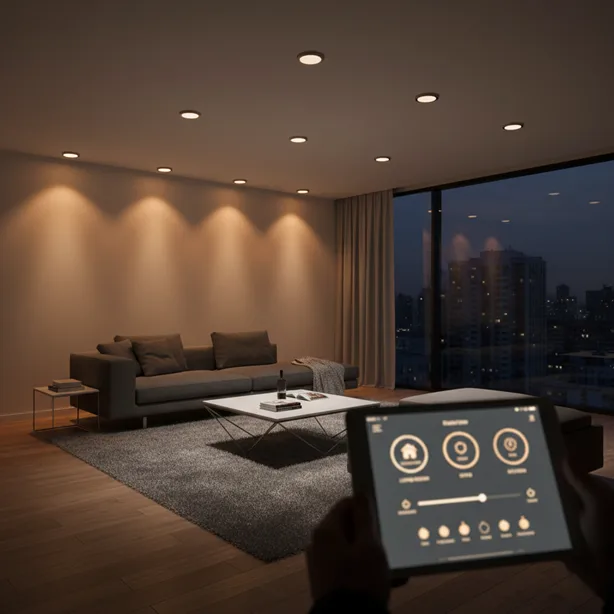
Look up at your ceiling right now. See those recessed lights glaring down like tiny spotlights from the 1990s? They’re probably making your living room feel more “dentist’s office” than “smart home sanctuary.” Upgrading to smart bulbs for recessed lighting might be the easiest smart home win you’ll pull off this year.
No rewiring. No electrician bills that make you question your life choices. Just screw in a bulb, tap your phone, and suddenly you’re living in the future. Whether you’re a homeowner going all-in on home automation or a renter who can’t touch the wiring, smart LED bulbs for your can lights deliver instant gratification without the commitment issues.
This guide cuts through the marketing nonsense and tells you exactly what works, what doesn’t, and how to avoid the headaches I’ve learned about the hard way.
- Why Smart Bulbs for Recessed Lighting Require an Upgrade
- Understanding Smart Bulb Compatibility with Recessed Lighting
- Top Smart Bulb Technologies for Can Lights
- Best Smart Bulbs for Recessed Lighting in 2025
- Installation Tips That Actually Work
- Smart Home Integration and Voice Control
- Cost Analysis: Are Smart Recessed Bulbs Worth It?
- Common Mistakes to Avoid
- FAQs
- Conclusion
Why Smart Bulbs for Recessed Lighting Require an Upgrade
Recessed lighting eats up more real estate on American ceilings than any other fixture type. They’re everywhere—kitchens, bathrooms, hallways, that weird nook where you pretend you’ll read books. But they’re also the most neglected when people start building their smart homes.
Big mistake.
Smart recessed lighting transforms how your space feels without construction dust or permit applications. Dim them for movie night. Brighten them when you’re searching for that missing AirPod. Set them to gradually wake you up, or turn red when your Ring doorbell spots someone at the door. The possibilities multiply once you ditch those boring old bulbs.
Plus, energy efficiency becomes automatic. Most smart bulbs track usage and cost you $1-2 yearly in electricity. Your old incandescent bulbs? They’re basically space heaters that occasionally produce light.
Understanding Smart Bulb Compatibility with Recessed Lighting
Here’s where people mess up immediately. They order the wrong bulb shape and spend an evening wrestling with Amazon’s return process.
The BR30 vs A19 Bulb Shape Dilemma
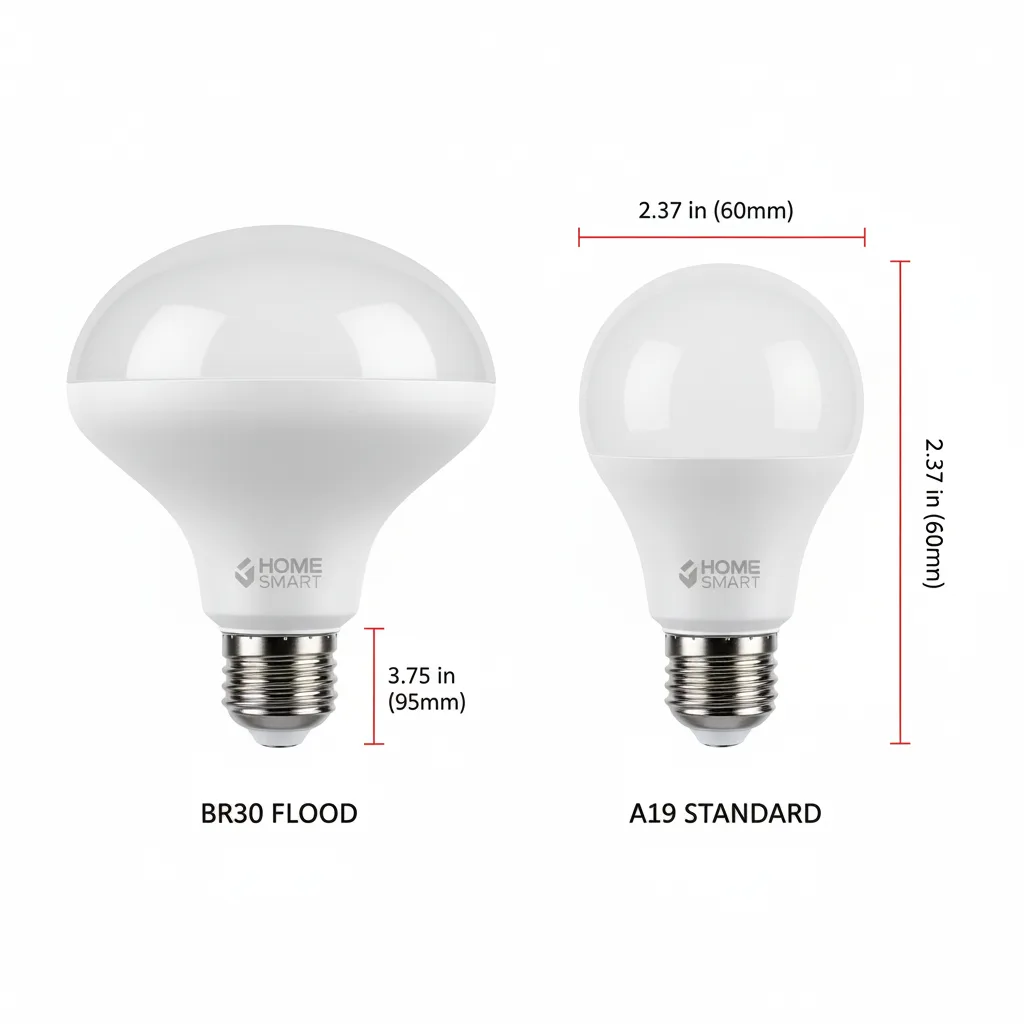
Recessed can lights typically need BR30 or BR40 bulbs—those wider, flood-style bulbs designed to fill rooms with light. The “BR” stands for “bulged reflector,” which is less romantic than it sounds but incredibly functional. These bulbs spread light across larger areas instead of pointing straight down like a spotlight.
Standard A19 bulbs (the classic light bulb shape) technically fit most recessed fixtures. But they’ll create this weird spotlight effect that makes your room look like an interrogation scene. Not the vibe you’re going for.
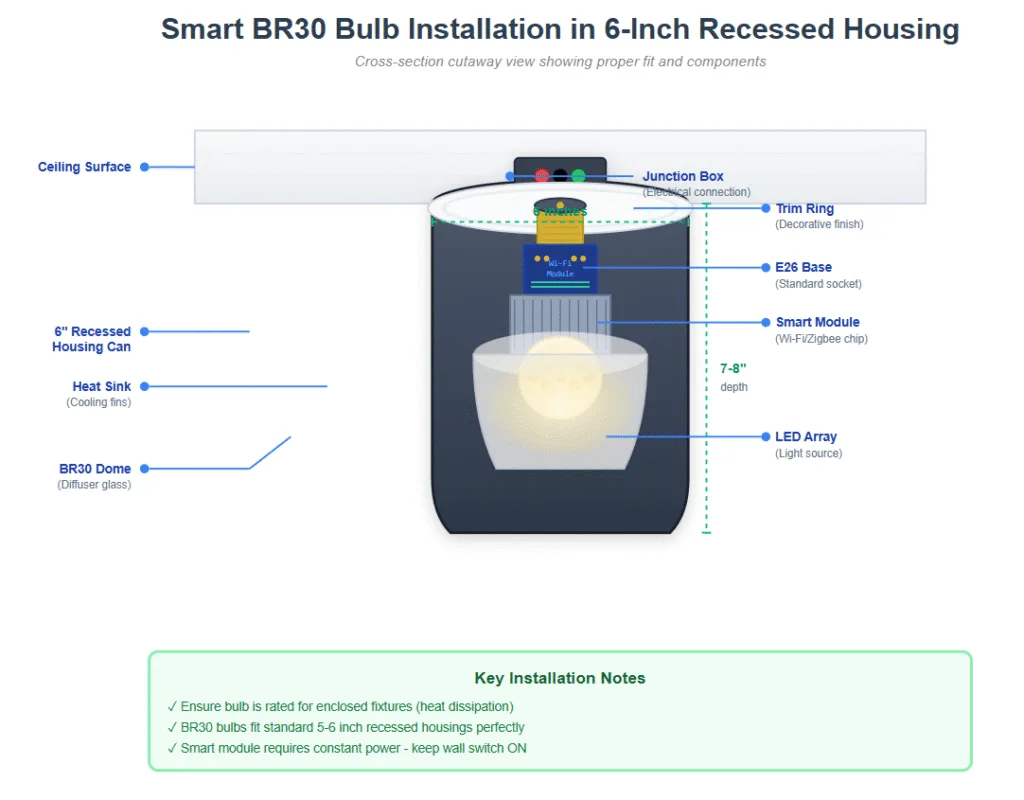
Most 5-6-inch recessed cans take BR30 bulbs perfectly. Larger 7-8-inch housings might need BR40s. Check your fixture size before ordering. Seriously, measure it. I learned this lesson after buying six wrong bulbs.
Dimmable vs Non-Dimmable Fixtures
Your recessed lighting fixtures might have existing dimmer switches installed. Good news: most quality smart bulbs handle dimming beautifully through their apps. Bad news: running smart bulbs on old mechanical dimmers creates flickering, buzzing, and occasionally a light show nobody asked for.
The fix? Either remove the dimmer switch and install a standard on/off switch, or grab a smart dimmer switch that plays nice with smart bulbs. Some people run both—the switch controls power, the app controls everything else.
Just don’t try using both simultaneously. Your smart bulbs will have an identity crisis.
Top Smart Bulb Technologies for Can Lights
The smart lighting world splits into three main camps, each with fanatic followers who’ll argue their choice until sunrise. Let me break down what actually matters.
Wi-Fi Connected Smart Bulbs
Wi-Fi smart bulbs connect straight to your home network without needing a hub – companies like Wyze and LIFX dominate this space. Setup takes about 90 seconds—download an app, screw in the bulb and connect it to your Wi-Fi, and you are done.
The upside? Zero extra hardware cluttering your already-crowded entertainment center. Control bulbs from anywhere with internet access. Great for renters who want simplicity.
The downside? Each bulb hogs a tiny slice of your network bandwidth. Install twenty Wi-Fi bulbs, and your router might start sweating. Response times can lag slightly compared to hub-based systems.
Zigbee and Z-Wave Options
Philips Hue built an empire on Zigbee technology, and for good reason. Zigbee smart bulbs create a mesh network where each bulb helps relay signals to others. The result? Rock-solid reliability and instant responses, even with dozens of bulbs installed.
You’ll need a hub, though—Hue Bridge, Samsung SmartThings, or similar. That’s another device, another power outlet, another thing to think about. But the tradeoff delivers consistently better performance for whole-home setups.
Z-Wave bulbs work similarly but remain less common in the lighting world. They’re more popular for switches and sensors.
Bluetooth Smart Lighting
Bluetooth bulbs connect directly to your phone without Wi-Fi or hubs. Cheap, simple, but limited to about 30 feet of range. Fine for a single bedroom setup. Terrible for controlling lights from bed when you’re cozy and the switch is across the room.
Most serious smart home builders skip Bluetooth entirely. It’s the training wheels of smart lighting.
Best Smart Bulbs for Recessed Lighting in 2025
I’m not writing a product review listicle here—those age like milk. But understanding what separates good from garbage helps.
Philips Hue BR30 bulbs remain the gold standard. Expensive? Absolutely. Worth it? If you value reliability and want 16 million color options, yes. Their color accuracy and smooth dimming spoil you for anything cheaper.
Wyze Color Bulbs deliver shocking value for budget-conscious builders. Not BR30 style officially, but their affordable ecosystem makes smart lighting accessible—great starter option before you know if you’ll actually use these features.
For color temperature adjustability without RGB party modes, white ambiance bulbs from multiple brands hit the sweet spot. Adjust from energizing daylight to relaxing warm white throughout the day. Your circadian rhythm will thank you.
The absolute key? Buy one bulb first. Test it in your actual fixtures. Make sure the beam angle works for your room. Then commit to more.
Installation Tips That Actually Work
Good news: installing smart LED bulbs in recessed lighting requires the same skill level as changing any light bulb. Which means if you can eat a sandwich, you can handle this.
Measuring Your Recessed Housing
Grab a measuring tape and check your can diameter. Most American homes use 4-inch, 5-inch, or 6-inch recessed housings. Six-inch cans dominate in newer construction. Knowing your size prevents ordering bulbs that look ridiculous or don’t fit properly.
Also, check the depth. Some ultra-slim “new construction” LED housings have limited space for larger smart bulbs. Rare problem, but worth investigating before buying ten bulbs.
Dealing with Enclosed Fixtures
Here’s a trap that catches people: many recessed can lights are technically “enclosed fixtures” with limited airflow. Smart bulbs generate heat through their electronics, not the LED itself, and they need breathing room.
Most quality smart bulbs now include “suitable for enclosed fixtures” ratings. Cheaper brands might not. Overheating shortens bulb lifespan dramatically—we’re talking months instead of years.
Check the packaging or specifications. If it doesn’t explicitly mention enclosed fixture approval, assume it’ll cook itself to death inside a recessed can.
Turn off the power at the switch first. I shouldn’t need to say that, but having watched my neighbor do it live… flip the switch off, okay?
Smart Home Integration and Voice Control
The magic happens when your smart recessed lighting talks to everything else. Suddenly, you’re not just turning lights on and off—you’re orchestrating your entire home.
Amazon Alexa integration means saying “Alexa, dim the kitchen to 30%” while your hands are covered in chicken marinade. Google Home delivers similar convenience with arguably better natural language understanding.
Apple HomeKit users get superior privacy and security, though the available bulb selection shrinks noticeably. HomeKit also enables those slick automation features where leaving home automatically adjusts your lighting.
The real power move? Connect your smart bulbs to motion sensors, door contacts, and schedules. Lights that automatically brighten when you walk into the kitchen at 6 AM, then gradually dim as the sun rises—no interaction required.
This level of home automation feels like magic until you visit someone else’s house and flip physical switches like a caveman.
Cost Analysis: Are Smart Recessed Bulbs Worth It?
Let’s talk money because pretending it doesn’t matter helps nobody.
Smart bulbs for recessed lighting run anywhere from $10 to $50 per bulb, depending on features and brand. A typical room with six recessed cans could cost $60-300 to outfit completely. Not pocket change.
But compare that to hiring an electrician to install smart switches or retrofit LED fixtures. You’re looking at $200-500 per room minimum for professional installation. Suddenly, buying smart bulbs seems downright reasonable.
The energy savings matter too, though not as much as manufacturers claim in their marketing fever dreams. Switching from old 65-watt incandescent BR30s to 9-watt smart LEDs saves $50-80 annually per six bulbs, depending on your electricity rates. Decent, not revolutionary.
The real value? Convenience, ambiance control, and the satisfaction of barking lighting commands at your smart speaker like you’re running the starship Enterprise. That’s priceless. Or at least worth $100.
Common Mistakes to Avoid
Mistake one: Mixing brands in the same room. Different manufacturers interpret “warm white” differently. Your ceiling will look like a color temperature patchwork quilt. Stick with one brand per room, minimum.
Mistake two: Forgetting that smart bulbs need constant power. If someone flips the wall switch off, your expensive smart bulb becomes a dumb bulb. Consider replacing switches with smart switches or installing switch guards to train your family.
Mistake three: Buying the cheapest option without checking reviews. Some budget bulbs lose connectivity daily, requiring resets. Others burn out in months. The $8 savings per bulb vanish when you’re buying replacements constantly.
Mistake four: Assuming all smart bulbs need hubs. Many don’t. Read the requirements before ordering extras you don’t need.
Mistake five: Installing RGB color bulbs everywhere. Sure, blue kitchen lighting sounds fun until you realize it makes your pasta look radioactive. Save full-color bulbs for accent lighting and entertainment spaces. Use white ambiance elsewhere.
FAQs
Do smart bulbs work in any recessed lighting fixture?
Most smart bulbs work in standard recessed cans, but you need the correct bulb shape—typically BR30 for common 5-6 inch housings. Check if your fixtures are rated for enclosed bulbs and verify the maximum wattage. Older fixtures with built-in dimmers might need switch replacement to avoid compatibility issues.
Can I use smart bulbs with existing dimmer switches?
Not recommended. Traditional dimmer switches conflict with smart bulb electronics, causing flickering, buzzing, or reduced functionality. Replace dimmer switches with standard on/off switches, or install smart dimmer switches specifically designed to work with smart bulbs. The bulbs handle dimming through their apps instead.
How long do smart LED bulbs last in recessed lighting?
Quality smart bulbs last 15,000-25,000 hours in proper conditions—roughly 10-15 years with typical usage. Heat buildup in enclosed recessed fixtures can reduce lifespan, so always verify your bulbs are rated for enclosed fixtures. Cheap bulbs without proper thermal management might fail within months.
What’s the difference between Wi-Fi and Zigbee smart bulbs?
Wi-Fi bulbs connect directly with your home network without requiring a hub, offering a simpler setup but potentially taxing your router with many bulbs installed. Zigbee bulbs need a hub but create reliable mesh networks with faster response times and better performance for larger installations. Your choice depends on system size.
Can renters install smart bulbs in recessed lighting?
Absolutely—it’s one of the most renter-friendly smart home upgrades available. Smart bulbs install exactly like regular bulbs without any fixture modification. When you move out, unscrew them and take them along. Just save the original bulbs to reinstall before leaving.
Do smart recessed bulbs work during power outages?
No, smart bulbs require electricity like any bulb. However, some models remember their last settings and return to that state when power is restores. Battery backup systems or UPS units can keep your smart home hub running, but the bulbs themselves won’t function without power.
How many smart bulbs can I connect to one system?
This varies by platform. Wi-Fi systems generally support 50-100 bulbs before network congestion becomes problematic. Zigbee systems like Philips Hue handle 50 bulbs per bridge, but you can add multiple bridges. Most homes never approach these limits—the average smart home uses 15-30 bulbs total.
Are color-changing smart bulbs worth it for recessed lighting?
For living rooms, bedrooms, and entertainment spaces, full-color (RGB) bulbs add genuine value for mood lighting and special occasions. For kitchens, bathrooms, and offices, white ambiance bulbs (adjustable color temperature only) make more practical sense. Color accuracy matters more than party modes in task-oriented spaces.
Conclusion
Smart bulbs for recessed lighting represent the lowest-friction entry point into home automation that actually improves daily life. No construction crews, no permit applications, no commitment you’ll regret when the next technology wave arrives. Just better light exactly when and how you want it.
Start with one room. Test the ecosystem. See if you actually use the features beyond the first week of novelty. Most people discover they do—those scheduling features and voice commands integrate into routines faster than you’d expect.
The technology finally works reliably enough that you won’t spend weekends troubleshooting connectivity issues. Well, mostly. This is still consumer electronics we’re talking about. But the hit rate for “set it and forget it” functionality finally crossed the threshold where normal humans can just enjoy the benefits.
Your home’s lighting sets the entire mood and atmosphere. Why leave it stuck in the past? Those recessed cans covering your ceilings have serious potential beyond basic illumination.
Ready to upgrade your recessed lighting game? Measure your fixtures, pick a platform that matches your ecosystem and order a couple of bulbs to test. Start simple with a white ambiance, expand to color if it fits your lifestyle. Your future self—the one dimming lights with voice commands while carrying groceries—will appreciate the 20 minutes you spend today making it happen.
The smart home you’ve been planning starts with the lights you already have. Everything else builds from there.
