
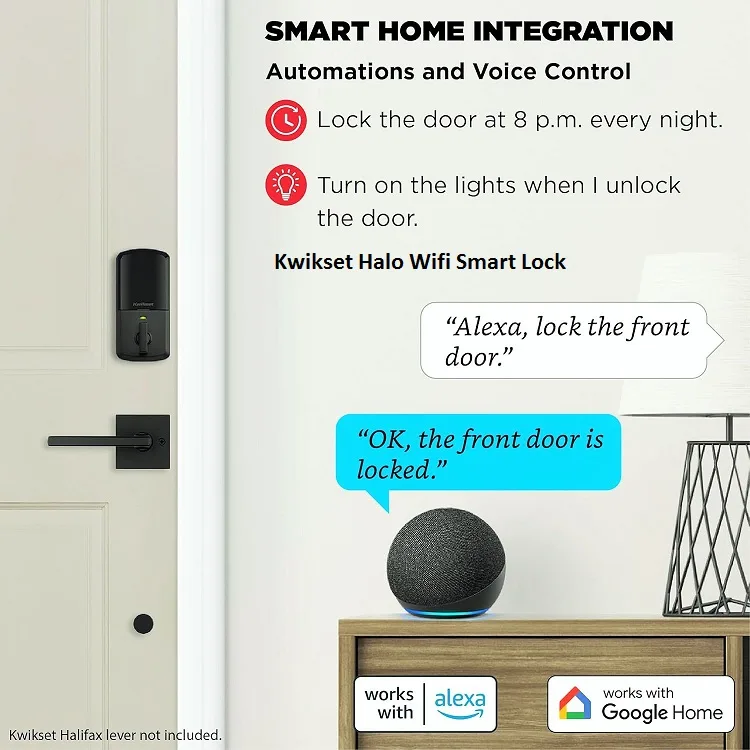
The front door sets the tone for your entire home. It’s where convenience meets caution, ritual meets routine, and—if you get it right—peace of mind begins before you even step inside. That’s the promise of the Kwikset Smart Lock: a modern, well‑built upgrade that blends everyday security, intuitive smart home integration, and understated style. Whether you want to ditch the key ring, grant guest access without stress, or check your lock status on the fly, Kwikset has thoughtful options that feel natural from day one.
This in‑depth guide is designed for US homeowners comparing models like Halo, Aura, Premis, and Obsidian, and wondering which fits their door and lifestyle. We’ll cover standout features, model breakdowns, installation insights, real security talk, and where to buy with confidence. By the end, you’ll know exactly which Kwikset Smart Lock belongs on your door and why.
What makes Kwikset smart locks stand out
Three pillars define Kwikset in the smart lock space: practical innovation, polished design, and straightforward integrations.
First, SmartKey Security. Rekey your lock in minutes (without a locksmith) using a simple tool; it’s a quiet superpower for families, landlords, and anyone who’s ever handed out one too many spare keys. It’s built to resist common attacks like bumping and picking, which addresses a classic weak spot in traditional cylinders.
Second, aesthetics that feel like real hardware. From satin nickel to matte black and venetian bronze, Kwikset finishes and silhouettes complement modern and traditional doors alike. They look intentional on the entry—less gadget, more grounded statement.
Third, integrations that don’t fight you. Many Kwikset smart locks connect directly over Wi‑Fi or Bluetooth, and pair cleanly with Alexa, Google Assistant, Apple HomeKit, and Ring—so your routines, scenes, and voice commands work the way you expect. If you’re mapping an ecosystem, start with the official overview to match models to your platform of choice.
Kwikset smart lock models breakdown
Choosing a lock isn’t about picking the fanciest features—it’s about finding the right fit for your door, your family, and your routines. Here’s how the core Kwikset lineup plays out in the real world.
Halo Touch: Wi‑Fi and fingerprint access
The Kwikset Halo Touch delivers the “walk up, it unlocks” experience, anchored by fingerprint access and direct Wi‑Fi connectivity. Manage user codes, view activity logs, and receive tamper alerts in the Kwikset app—without a hub. With ANSI Grade 2 durability on many configurations, it checks the boxes for busy households that want remote control and biometrics in one package.
Explore models and finishes on the official buy page to compare Halo variants, connectivity, and price ranges.
Aura: Bluetooth simplicity with keypad entry
Prefer local control without cloud dependencies? The Kwikset Aura uses Bluetooth and a full keypad for reliable, offline entry. It’s budget‑friendly and ideal for secondary doors, home offices, or internal rentals—anywhere you want app‑managed codes without Wi‑Fi. You still get the essentials: scheduled codes, quick lock status checks within range, and low‑drama installation.
Check availability and compare specs against Wi‑Fi models on Kwikset’s buying portal.
Premis: Native Apple HomeKit compatibility
If your home runs on Apple HomeKit, the Kwikset Premis integrates natively: scenes, automations, remote control via Apple TV or HomePod, and a thoughtful SecureScreen feature to prevent code smudge detection. You get the privacy posture and end‑to‑end encryption standards Apple enforces, plus a design that doesn’t feel out of place on a refined entry.
Learn more about HomeKit requirements and secure setup in Apple’s official support guide.
Obsidian: Minimalist, keyless, touchscreen
The Kwikset Obsidian removes the keyway entirely. It’s touchscreen-only, sleek, and tamper‑resistant by design—a win for minimalists who want a clean façade and no physical keys. If your household is comfortable with code‑only entry and diligent about battery swaps, it’s a striking upgrade that looks custom without custom carpentry.
For hub‑centric smart homes, SmartCode Home Connect variants with Z‑Wave/Zigbee also exist, slotting into broader ecosystems while retaining SmartKey Security and flexible finishes.
Real‑world installation and setup insights
Installing a Kwikset Smart Lock is DIY‑friendly for a standard US door prep. Expect a 20–30 minute job if your latch and strike align well. The typical flow:
- Remove the old deadbolt and strike, check your backset and door thickness.
- Fit the new latch, mount the exterior keypad/touch unit, and the interior assembly.
- Tighten evenly—over‑torque can cause binding.
- Power up, then pair in the Kwikset app (keep the door open while testing).
Battery life generally lands in the 6–12 month range, depending on usage, climate swings, and features like auto‑lock or frequent fingerprint access. Keep fresh alkaline batteries handy; don’t mix old and new. For SmartKey Security rekeying, follow the official steps—insert current key, rotate, use the SmartKey tool, swap to the new key, and test—so you keep durability intact.
If you want a step‑by‑step walkthrough with fit checks and troubleshooting tips, these guides provide clear visuals and sequencing you can follow confidently.
Kwikset vs competitors: what actually matters
Comparisons are inevitable—and useful. Here’s the practical lens US buyers use when weighing Kwikset against Schlage, Yale, and August.
- Kwikset vs Schlage: Schlage leans rugged, with select models touting ANSI Grade 1—Kwikset counters with broader finish choices, accessible pricing, and the flexibility of SmartKey Security. If you prioritize raw spec sheets, Schlage’s top tiers appeal. If you value design variety and easy rekeying, Kwikset is compelling.
- Kwikset vs August: August excels at retrofit simplicity and proximity‑based auto‑unlock. It’s great if you want to keep existing hardware. Kwikset gives you full hardware replacement, a more finished look, and options like fingerprint access and native Wi‑Fi in the Halo family.
- Kwikset vs Yale: Yale’s touchscreen locks and hub ecosystems (Z‑Wave, Zigbee) are strong for power users. Kwikset often wins on price and SmartKey Security, with direct Wi‑Fi/Bluetooth models for simpler setups. If you’re building an intensive hub‑driven home, Yale is solid; for direct control and value, Kwikset lands well.
For a broad, test‑driven context across brands, Tom’s Guide maintains a current ranking of the best smart locks with hands‑on notes that reflect real‑world quirks and wins.
Security features that actually matter day to day
Let’s talk about what you’ll feel after installation.
- ANSI/BHMA Grade 2 durability on many Kwikset models means recognized performance under stress and repeated use. If you want to understand grading frameworks, BHMA’s standards outline the testing behind the numbers and why grades matter at home.
- SmartKey Security resists bumping and picking while giving you the ability to rekey cleanly. It solves for everyday risks without locking you into service calls—a practical edge for households that share keys or rotate access.
- Tamper alerts, activity logs, and auto‑lock build habits of awareness. That quiet “lock engaged” notification after school pickup? It’s a small thing that adds up to daily calm.
- Encryption and platform‑level policies—especially for Apple HomeKit—govern how credentials and commands are protected. Keep firmware updated, use strong app passwords, and limit shared accounts to reduce remote risk. It’s sensible hygiene that keeps convenience and caution in balance.
For a pragmatic look at strengths and trade‑offs (including fingerprint nuance), Security.org’s review synthesizes many of these considerations with pricing and everyday takeaways.
Where to buy and what to expect on pricing
You won’t struggle to find Kwikset Smart Lock models in the US. The official store lists current Halo, Halo Touch, Aura, Premis, and SmartCode Home Connect options with clear connectivity and finish comparisons. Major retailers carry broad inventories for quick shipping and returns.
- Official: Buy Smart Locks | Kwikset
- Retail: Amazon, Home Depot
Typical US pricing clusters around $150–$350, depending on connectivity (Wi‑Fi vs Bluetooth), biometric features (fingerprint access), and finish. Expect stronger promo cycles on Bluetooth/keypad models and premium pricing on Wi‑Fi/biometric SKUs. Warranty terms vary by electronics and finish; check listings for lifetime mechanical coverage and defined electronics periods.
If you want a review‑driven snapshot with pros/cons, Security.org’s 2025 update is a helpful reference before checkout.
FAQs
How secure is Kwikset SmartKey rekeying, and does it impact long‑term durability?
SmartKey Security is engineered to resist common attacks and lets you rekey the cylinder without replacing hardware. Follow the official sequence—current key, 90‑degree rotation, SmartKey tool, new key—and test multiple times. Done correctly, it doesn’t degrade durability and saves recurring service costs.
Can a Kwikset smart lock be hacked remotely, and what safeguards exist for US households?
Any connected device carries theoretical risk, but Kwikset employs encrypted communication and adheres to platform standards (like Apple HomeKit). Use unique, strong passwords, keep firmware updated, and limit shared accounts for best results. Combine that with local alert settings for everyday awareness.
Does Kwikset work with Alexa, Google Assistant, and Apple HomeKit—and will I need a hub?
Most Wi‑Fi models like Halo integrate directly with Alexa and Google Assistant without a hub. Premis is built for Apple HomeKit, enabling native automations and remote access via Apple TV/HomePod. Z‑Wave/Zigbee variants (e.g., SmartCode Home Connect) require a compatible hub for full features.
What’s the difference between Halo and Aura, and who should choose which?
Halo provides Wi‑Fi for true remote control, cloud alerts, and optional fingerprint access with Halo Touch. Aura uses Bluetooth for local control and keypad entry—no cloud dependence. Choose Halo for busy households and travelers; pick Aura for secondary doors, simpler setups, or tighter budgets.
How long do batteries last, and how can I avoid downtime?
Most setups see 6–12 months per set, depending on climate, usage, and features. Use high‑quality alkaline batteries, avoid mixing old/new, and swap proactively when the app alerts you. Keep a spare set near the door for quick changes.
Will a Kwikset fit my US door, and can I install it without a professional?
Most Kwikset smart locks fit standard US door preps. Verify thickness, backset, and strike alignment first. DIY installation is highly doable with a screwdriver and 20–30 minutes. For clarity and confidence, lean on official support steps and a visual walkthrough before pairing in the app.
Is a keyless, touchscreen‑only lock (like Obsidian) practical for families?
Yes—if your household is comfortable with code management and timely battery swaps. Enable auto‑lock, assign backup codes, and turn on alerts. You’ll appreciate the clean exterior and the “no keys to lose” dynamic.
Conclusion
A great lock should fade into the background while quietly doing its job. The Kwikset Smart Lock lineup hits that mark—combining dependable security, intuitive smart home features, and a design language that looks at home on American doors. If you want remote control and biometrics, choose Halo Touch. If local simplicity is your style, Aura is steady and cost‑effective. If your home speaks Apple HomeKit, Premis integrates like it was always meant to be there. And if minimalism is the brief, Obsidian brings keyless elegance with everyday practicality.
Ready to make your entry feel smarter every single day? Compare finishes, pick your connectivity, and buy with confidence:
- Shop the official Buy Smart Locks | Kwikset to see current Halo, Aura, Premis, and Obsidian options.
- Check inventory and quick shipping at Amazon and Home Depot for US delivery.
Your door is the threshold to everything that matters. Give it the brains—and the calm confidence—it deserves with a Kwikset Smart Lock.
