
Your heart sinks. That familiar, reassuring click of your smart lock didn’t happen. You jab at the keypad. Nothing. You frantically open the app on your phone. “Unable to Connect.” The rain is starting to fall, or maybe the sun is beating down. Suddenly, your high-tech fortress feels a lot like a prison. You’re not sure how to unlock a smart lock without a key and regain entry in you home safely.
Don’t panic.
You are not the first person to be betrayed by technology. And here’s the secret: most smart locks are designed with this exact nightmare in mind. They have hidden escape hatches. This isn’t a hack; it’s a feature.
Consider this your digital locksmith. We’re going to walk you through, step-by-step, how to regain control. From the simple 9-volt battery trick to the physical key you forgot you had, we’ve got you covered. Let’s get you back inside.
- How to Unlock a Smart Lock Without a Key
- Method 1: The Emergency Power-Up (The 9-Volt Lifesaver)
- Method 2: The Physical Key You Forgot You Had
- Method 3: The Digital Backdoor (Your Phone is a Key)
- Method 4: The Mechanical Override (A Last Resort)
- What NOT to Do: The "Hulk Smash" Prevention Guide
- Proactive Protection: How to Never Get Locked Out Again
- FAQs
- Conclusion
How to Unlock a Smart Lock Without a Key
Finding yourself locked out can feel like a major betrayal by the technology you trusted. The frustration is real. But the truth is, you’re not powerless. Unlocking your smart lock without the key isn’t a mysterious hack; it’s about understanding the built-in safety nets engineered for this exact moment.
These methods are your digital locksmith kit. We’ll guide you through the most common and effective solutions, starting with the simplest. The goal isn’t just to get you back inside, but to give you the confidence that you can handle this situation. Your smart lock hasn’t defeated you—it just requires a different key, and we’re about to hand it to you.
First Things First: The 30-Second Smart Lock Diagnostic
Before you try anything, take a deep breath and run through this quick mental checklist. Diagnosing the problem correctly will point you to the right solution, fast.
- Is it completely dead? No lights, no sound, no hum. This points to a total power failure.
- Is it just unresponsive? Maybe the keypad lights up but doesn’t unlock. This could be a Wi-Fi issue or a motor problem.
- Can you hear anything? A faint whirring or clicking sound means the motor is trying, but something’s physically stuck.
- Did you recently change your Wi-Fi password? Some locks can lose their connection and act up.
Key Insight: Knowing the symptom leads you directly to the cure. A deadlock needs power. A glitchy lock might need a reset.
Method 1: The Emergency Power-Up (The 9-Volt Lifesaver)
This is, by far, the most common fix for a completely dead smart lock. It feels like a secret handshake for the modern homeowner.
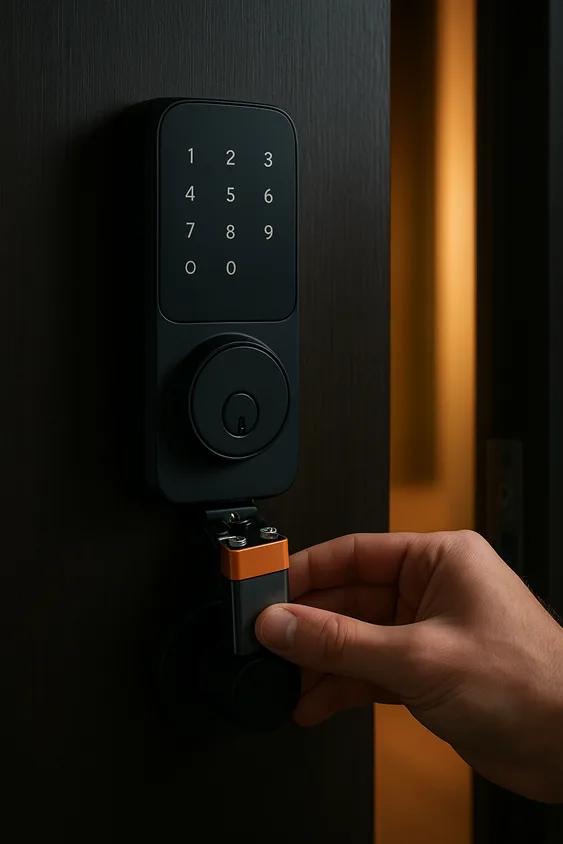
The “Aha!” Moment: Nearly every single modern smart lock—from an August Wi-Fi Smart Lock to a Schlage Encode—has a pair of hidden external contacts designed for this exact emergency. They’re usually located on the bottom of the outdoor keypad or tucked away discreetly on the front plate.
Here’s how to perform the power-up rescue:
- Get a fresh 9V battery. You know, the rectangular kind with the two prongs on top. If you don’t have one in a drawer, a quick run to any gas station or pharmacy will get you one.
- Locate the two metal contacts on your lock. They might be labeled, or they might be two small, exposed metal dots.
- Firmly press the terminals of the 9V battery against the two contacts. You should hold it there for a few seconds.
Side Note: It feels like jump-starting a car, but for your door. There’s a small spark of satisfaction when the lock suddenly lights up and whirs back to life.
Once it powers up, you’ll have a brief window—usually 30 to 60 seconds—to use your code, fingerprint, or app to unlock it normally.
Pro Tip: This is your wake-up call. Buy a dedicated 9V battery and keep it in your car’s glove compartment or in your garage. Think of it as the spare key for the 21st century.
Method 2: The Physical Key You Forgot You Had
Let’s bust a myth right now. “Keyless” entry rarely means “key-less” forever. Most smart locks are hybrids, blending cutting-edge tech with old-school mechanical reliability.
The Reality Check: That sleek, minimalist design often hides a classic, physical keyhole. Manufacturers know that batteries die and software glitches occur. This is their failsafe.
Your Action Plan:
- Look for the hidden keyhole. Check beneath a magnetic cover, under a slide-off panel, or sometimes right in the center of the thumb-turn. Run your fingers over the housing; you’ll often feel the seam.
- Find. That. Key. Remember that unassuming little key that came in the big, colorful box? The one you probably tossed in a “junk drawer” thinking you’d never need it? It’s time to go on a treasure hunt.
Where is it now? If you’re reading this from your porch, that’s a problem for later. If you’re preparing, this is your sign to find it and give it to a trusted neighbor or put it in a secure lockbox.
This tiny piece of metal is your ultimate get-out-of-jail-free card. Using it is simple, familiar, and 100% effective. It doesn’t care about your Wi-Fi password or battery level.
Method 3: The Digital Backdoor (Your Phone is a Key)
Sometimes the lock isn’t the problem. Maybe you’re locked out because you forgot your code, or the keypad itself is broken. If your lock is connected to the internet, you might have a digital savior.
For the Network-Enabled Home: Many smart locks, like those that integrate with platforms like Google Home or Apple HomeKit, can be controlled remotely.
How to leverage your digital backdoor:
- Use the Companion App. If your lock is Wi-Fi enabled (like a Yale Assure Lock 2 with Wi-Fi), you might be able to control it from anywhere. But if your phone is your only key and it’s in your hand, this might not work.
- Call for Backup. This is the real power move. Do you have a family member, roommate, or trusted neighbor who also has access to the lock in the app? A quick phone call to them could have them tapping an “Unlock” button on their phone from across town, granting you immediate access.
- Check for Voice Assistant Integration. If you have a smart speaker with a screen (like an Amazon Echo Show) outside or in a nearby window, you might be able to trigger an unlock command through it.
This method turns a personal crisis into a minor social inconvenience. It’s a good reminder to set up shared access with someone you trust before you need it.
Method 4: The Mechanical Override (A Last Resort)
We’re getting into advanced territory now. This is for when all else has failed, and you’re feeling particularly resourceful.
A Word of Caution: This method involves using traditional lock-picking tools on the physical keyway of your smart lock. It requires patience, specific tools, and a gentle touch. This can void your warranty and should only be attempted if you are comfortable with the concept and it is legal in your area.
How it works in theory:
- You would use a tension wrench and a lock pick to manipulate the traditional pin-tumbler mechanism inside the keyhole manually.
- It’s a skill. It’s not something you can learn in five minutes on YouTube while standing on your doorstep.
Our official recommendation? For 99% of people, if you’ve reached this point, it’s time to call a professional locksmith. Tell them you have a smart lock that needs to be picked. They have the expertise and tools to do it without causing damage.
What NOT to Do: The “Hulk Smash” Prevention Guide
Panic makes us do stupid things. Let’s be very clear about what will only make the situation worse and more expensive.
- Do NOT try to pry the lock off the door. You will destroy the door frame and the lock, resulting in a repair bill far higher than a locksmith’s call-out fee.
- Do NOT drill into the mechanism. You see this in movies. In real life, it’s a disaster. You’ll ruin the lock and likely damage the door.
- Do NOT spray WD-40 or other lubricants into the keypad. This can short out the remaining electronics and gum up the mechanical parts, creating a bigger problem.
The bottom line is simple. Forcing it will break it. A locksmith is cheaper than a new door and a new lock. Exercise restraint.
Proactive Protection: How to Never Get Locked Out Again
Let’s turn this stressful experience into a lesson. A little preparation makes you invincible to this problem. Here is your go-forward checklist.
- Embrace the Key Vault. Buy a simple lockbox and mount it somewhere discreet on your property. Put the physical backup key inside. Now you have a secret key stash that only you know the code to.
- Become a Battery Buddy. Set a calendar reminder on your phone for every six months. “Check smart lock batteries.” It takes two minutes and saves you hours of frustration.
- Manage Your Backup Key. Give your physical key to a trusted neighbor or family member who lives nearby. It’s the oldest form of network security, and it works.
- Learn the Low-Battery Lingo. Your lock is trying to tell you it’s sick. A flashing red light, a specific beep sequence, or a notification in your app—learn its language. Replace the batteries at the first warning sign.
FAQs
My lock is beeping continuously and won’t open. What does that mean?
That’s your lock screaming for help! It’s almost certainly a low-battery warning. The beeping is designed to get your attention before it dies completely. Replace the batteries immediately.
I’ve lost my physical backup key. What are my options now?
You have two main paths. First, contact the lock manufacturer. They might be able to provide a replacement key if you have the key code (often on a little tag in the original box). If not, your only option is to contact a locksmith who can either pick the lock or, as a last resort, drill and replace it.
Will using the 9V battery trick void my warranty?
Absolutely not. This is an official, manufacturer-designed emergency procedure. Using the physical key also will not void your warranty. These are intended failsafes.
Conclusion
The irony is thick, isn’t it? The very technology designed to make your life easier suddenly made it harder. But now, you’re armed with more than hope. You now know the secrets. You know about the 9-volt jumpstart. You remember the physical key. You understand the power of a digital backup.
This knowledge is power. It transforms that sleek piece of tech on your door from a potential point of failure back into a tool of convenience. You are no longer at the mercy of a dead battery.
Bookmark this guide. Please share it with everyone in your home. Then, find that backup key and put it somewhere safe. Your future self, standing on a dark porch, will thank you. Now, enjoy that keyless life—with confidence.
