
Resetting a Schlage keypad lock can seem daunting, but it’s a straightforward process. These locks are popular for their ease of use and security features.
Whether you’ve forgotten your code or need to update it, knowing how to reset is crucial. The process varies by model, but most require a programming code. If you don’t have this code, a factory reset might be necessary. This will erase all user codes and restore default settings. Understanding the reset process ensures your lock functions correctly and maintains security. In this guide, we’ll walk you through each step, including tips for troubleshooting and maintenance.
Let’s dive into the details of how to reset Schlage keypad lock.
- Understanding Schlage Keypad Locks and When to Reset
- Preparing for a Schlage Keypad Lock Reset
- How to Reset Schlage Keypad Lock With Programming Code
- How to Reset Schlage Keypad Lock Without Programming Code (Factory Reset)
- Step-by-Step Reset Instructions for Popular Schlage Models
- What to Do After Resetting Your Schlage Keypad Lock
- Troubleshooting Common Issues During Schlage Lock Reset
- Tips for Maintaining and Securing Your Schlage Keypad Lock
- FAQs
- Conclusion
Understanding Schlage Keypad Locks and When to Reset
Schlage keypad locks offer a blend of security and convenience, making them a popular choice for many homeowners. They can be used on both residential and commercial properties. These locks eliminate the need for physical keys, reducing the risk of lockouts due to lost keys.
There are several situations where a reset may be necessary. One common reason is forgetting the entry code. In such cases, resetting the lock allows you to regain access without hassle. Additionally, if you suspect unauthorized access or wish to enhance security, resetting and changing the code is advisable.
Here’s when you should consider a reset:
- Forgotten or lost entry code
- Transitioning between different occupants
- Security concerns due to potential code compromises
Knowing your lock model is essential, as reset procedures can differ. Recognizing your lock’s specific features will guide you through the reset process effectively. Being proactive with resets ensures that your property remains secure over time. Regularly updating codes can deter unauthorized access, protecting your assets and providing peace of mind.
Preparing for a Schlage Keypad Lock Reset
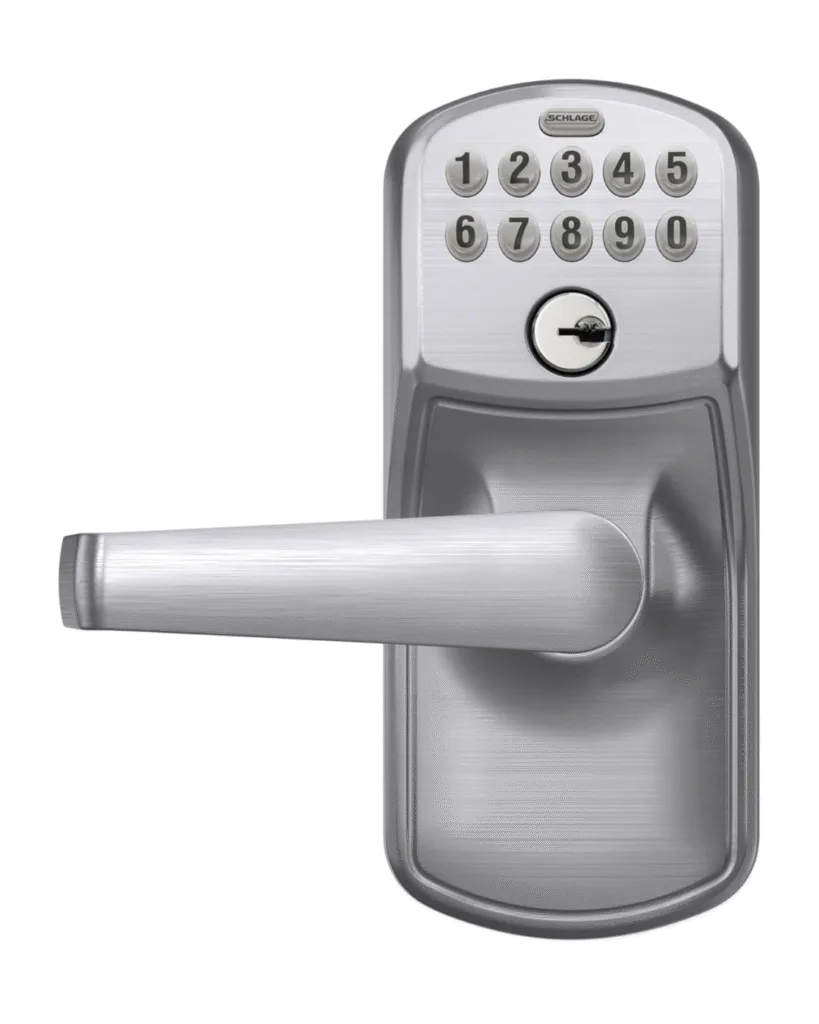
Before starting a Schlage keypad lock reset, it’s crucial to gather necessary items and information. Ensure you have your user manual readily available. This contains essential details like default codes and specific instructions for your lock model. It’s also helpful to know if the lock has any special features.
Check the battery status as well. A fresh battery ensures the reset process isn’t interrupted. This also helps the lock function efficiently once reset. Sometimes, weak batteries can cause issues during the reset procedure.
Here’s a quick checklist to prepare:
- User manual with default programming codes
- Fresh batteries for an uninterrupted process
- Screwdriver for removing the battery cover
- Clear understanding of your lock model
Having these preparations in place minimizes complications during the reset. Being ready streamlines the process, helping you swiftly restore or change access codes.

Image Courtesy: www.amazon.com
How to Reset Schlage Keypad Lock With Programming Code
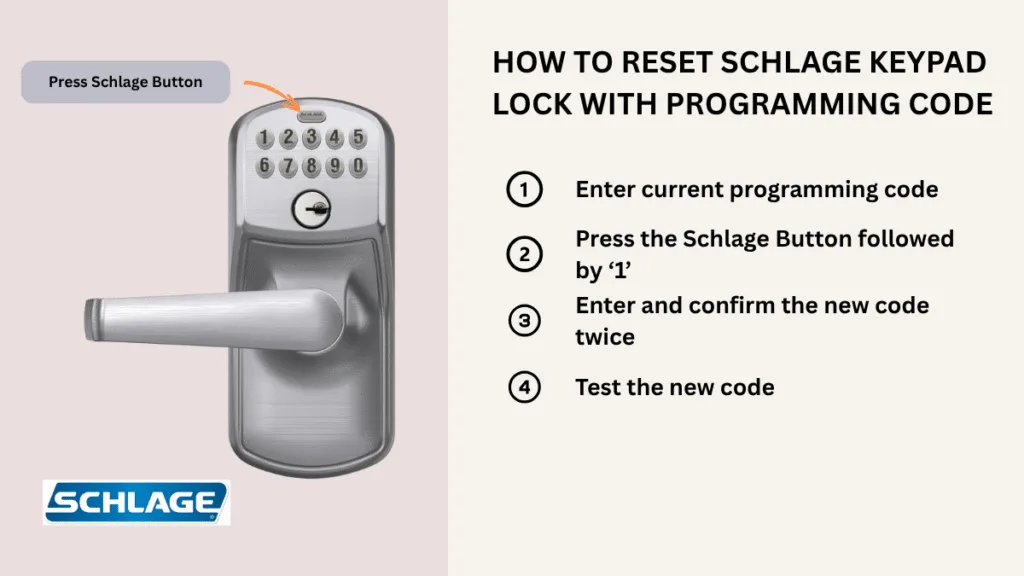
Resetting a Schlage keypad lock using the programming code is straightforward. This process is critical when needing to change access codes for security reasons. First, make sure you know your lock’s existing programming code.
Start by entering this programming code on the keypad. The keypad will usually flash or beep, indicating it’s ready for the next step. This signal confirms that you’ve correctly entered the code.
Next, press the ‘Schlage’ button. After that, press ‘1.’ This sequence begins the process of resetting user codes. Now, enter your new user code twice. It’s important to confirm the code to avoid errors.
Remember, user codes can be four to eight digits long. Ensure they’re easy to remember but difficult for others to guess. This will enhance the security of your property.
To ensure success, test the new code after setting it. Lock the door and try unlocking it using the latest code. If it works, the reset was successful.
Here’s a quick recap of the steps:
- Enter current programming code
- Press the ‘Schlage’ button followed by ‘1’
- Enter and confirm the new user code twice
The reset process should only take a few minutes. Always refer back to your user manual for model-specific instructions.
Keep a note of the new codes in a secure location. This prevents future lockouts and ensures seamless access.
How to Reset Schlage Keypad Lock Without Programming Code (Factory Reset)
If you’ve misplaced the programming code, a factory reset can help. This method restores the lock to its original settings. However, it wipes all existing user codes.
Begin by removing the battery cover. This step varies between models, so consult your manual if unsure. Next, disconnect the battery to prepare for the reset.
Locate the reset button within the battery compartment. Press and hold it while reconnecting the battery. This action should trigger a response from the lock, often a beep or flashing light.
Holding the reset button steady is crucial. Keep it pressed for around ten seconds. Once released, the lock should signal that the reset is complete.
With the factory reset, the lock’s default codes are reinstated. You’ll usually find these codes in the user manual or on a sticker inside the battery compartment. Use the default programming code to set new user codes.
Factory resetting is a valuable tool. It’s especially useful when acquiring a used lock or for rental properties. Just remember, all prior settings are erased during this process.
Once reset, verify the default codes work by testing them. This ensures your lock is functioning properly post-reset.
Here’s a summary of the reset steps:
- Remove the battery cover and disconnect the battery
- Press and hold the reset button while reconnecting the battery
- Wait for the signal and release the button
- Test lock with default codes
Take care to handle components gently during a reset. This prevents damage and ensures the lock continues to function as expected.
Step-by-Step Reset Instructions for Popular Schlage Models
Different Schlage models have unique reset processes. Knowing your specific model is crucial. Here’s a guide for popular models like the Schlage FE595 and BE365.
For the Schlage FE595, start by opening the battery compartment. Press and hold the Schlage button. Reconnect the battery while holding the button—release when the light or sound cues signal success.
For the BE365, the steps differ slightly. Remove the battery cover first. Press and hold the outside Schlage button. Reinstall the battery with the button pressed. Release after the lock signals.
Always check your user manual for exact details. Each model may have minor variations. Ensure you follow each step accurately to avoid issues.
Key steps typically include:
- Identifying your lock model
- Accessing the battery compartment
- Performing the sequence specific to your model
- Verifying the reset with default codes
For newer models, the process might incorporate touchpad functions. Familiarizing yourself with keypad commands can ease the reset process. Additionally, newer models might prompt you with visual indicators.
Resetting your lock maintains security and functionality. These steps should guide you through resetting most Schlage keypad locks effectively. Always ensure the lock functions correctly after any reset to maintain safety.
What to Do After Resetting Your Schlage Keypad Lock
After resetting, it’s crucial to test your Schlage lock. Ensure it’s functioning as expected. This step confirms the reset was successful.
Next, set new user codes. Decide how many codes you need and distribute them carefully. Ensure each code has a purpose, whether for family members or temporary guests.
It’s important to document these codes. Keep them in a secure place. This prevents future lockouts and maintains a smooth operation.
Consider these key actions post-reset:
- Test the lock to ensure proper function
- Assign and test new user codes
- Keep a secure record of all codes
Remember, maintaining documentation aids in managing security efficiently. This habit is part of effective lock management, ensuring both convenience and safety. Check that your lock responds accurately to new codes. If issues occur, consult your manual or seek professional help.
Troubleshooting Common Issues During Schlage Lock Reset
Sometimes, resetting a Schlage keypad lock doesn’t go as planned. Issues can arise, often due to simple mistakes. Staying calm and methodical helps tackle these problems effectively.
Firstly, ensure the lock has fresh batteries. Weak or old batteries can disrupt the reset process. This can prevent the lock from responding to commands.
If the lock still isn’t working, consult the user manual. It offers specific guidance tailored to your lock model. Online resources and Schlage’s customer service can also provide valuable help.
Common troubleshooting steps include:
- Verifying battery installation
- Rechecking reset instructions
- Confirming correct button sequences
Should problems persist, consider professional help. A lock specialist can diagnose complex issues. Regular maintenance also minimizes such occurrences, keeping your lock in top shape.
Tips for Maintaining and Securing Your Schlage Keypad Lock
Keeping your Schlage keypad lock in prime condition ensures reliability and security. Regular maintenance tasks prolong the lifespan and enhance performance.
Firstly, clean the lock and keypad gently. Use a soft, damp cloth to prevent dust buildup. Avoid harsh chemicals that can damage the keypad surface.
In addition, conduct regular checks of the battery status. Replacing batteries as needed prevents lockouts due to power loss. Always use high-quality batteries for optimal performance.
Here are some essential maintenance tips:
- Regularly inspect for signs of wear
- Test all user and programming codes
- Verify door alignment for smooth operation
By following these tips, you can secure your property effectively and extend the life of your lock.
FAQs
Can I reset the lock without the manual?
Yes — you can often reset a Schlage keypad lock without the paper manual. If you know the programming code, you can change user codes directly from the keypad. For a full factory reset you’ll usually remove the interior cover, locate the reset button or follow the keypad sequence printed on the interior, and perform the reset. Models differ, so if unsure, check Schlage’s support site or a brief online guide for your exact model.
How long does a reset take?
A typical user code change or programming update takes under five minutes — usually just the time to enter the programming code, press the required buttons, and confirm the new code. A full factory reset (remove interior cover, press a button or follow a sequence) generally takes 2–10 minutes, depending on familiarity and whether you need to remove/replace batteries or interior trim. Always test the new code at the door afterwards.
Will a reset affect the warranty?
A normal reset to change codes does not void Schlage’s warranty. Warranties are usually only affected by physical damage, unauthorized repairs, or improper modifications. Performing manufacturer recommended resets and following installation instructions is fine. If you’re worried, check your original warranty paperwork or Schlage’s official warranty terms online — they list what actions or damage can void coverage. When in doubt, contact Schlage support before doing hardware alterations.
How can I find my lock model?
Find the model by checking visible and hidden spots: look on the back of the keypad, the inside (interior) mounting plate under the battery/cover, the edge of the door near the latch, the original box, or any paperwork you saved. The model or part number is often printed on a label inside the interior housing once you remove the battery cover. If you can’t find it, a clear photo of the lock and a quick search or Schlage support message usually identifies the model.
Conclusion
Resetting your Schlage keypad lock is vital for property security. By following the correct procedures of this how to reset Schlage keypad lock guide, you safeguard your space. Regular updates to your lock’s codes further enhance this security.
Stay informed and proactive about your lock’s maintenance needs. With Schlage, you gain peace of mind knowing your property is protected.
.
