
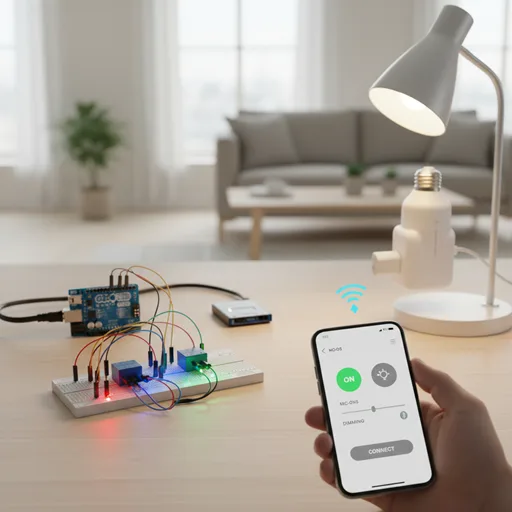
If you want smarter lights without ripping out wiring or signing up for months of cloud subscriptions, Bluetooth can be your best friend. Quietly efficient, inexpensive, and increasingly capable, Bluetooth Low Energy (BLE) has moved from tiny one-off hobby projects to real, practical home lighting solutions. I’ll walk you through everything: why Bluetooth, how to plan your system, a step-by-step lamp build, how to scale to multiple rooms, security essentials, troubleshooting, and the best gear to start with. No marketing fluff. Just practical, tested advice you can use tonight.
Before we jump in: the smart lighting market is booming. Several market analysts put the global smart lighting market in the tens of billions and growing at double-digit CAGRs — meaning more hardware, more integrations, and more affordable options for DIYers. For perspective, North America alone was valued at several billion dollars in 2024, with strong growth projected through 2025 and beyond.
- Why Bluetooth smart lighting is worth considering
- Planning your Bluetooth lighting architecture
- What you’ll need — Parts & tools (downloadable BOM idea)
- Steps to Build a single Bluetooth-controlled lamp (Project A)
- Scaling up: multi-room Bluetooth lighting with a gateway (Project B)
- Bluetooth Mesh: when and how to use it (Project C)
- Security & privacy: don’t skip this
- Troubleshooting common Bluetooth lighting issues
- Recommended devices & controllers (expert picks)
- Real-world trends and a quick reality check
- Frequently Asked Questions (FAQs)
- Conclusion
Why Bluetooth smart lighting is worth considering
People often assume “smart lighting” means Wi-Fi bulbs, hubs, or Zigbee networks. That’s true — but Bluetooth now offers a sweet spot for many homeowners.
Why choose Bluetooth? In plain language: it’s simple, cheap, and works offline. Bluetooth Low Energy is designed for small, low-power devices. Add a little gateway or run it directly from your phone, and you have a fully functional setup without expensive hubs or constant cloud dependence. The Bluetooth SIG reports active growth in Bluetooth capabilities and new markets (think LE Audio, Auracast, Ambient IoT) — the ecosystem is alive and moving.
Pros
- Lower power use than Wi-Fi. Good for battery-powered nodes or long-lived devices.
- Cheap hardware — microcontrollers like the ESP32 include BLE for $5–$10.
- BLE Mesh lets many devices relay messages; that’s perfect for whole-house lighting.
- Works locally: no cloud required if you don’t want it.
Cons
- Range can be shorter than some mesh networks; walls matter.
- Interoperability is a mixed bag — not all Bluetooth lights speak the same app or profile out of the box.
- For voice assistant or cloud features, you’ll need a bridge/gateway.
If you want the quick comparison chart in one line: Bluetooth = affordable + local control, Wi-Fi = direct cloud & high bandwidth, Zigbee/Thread = mature mesh + wide ecosystem. Use that as your rule of thumb when choosing tech for a room.
Planning your Bluetooth lighting architecture
Start by asking: how many lights? How automated? Voice control? Budget?
There are three practical topologies most DIYers use:
1. Direct smartphone control (best for one or two fixtures)
Simple and fast. You flash a device (ESP32 or a Bluetooth LED controller), open a companion app or a BLE scanner, and control from your phone. No hub needed. Great for a desk lamp, bedside lamp, or a single accent light.
When to use: single-room, no automation szükséges, or when you want the cleanest, fastest setup.
2. BLE Gateway → Home automation (best for scale and automation)
A small gateway (another ESP32, Raspberry Pi with a USB dongle, or a purpose-built gateway) connects multiple BLE nodes to your automation platform like Home Assistant or Node-RED. Your phone becomes just one control option among schedules, automations, and voice.
This is how you go from a single lamp to multi-room routines (think: “at sunset, set living room lights to 60% warm”).
Home Assistant has a built-in Bluetooth integration that makes adding local BLE devices easier. If you want to explore it, check the official Home Assistant documentation.
3. Bluetooth Mesh (best for whole-house, battery-friendly networks)
Bluetooth Mesh is a standard that connects multiple Bluetooth devices into one dependable network. Data travels between devices, which helps expand the area covered and allows the network to support hundreds of devices. It’s the best choice if you want a dependable lighting setup with many lights, without needing a separate central gateway for every control command.
When to choose Mesh: large homes, commercial setups, or when bulbs/fixtures explicitly support Bluetooth Mesh.
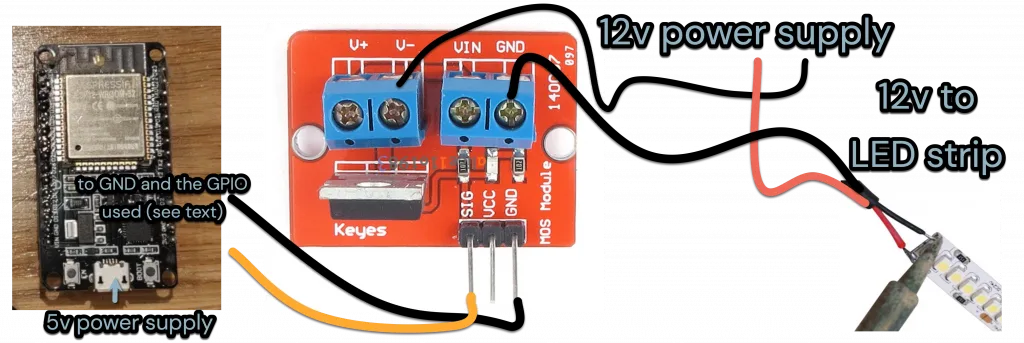
Image credits: https://www.rogerfrost.com
What you’ll need — Parts & tools (downloadable BOM idea)
I always tell people: buy a little more than you think — spare connectors, extra headers, an extra LED driver. You’ll thank yourself later.
Here’s a concise parts breakdown for three project sizes:
Project A — Single Bluetooth Lamp
- ESP32 Dev Board (supports BLE) — versatile and inexpensive.
- LED driver (constant current for LEDs or a simple LED strip controller).
- Lamp fixture, lamp holder, power supply (5–12 V depending on LED driver).
- Wires, shrink tubing, switch (optional).
Project B — Multi-room BLE with Gateway
- Several ESP32-based LED controllers or commercial Bluetooth LED controllers.
- A gateway: Raspberry Pi with BLE adapter or a dedicated ESP32 gateway.
- Home automation server (Home Assistant or Node-RED running on Pi or local server).
- Power distribution (safely handled).
Project C — Bluetooth Mesh
- Mesh-capable bulbs/controllers (verify Bluetooth Mesh support).
- Coordinator or mobile app for provisioning.
- Consider certified controllers from manufacturers when possible.
For hardware details and BLE stacks, the ESP-IDF documentation is an excellent technical reference.
Steps to Build a single Bluetooth-controlled lamp (Project A)
1. Gather parts and safety first
Get an ESP32 development board, an LED driver matching the voltage and current of the LED strip, a power supply, a lamp housing, and insulation materials. Make sure to work on a non-conductive surface. Unplug the power while wiring. Safety is not optional — treat mains work with respect (or hire an electrician if you’re unsure).
2. Wiring the lamp
Wire the LED driver to the lamp’s LED string, then connect the driver’s logic input to the ESP32’s PWM pin (or use a MOSFET if controlling DC LED strips). If you’re using a commercial Bluetooth LED controller, follow its wiring guide.
Pro tip: keep all low-voltage wiring separate from mains wiring; use proper strain relief on the lamp cord.
3. Flashing BLE firmware (ESP32)
You’ll want a minimal BLE GATT (Generic Attribute Profile) server on the ESP32. The device advertises a service with characteristics for power and brightness. You can use the NimBLE stack on ESP32 — it’s lean and efficient for BLE tasks. Espressif’s docs describe NimBLE usage and the Bluetooth APIs in detail.
Random Nerd Tutorials has a clear ESP32 BLE server/client example that’s approachable and well-documented if you prefer a ready tutorial with code examples. It’s a good learning bridge if you’re new to BLE.
4. Pairing and app testing
Use a BLE explorer app (Android and iOS have options) to scan for your device. Connect and write to the characteristic for on/off or brightness. If your firmware exposes a simple write characteristic, a 0/1 value or 0–255 brightness scale works fine.
Troubleshooting tip: if the lamp doesn’t appear in the scanner, restart the ESP32 and check the logs over USB serial. BLE advertising may be stopped if the firmware errors on boot.
Scaling up: multi-room Bluetooth lighting with a gateway (Project B)
Once one lamp works, the temptation is to stop. Don’t! The real fun begins when you automate.
The gateway idea
A gateway listens for BLE devices in range and forwards controls to your automation server. For example, three BLE lamps in the living room can be discovered by a Raspberry Pi gateway, which exposes them to Home Assistant. This lets you create routines: at sunset, set mood lighting; when motion is detected, dim and warm.
Home Assistant’s Bluetooth integration can add local BLE devices directly — and for more advanced setups, you can use Node-RED to create flows that orchestrate groups of BLE devices. The Node-RED community has BLE nodes you can use to create “turn on the living room” flows.
Performance and scaling considerations
- Number of devices: BLE advertising intervals and scan windows matter. A single gateway can handle dozens of devices, but very large installations should use multiple gateways or Bluetooth Mesh.
- Placement: Gateways placed centrally will get better reach. Metal furniture and concrete walls cut the Bluetooth range a lot.
- Interference: Wi-Fi at 2.4 GHz sits near BLE channels — keep important devices well-placed and consider channel planning for heavy installs.
Bluetooth Mesh: when and how to use it (Project C)
Bluetooth Mesh solves scale and range by letting nodes relay messages. It’s enterprise-grade in behavior but accessible to serious DIYers.
Why mesh? It removes the single point of command failure and extends the effective range across a home by hopping messages. For a whole-house lighting system where every fixture must be in sync, mesh is ideal.
Realistic note: not every BLE device supports mesh. When buying bulbs or drivers, look specifically for Bluetooth Mesh support. Brands and product lines are increasingly releasing mesh-ready hardware, and market research shows that Bluetooth Mesh for lighting is a growing segment of the smart lighting market.
How to provision: Use a mesh provisioning app or gateway; each device is added to the mesh network and given an address. Once the mesh is live, nodes relay publish/subscribe messages to control groups, scenes, and so forth.
Security & privacy: don’t skip this
I can’t stress this enough: default settings are rarely secure. Protecting your BLE devices keeps your scenes private and prevents spoofing.
Practical steps
- Don’t leave devices discoverable forever. Use pairing and bonding devices when possible.
- Use encrypted characteristics if you control firmware. BLE supports bonding and encrypted connections; at minimum, avoid leaving an unauthenticated control characteristic open.
- Plan OTA updates. Unpatched firmware is the easiest way for attackers to get in. Signed firmware updates are best practice.
If you want the deep technical side, Espressif’s Bluetooth API docs explain pairing modes and the NimBLE stack features you can use to implement bonding and encryption.
Troubleshooting common Bluetooth lighting issues
Things sometimes go sideways. Here’s a practical troubleshooting checklist you can print and stick to your workbench.
Pairing failures
- Move closer — proximity matters.
- Reboot the device and the gateway.
- Check firmware logs (serial output on ESP32).
- If you use an older Bluetooth Classic module (HC-05/HC-06), consider moving to a modern BLE solution like ESP32 — more flexible and actively supported.
Intermittent disconnects or lag
- Check interference from Wi-Fi or other 2.4 GHz devices.
- Increase advertising intervals if you see devices sleeping too quickly.
- Reevaluate antenna placement.
Gateway or Node-RED sync problems
- Verify service UUIDs in your Node-RED BLE nodes.
- Use scanning tools to confirm devices are advertising.
- If many devices are on the same gateway, consider splitting them across multiple gateways.
A lot of fixes are “move, reboot, update firmware” — boring, but they work.
Recommended devices & controllers (expert picks)
I’ve tested dozens of boards and controllers. Here’s what I trust and why.
- ESP32 Dev Boards (Espressif): cheap, well-supported, and have mature BLE stacks (NimBLE recommended). Great for custom controllers.
- Commercial Bluetooth LED Controllers: if you prefer plug-and-play, look for controllers that support Bluetooth Mesh or open GATT profiles. Companies are shipping more BLE controllers aimed at retrofit lighting. (Check vendor specs carefully.)
- Gateways: Using a Raspberry Pi with a reliable BLE USB dongle, or dedicated ESP32 gateways, is effective for integrating with Home Assistant or Node-RED.
- Apps: BLE scanning apps are very helpful for troubleshooting, and provisioning apps are essential for setting up mesh networks.
If you want high-level product categories and specs, manufacturers’ pages and marketplace listings give quick comparisons. For commercial controller specs, product pages show power ratings, supported profiles, and certifications — useful if you’re doing a permanent install.
Real-world trends and a quick reality check
It’s not just hobbyists driving this — the smart lighting market is expanding fast. Analysts reported significant market growth in 2024 and expect continued double-digit CAGR into the late 2020s. That growth means better hardware options for DIYers, more certified devices with Bluetooth Mesh, and lower prices on capable controllers. In plain English: the time to jump in is now.
Also worth noting: mainstream brands are innovating. At CES 2025, several lighting companies introduced new smart lamps and ceiling lights supporting modern protocols (Matter, advanced Wi-Fi/Matter combos) — that competition raises baseline expectations for connectivity and integrations. If you plan long term, buy devices that support open standards or at least are bridgeable into your hub.
Frequently Asked Questions (FAQs)
Can I use Bluetooth lights with Alexa or Google Home?
Yes — but usually via a bridge. Some commercial controllers or gateways expose BLE devices to cloud or local integrations that voice assistants can use. If you want direct voice integration, plan to use a gateway or buy devices with native smart assistant support.
How many Bluetooth devices can I control at once?
It depends on the gateway and network topology. Direct phone control is limited; a dedicated gateway can manage dozens. For hundreds of lights, consider Bluetooth Mesh.
Is Bluetooth mesh better than Zigbee for lighting?
Both have strengths. Bluetooth Mesh is newer and integrates well with BLE ecosystems; Zigbee has a mature consumer space and many certified devices. Choose based on device availability and your comfort level with provisioning and management.
Do I need programming experience to build this?
You’ll be faster if you know basic flashing and serial logs, but many open-source guides and prebuilt controllers make it accessible. Start small: one lamp, then expand.
How do I keep devices secure?
Use pairing, bonding, and encrypted characteristics, and keep firmware updated. Don’t expose your control interfaces to the internet unless you secure them properly.
Conclusion
Bluetooth gives you a practical, affordable path to smart lighting that’s local, private, and easy to expand. Start with an ESP32 lamp as a weekend project. Learn the ropes. Then add a small gateway and bring it into Home Assistant or Node-RED. If you push to whole-house lighting, look into Bluetooth Mesh devices.
If you’re ready to begin, pick a starter kit (an ESP32 dev board, an LED driver, and a basic lamp fixture) and a BLE scanner app. Try the lamp build this weekend. If you want, I’ll package a downloadable BOM CSV and a Node-RED flow that sets “living room scene at sunset” — copy-paste ready. Say the word and I’ll generate them now.
One last thing — pick a gear that’s friendly to firmware updates and community support. That keeps your system secure and future-proof. Your lights should make life easier, not give you headaches.
Ready to build? Grab an ESP32 dev board and a Bluetooth LED controller, and let’s get a lamp blinking tonight. Click here to read the official ESP32 BLE docs for a quick technical reference, or check the Home Assistant Bluetooth integration for automation instructions.
