
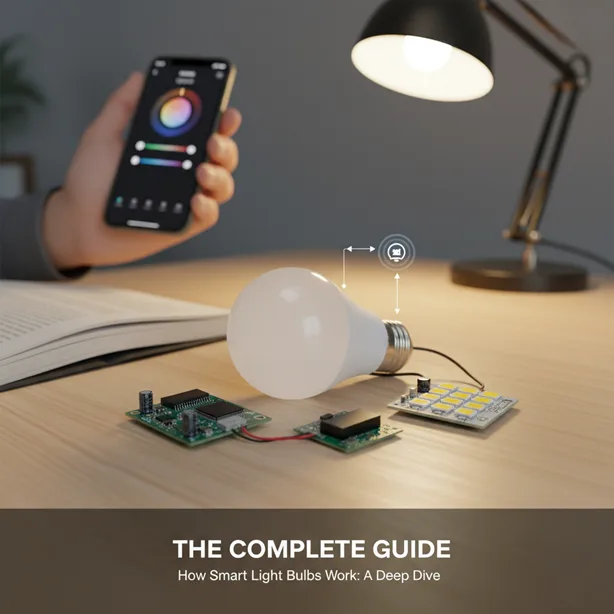
You flip a switch. Light appears. Simple, right?
Now imagine controlling that same light from bed, from work, or even from another country. Welcome to the world of smart light bulbs—where your lighting doesn’t just illuminate rooms but actually thinks alongside your daily routines. If you’ve ever wondered how do smart light bulbs work and what makes them so different from the bulbs your grandparents screwed into sockets, you’re about to find out.
These aren’t just fancy LED bulbs with attitude. They’re mini computers that produce light, packed with wireless radios, processors, and enough intelligence to recognize your voice commands. Pretty wild for something that replaces a $2 incandescent.
- The Brains Behind the Brightness
- Protocol Wars: How Your Bulb Talks to Your Phone
- Setting Up: From Box to Brilliance
- The Colour-Changing Circus
- Automation: When Bulbs Get Predictive
- Energy Efficiency: The Unexpected Benefit
- Smart Bulbs vs. Smart Switches: The Great Debate
- Troubleshooting Common Hiccups
- The Future Is Getting Brighter
- FAQs
- Light Up Your Life—Intelligently
The Brains Behind the Brightness
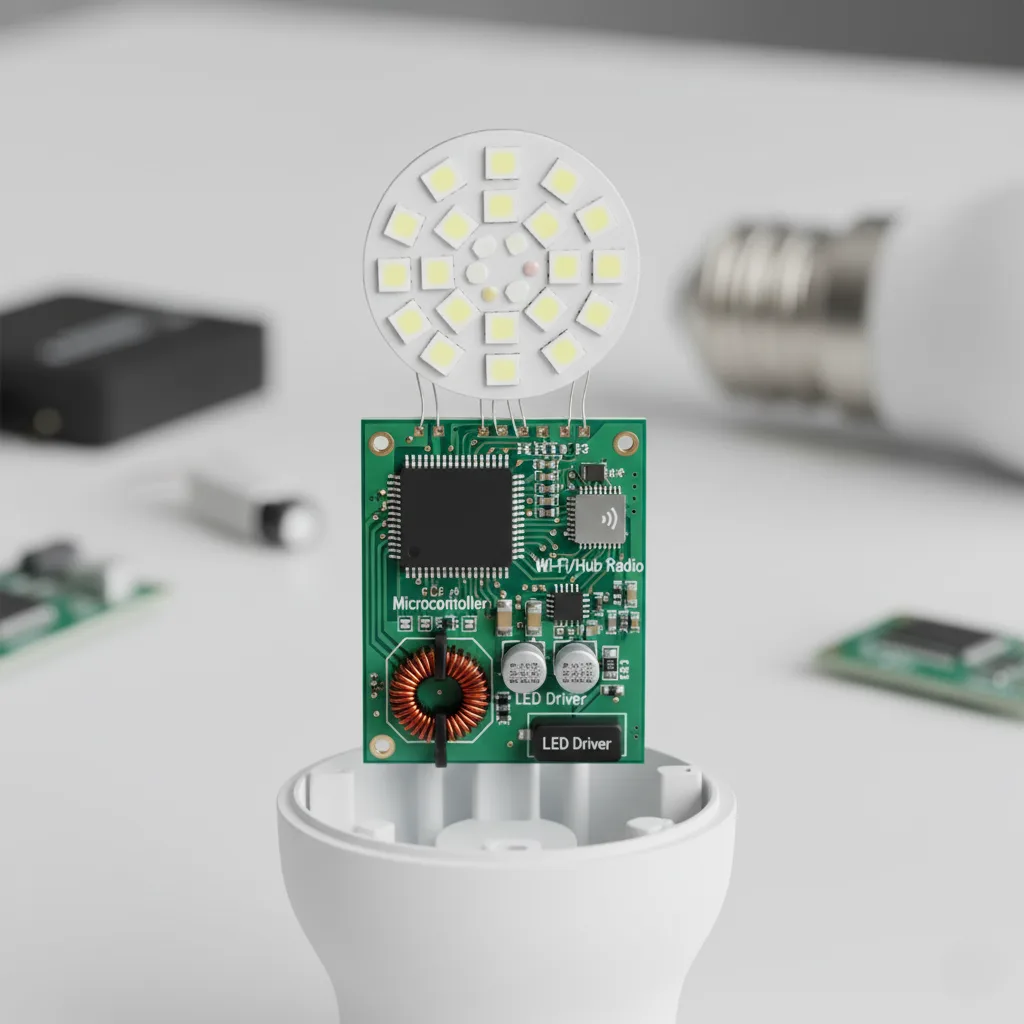
Here’s what most people miss: a smart bulb is essentially a tiny computer wrapped around an LED.
Inside that familiar bulb shape, there’s a microprocessor running firmware. This little brain manages everything from dimming levels to colour changes to wireless connectivity. Think of it as the conductor of a very small, very bright orchestra.
The LED chip itself produces the light. But unlike dumb bulbs that turn electricity into photons, smart bulbs modulate that light output based on digital commands. Want 40% brightness? The processor tells the LED driver circuit to dial it back. Want warm amber at sunset? The chip adjusts the mix of colored LEDs.
And then there’s the wireless radio.
This is where things get interesting. Every smart bulb contains at least one radio transmitter that speaks specific wireless protocols. Some use Wi-Fi. Others prefer Zigbee or Z-Wave. The newest generation supports Matter, which is basically the universal translator of smart home protocols.
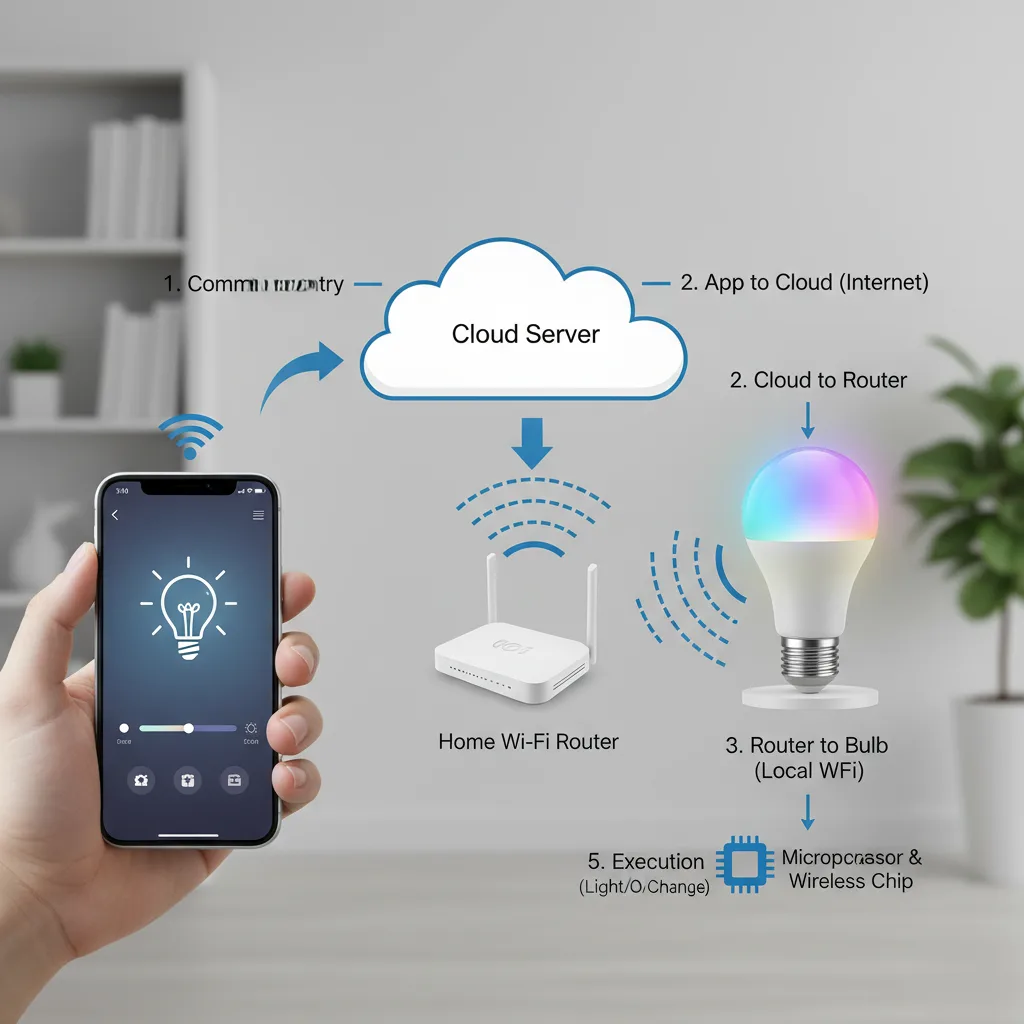
These radios are constantly listening for commands. When you tap “turn on” in an app, your smartphone sends a signal to your router (or hub), which relays it to the bulb’s radio, which tells the processor, which fires up the LED. All in milliseconds.
Protocol Wars: How Your Bulb Talks to Your Phone
Let’s break down the communication highways your smart bulbs use.
Wi-Fi bulbs connect directly with your home network. No hub needed. They’re the plug-and-play option—though they do hog bandwidth and drain power faster than other options. Brands like LIFX built their reputation on Wi-Fi connectivity. The advantage? One less device to buy. The downside? Each bulb needs its own IP address, and that adds up fast when you’ve got twenty lights in your house.
Zigbee and Z-Wave take a different approach. These are mesh network protocols specifically designed for smart home devices. Instead of connecting to your router, they create their own network using a dedicated hub (like a Philips Hue Bridge or SmartThings hub). Each device extends the network’s range, making it more reliable over distance.
The technical difference? Zigbee operates on the 2.4GHz band. Z-Wave uses a less congested frequency around 900MHz. Both use less power than Wi-Fi and respond faster. If you’ve ever noticed your Wi-Fi bulbs lagging, you’ve felt the difference.
Bluetooth bulbs work within close range—usually about 50 feet. Great for apartments or single rooms. Terrible for whole-home control. Some hybrid bulbs use Bluetooth for initial setup, then switch to other protocols for regular use.
Then there’s Matter. This is the new kid changing everything. Launched in late 2022 by an alliance of tech giants, Matter creates a common language for smart home devices. It means your Thread-enabled bulb can talk to your Google Home, Alexa, and Apple HomeKit simultaneously—no more “works with” limitations.
Setting Up: From Box to Brilliance
The setup process reveals a lot about how these bulbs actually function.
First, you screw in the bulb. It powers on using standard household voltage—usually 120V in the US. Inside, a power supply converts AC to DC and steps down the voltage to something the electronics can handle (typically 3-12V). The microprocessor boots up, loads its firmware, and enters pairing mode.
Most bulbs flash or pulse to indicate they’re ready to pair. This is the processor saying, “I’m listening for setup commands.”
You open the manufacturer’s app. Behind the scenes, your phone searches for available devices on whatever protocol that bulb uses. When it finds your bulb, it initiates a handshake—exchanging security credentials and network information. This is where encryption keys get swapped, network passwords get stored, and your bulb gets assigned a unique identifier.
Once paired, the bulb joins your home network. From then on, every command you send gets encrypted, transmitted, received, decrypted, and executed. The whole cycle takes about 200 milliseconds on a good day.
Voice control adds another layer. When you tell Alexa or Google Assistant to turn on the lights, your voice travels to cloud servers where AI processes your words, determines your intent, and sends a command back to your smart home hub, which forwards it to your bulb. It’s the longest route possible, yet still feels instantaneous. That’s engineering.
The Colour-Changing Circus
Here’s something cool: white-light bulbs use two LED types—warm white and cool white. By adjusting the ratio between them, the bulb can shift from cozy candlelight (2000K) to bright daylight (6500K). The processor manages this colour temperature blend based on your preferences.
Colour bulbs are even more sophisticated. They pack in red, green, blue, and sometimes additional white LEDs (RGBW or even RGBWW). By varying the intensity of each colour, the bulb can produce millions of colour combinations. Want purple? Red at 75%, blue at 100%, green at 0%. Want that perfect Instagram-worthy teal? The processor calculates the exact LED mix.
This happens through pulse-width modulation. The processor rapidly turns LEDs on and off—thousands of times per second. Our eyes perceive these rapid pulses as continuous light at varying brightness levels. Clever, right?
Automation: When Bulbs Get Predictive
The real magic isn’t in controlling lights remotely. It’s in forgetting about them entirely.
Schedules live in the bulb’s firmware or the hub’s memory. The processor keeps track of time (synced with internet time servers) and executes pre-programmed routines. Sunrise simulation? The bulb gradually increases brightness over 30 minutes. Movie mode? It dims to 10% and shifts warm.
Geofencing uses your phone’s GPS. When you leave a defined area, the system triggers “away” routines. Your bulbs turn off or switch to security mode. The technology isn’t in the bulb itself—it’s in the ecosystem. The app monitors your location, and when you cross a boundary, it sends commands to your lights.
Motion sensors add another input. When a compatible sensor detects movement, it signals the hub, which tells specific bulbs to turn on. The bulb itself receives and executes commands. The intelligence lives in the network.
Some systems use adaptive lighting that adjusts colour temperature throughout the day, mimicking natural sunlight patterns. This improves circadian rhythms and supposedly helps you sleep better. The system tracks local sunrise and sunset times, then gradually shifts from energizing blue-white mornings to relaxing amber evenings.
Energy Efficiency: The Unexpected Benefit
Smart bulbs typically draw 8-12 watts. Compare that to a 60-watt incandescent producing similar lumens. The LED technology alone saves money, but the smart features multiply those savings.
Think about it this way: traditional lights stay on until someone remembers to turn them off. Smart bulbs can auto-off after detecting no motion. They can dim when natural light is sufficient. They can learn your patterns and adjust accordingly.
The Department of Energy estimates that widespread LED adoption could save $30 billion in electricity costs by 2027. Add smart features to that efficiency, and the numbers get even better.
But here’s the catch—leaving smart bulbs installed but powered off at the switch breaks their functionality. They need constant power to maintain wireless connectivity. This means they draw a tiny amount of standby power (usually under 0.5 watts) even when “off” it is negligible but worth knowing.
Smart Bulbs vs. Smart Switches: The Great Debate
Why not just replace switches instead of bulbs?
Smart switches control all the lights on a circuit. They’re hardwired, more permanent, and work with any bulb. But they require neutral wires (which many older homes lack) and need professional installation for some people. They also can’t do colour-changing or per-bulb control.
Smart bulbs offer granular control. Each bulb operates independently. You can have reading lights at full brightness while ambient lights stay dim. You get colour options. Installation is literally “screw in a bulb.” And renters don’t need landlord permission.
The trade-off? The cost adds up with multiple bulbs. And if someone kills the switch, your smart bulb becomes a dumb, expensive LED that won’t respond to any commands until power returns.
Many smart home enthusiasts use both switches for overhead fixtures, bulbs for lamps and accent lighting.
Troubleshooting Common Hiccups
Connection drops happen. Usually, it’s because your router placed the bulb on a different network band than your phone, or the mesh network lost a critical node.
First fix: power cycle everything. Seriously. Please turn off the bulb for 10 seconds, then turn it back on. Restart your hub. Reboot your router. This clears temporary glitches in about 70% of cases.
Bulbs not responding often means they’ve lost network connection. Check if the hub is online. Verify your Wi-Fi hasn’t changed passwords. Make sure you haven’t hit device limits on your network—some routers max out at 50-100 connected devices, and every smart bulb counts.
Slow response times usually indicate network congestion or distance issues. Mesh networks need devices close enough to relay signals. If your furthest bulb takes seconds to respond, it’s too far from the hub. Adding a mesh extender or plug-in device between them usually solves it.
Bulbs flickering at low dim levels? That’s often a compatibility issue between the bulb’s driver and your home’s electrical supply. Some bulbs don’t play nice with certain dimmers or older wiring. Check manufacturer compatibility lists or try a different brand.
Video credits: @GosforthHandyman
The Future Is Getting Brighter
The technology keeps evolving. Thread protocol (which underlies Matter) offers faster response times and better mesh networking than Zigbee. Li-Fi research explores using LED bulbs for data transmission—imagine downloading files through your ceiling light.
Some manufacturers are integrating additional sensors directly into bulbs—motion detection, temperature monitoring, and even air quality sensing. Your light bulb could become your home’s nervous system.
Machine learning algorithms are making predictions smarter. Instead of programmed schedules, bulbs learn your actual behaviour patterns and adjust proactively. Forgot to create an “away” routine? The system notices you never need lights between 9 AM – 5 PM on weekdays and adjusts automatically.
And prices keep dropping. What cost $60 per bulb five years ago now runs $15 or less. The technology becomes accessible to everyone, not just early adopters with deep pockets.
FAQs
Q: Do smart light bulbs work with any lamp or fixture?
Yes, if the fixture accepts standard bulb bases (E26/E27 for most household fixtures, E12 for candelabra). Just verify that the bulb’s physical dimensions fit the fixture especially for enclosed fixtures, which can trap heat. Some smart bulbs aren’t rated for enclosed spaces. Always check manufacturer specifications before buying.
Q: Can smart bulbs work without Wi-Fi?
It depends on the protocol. Wi-Fi bulbs need internet for remote control, though local network control sometimes works. Zigbee and Z-Wave bulbs work fine without internet since they communicate through a hub. Bluetooth bulbs work completely offline but only within range. Matter-enabled bulbs have local control built into the standard.
Q: Do smart bulbs use electricity when turned off?
Yes, but minimally—typically 0.3 to 0.5 watts for standby power. This keeps the wireless radio active so the bulb can receive “turn on” commands. Over a year, this standby consumption costs roughly $0.50 per bulb at average electricity rates—the trade-off for remote control convenience.
Q: How long do smart light bulbs last?
Most manufacturers rate their bulbs for 15,000 to 25,000 hours—roughly 15-20 years at 3 hours daily use. The LEDs typically outlast the electronics. Realistic lifespan? About 10-15 years. Heat management affects longevity, so bulbs in enclosed fixtures or high-use areas may fail sooner than rated.
Q: Can I use smart bulbs with a dimmer switch?
Generally no. Smart bulbs need constant full power to maintain connectivity. Traditional dimmer switches reduce voltage, which causes smart bulbs to flicker, lose connection, or behave erratically. Remove dimmers and replace them with regular switches, then control dimming through your app. Or install smart dimmer switches instead.
Q: Are smart bulbs secure from hackers?
Modern smart bulbs use encryption for communication, making them reasonably secure. Risks exist if manufacturers use weak default passwords or don’t release security updates. Buy from reputable brands that regularly update firmware. Keep your home network secure with strong passwords. Enable two-factor authentication on your smart home accounts.
Q: What happens if the company stops supporting my smart bulbs?
The bulbs continue functioning locally through established protocols, but cloud-dependent features may disappear. Zigbee and Z-Wave bulbs work through any compatible hub, offering more longevity than proprietary Wi-Fi systems. Matter certification provides future-proofing since it’s an industry standard rather than a single-company protocol. Check for Matter compatibility when buying.
Q: Do smart bulbs work during power outages?
No. Smart bulbs need electricity like any bulb. Some systems allow you to set default “power restoration” states—so bulbs automatically turn on when power returns. During outages, keep flashlights handy. Battery-powered smart backup lights exist, but cost significantly more than standard smart bulbs.
Light Up Your Life—Intelligently
So how do smart light bulbs work? They’re sophisticated combinations of LED technology, wireless communication, microprocessors, and clever software working in concert to transform the most basic household utility into something responsive, efficient, and genuinely useful.
They connect to your network through Wi-Fi, Zigbee, Z-Wave, or Bluetooth protocols. They execute commands in milliseconds through onboard processors. They save energy through LED efficiency and smart automation. And they’re getting smarter, cheaper, and more capable every year.
The real question isn’t whether they work—it’s whether they work for you.
If you’re tired of walking into dark rooms and fumbling for switches, they work. If you want lighting that adapts to your mood without thinking about it, they work. If you’re building a smart home ecosystem that responds to voice commands and automated routines, they definitely work.
The technology has matured. The prices have dropped. The standards have been unified through Matter. There’s never been a better time to upgrade your lighting from dumb to brilliant.
Ready to brighten up? Start with a starter kit from a major manufacturer such as Philips Hue, LIFX, or Wyze offer solid entry points. Replace your most-used lights first. Experience the convenience of automated schedules, voice control, and remote access. Then expand room by room as you discover which smart features actually improve your daily life.
Your light switches have remained unchanged for over a century. It may be time they caught up with the rest of your connected life.
