
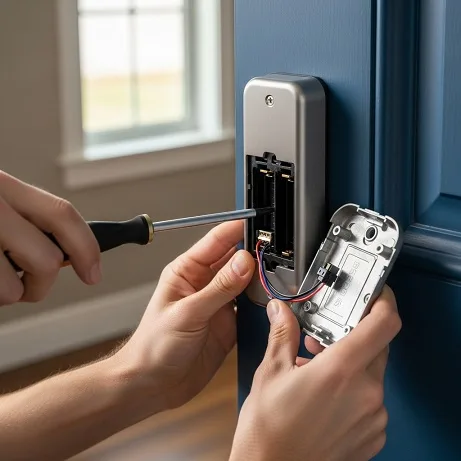
So, the moment has arrived. Whether you’re looking to upgrade to the newest and most advanced smart home security system, you’re relocating to a new home and want to bring your reliable digital doorman along, or maybe your existing smart lock has started acting a bit less intelligent than usual, you’re here because you need to remove that device from your door. The good news? You absolutely can. Taking off a smart lock might seem like a task for a professional, but I’m here to walk you through it. It’s a surprisingly straightforward process that you can tackle with a few common tools and a bit of patience.
This guide is your complete roadmap for the how to remove a smart lock from your door process. We’ll take care of everything, from the important setup to the last bit of cleaning, so you can complete the job safely without damaging your door or the device. Please think of me as your digital handyman here to help with every step. Let’s get that lock off.
Before You Begin: Essential Prep for a Smooth Removal
The actual unscrewing is the easy part. The secret to a stress-free removal is in the preparation. Taking five minutes to get organized now can save you a thirty-minute headache later. Don’t skip this part!
Safety First – Don’t Skip This Step!
Before you even think about touching a screwdriver, let’s go over a few critical safety and security checks.
First, disconnect the lock from the digital world. Open the app associated with your smart lock and remove the device from your account. This is a vital step, especially if you plan on selling or giving the lock to someone else. It ensures none of your data or digital “keys” remain tethered to the hardware.
Next, and this is non-negotiable, power it down completely. The simplest way to do this is to remove the batteries. This prevents any unexpected electronic beeps, movements, or potential short circuits while you’re working. It’s the digital equivalent of unplugging an appliance before you start tinkering with it.
Finally, have a backup plan for securing your door. The last thing you want is to successfully remove your lock only to realize you have no way to lock up your home. Make sure you have the old, original deadbolt ready to install, or at least have a plan to keep the door secure until you can install its replacement.
Gather Your Toolkit
There’s nothing more annoying than being deep into a project and then having to pause and search for a tool. Let’s gather all the essentials right away so you can keep moving smoothly. You won’t need a massive toolbox, just a few essentials:
- A good quality Phillips head screwdriver. This will be your primary tool.
- A flathead screwdriver can be useful for gently prying off covers without scratching them.
- An Allen wrench (or hex key) may be needed for certain models, particularly for set screws.
- A small container or magnetic tray for screws and parts. Trust me, those tiny screws have a magical ability to disappear the second they hit the floor.
- A soft cloth to place your tools on and to protect your door’s finish.
Know Your Lock
While this guide covers the universal steps to uninstall a smart lock, keep in mind that the exact design can vary between brands. If you still have the instruction manual that came with your lock, now is the perfect time to give it a glance. It can be a great resource for identifying any unique quirks of your specific model.
How to Remove a Smart Lock from Your Door in 7 Steps
Alright, you’re prepped and your tools are ready. Let’s get to the main event. We’ll go through this step-by-step. Work slowly and deliberately, and you’ll have that lock off in no time.
Step 1: Remove the Interior Cover
Start on the inside of your door. The interior assembly, the part with the thumb-turn, has a plastic or metal cover. This is usually held in place by friction clips, a small set screw on the side, or sometimes by the thumb-turn itself. Look for a small notch or seam where you can gently insert a flathead screwdriver to pry it off. Be gentle here to avoid marring the plastic.
Step 2: Take Out the Batteries
If you haven’t already, now is the time. With the cover off, you’ll see the battery pack or compartment. Slide the batteries out and set them aside. This is your final safety check to ensure there’s no power running to the device.
Step 3: Disconnect Any Wiring
You’ll see a thin wire or ribbon cable connecting the interior assembly to the motor and components that pass through the door. This is the communication link to the exterior keypad. It will have a small plastic connector. Carefully unplug this. Don’t just yank the wires; grip the plastic connector itself, perhaps using your fingernails or a small pair of pliers to wiggle it free gently.
Step 4: Unscrew the Mounting Plate
This is the key step to take off the smart lock. The interior assembly is held onto the door by a metal mounting plate secured with two or three long screws. These screws pass through your door and thread into the exterior part of the lock, sandwiching the door between them. Use your Phillips head screwdriver to remove these screws. They might be tight, so apply firm, steady pressure. As you loosen the final screw, be prepared to support the exterior part of the lock so it doesn’t fall off and hit the floor.
Step 5: Remove the Interior and Exterior Assemblies
With the mounting screws gone, the hard part is over. The interior assembly should now lift away from the door easily. Go to the outside of your door and carefully pull the exterior keypad assembly straight out. The attached cable will slide back through the borehole. You’ve now separated the main components!
Step 6: Detach the Latch Mechanism
The last piece of the smart lock still in your door is the deadbolt latch itself. Look at the edge of your door where the bolt extends. You’ll see a small plate held in place by two shorter screws. Remove these two screws, and the entire latch mechanism will slide right out of the side of the door.
Step 7: Final Inspection and Cleanup
Take a moment to inspect the borehole and the surface of your door. Give the area a quick wipe-down with a cloth to remove any dust or residue left behind. You now have a clean slate, ready for whatever comes next.
Brand-Specific Removal Tips
Most smart locks follow the blueprint above, but some popular brands have a few quirks. Knowing them can make the smart lock removal process even smoother.
How to Remove an August Smart Lock
The August Smart Lock is unique as it’s often a retrofit model. To remove it, you’ll need to lift the faceplate and then release the two side “wings” or clamps that grip the existing deadbolt hardware. Once those are released, the main unit will come right off.
Removing a Yale Smart Lock
Yale locks are typically very straightforward. The main thing to watch for is a tiny set screw that sometimes holds the interior cover on. Check the bottom or sides of the housing before you try to pry it off.
Schlage Smart Lock Removal
With a Schlage Smart Lock, the process is almost identical to the universal guide. The battery is often at the top of the interior assembly, and the mounting screws are very easy to access once the cover is off.
Nuki Smart Lock Removal
The Nuki Smart Lock is another popular European model. Depending on your installation, it’s held either by a mounting plate with set screws or a strong adhesive. For the screw-mounted version, you’ll need an Allen key. For the adhesive version, you’ll need to carefully and slowly twist the mounting plate to break the bond.
Troubleshooting: When Things Don’t Go as Planned
Even the best-laid plans can hit a snag. If you run into a problem, don’t worry. Here’s how to handle a few common issues.
- A Stripped Screw: This is incredibly frustrating. Before you panic, try placing a wide rubber band over the head of the screw and then pressing your screwdriver into it. The rubber can provide the extra grip needed to back the screw out. If that fails, a specialized screw extractor kit is your next best bet.
- Stuck Components: If a part feels stuck, resist the urge to pull with all your might. Double-check that you’ve removed all the screws. Sometimes, paint or humidity can create a seal. Try gently wiggling the component back and forth to break it free.
- “I’ve removed the lock, but now what?”: This is where your preparation pays off. You should have your old lock or a new one ready to go. You can easily replace the smart lock with a standard deadbolt using the reverse of the process you just completed.
What’s Next? Post-Removal Considerations
Once you’ve completed the smart door lock removal, you have a couple of options.
If you’re moving and taking the lock with you, it’s a good idea to perform a factory reset. This will wipe all your personal data, user codes, and app connections, giving you a clean slate for your new home.
If you’re upgrading, now is the perfect time to explore the market. Technology has likely advanced since you bought your last lock. Consider new features like fingerprint access, improved battery life, or integration with different smart home ecosystems like Matter.
FAQs
Can I remove a smart lock if I’m a renter?
Generally, yes, but you should always check your lease agreement and talk to your landlord first. If you installed it yourself, you should be able to remove it, but you’ll almost certainly be required to reinstall the original lock that was there when you moved in.
How to remove a smart lock without visible screws?
If you don’t see any screws on the interior housing, they are hidden beneath a cover. Look for a small notch on the bottom or side of the unit. This is a pry point to pop the cover off and reveal the mounting screws underneath.
Will removing the smart lock damage my door?
If you follow the steps carefully and work slowly, there should be no damage to your door. The mounting holes for a smart lock are typically the same standard size as those for a traditional deadbolt. Use a soft cloth to protect the door’s paint from your tools.
Conclusion
And there you have it. You’ve successfully navigated the process of how to remove a smart lock from your door. By taking it one step at a time, you’ve not only completed the task but also gained a little more confidence in your own DIY abilities. That feeling of empowerment is what home improvement is all about.
You’re now standing at a crossroads. Is it time to reinstall a classic, reliable deadbolt? Or are you ready to dive into the next generation of home security? If you’re excited to see what’s new, check out a guide to the best smart locks of 2025. From biometric scanners to seamless smart home integration, the perfect lock to secure your home and simplify your life is out there waiting for you. Go ahead, take the next step.
