
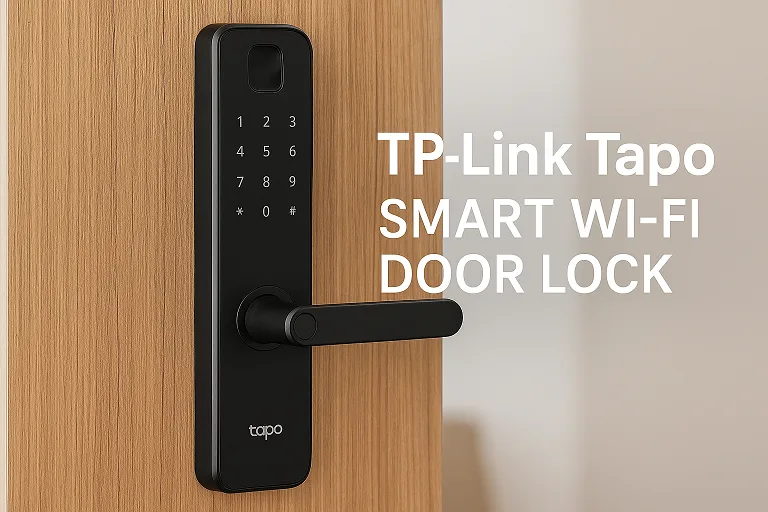
If you’re shopping for a smart home upgrade, the Tapo Smart Wi-Fi Door Lock deserves your attention right out of the gate. With a name like that, you expect convenience, security, and modern features—and this device delivers. Whether you’re locked out with bags in both hands, handing one-time access to a dog-walker, or simply craving peace of mind that your front door isn’t “dumb”, this lock aims to offer more than just a key.
In an era of smart homes and connected devices, a door lock is no longer just a piece of steel and wood—it’s an entrance to convenience, remote control, and yes, smart-home flair.
In the US market especially, homeowners want seamless remote access, guest code sharing, and voice-assistant integration without breaking the bank—and this TP-Link offering hits many of those checkboxes.
If you’re shopping for the best smart door lock market, or want to upgrade your front door without feeling like you’re living in a sci-fi movie, this article is exactly for you. Let’s dig into why the Tapo Smart Wi-Fi Door Lock might be exactly the upgrade your entryway needs.
- Why Choose a Smart Wi-Fi Door Lock?
- What exactly is the Tapo Smart Wi-Fi Door Lock?
- Key Technical Features
- Security, Durability & Reliability
- Why it matters in everyday life
- Real-World User Experience
- Installation & set-up: what you need to know before you buy
- Comparison with other smart door locks
- Cost, availability and suitability in the US market
- FAQs
- Conclusion
Why Choose a Smart Wi-Fi Door Lock?
Think about the old clink-clank of keys, fumbling in the dark, the nagging “did I lock the door?” question… A proper smart Wi-Fi door lock solves that—and then some. With features like remote locking/unlocking, user codes for guests, and even fingerprint access, you’re stepping into a future where security meets convenience.
If your home is already part smart-home, adding a smart deadbolt elevates the phone-app, voice-control, and automation game. Plus, for renters, short-term stays, or homes with frequent visitors, the ability to grant scheduled codes is a game-changer.
What exactly is the Tapo Smart Wi-Fi Door Lock?
When you hear “TP-Link Tapo Smart Wi-Fi Door Lock”, you’re likely referring to their flagship model, such as the DL110 or the more budget-friendly DL100. For instance, the DL110 is a full-featured smart deadbolt that replaces most standard locks while adding fingerprint, keypad, app control, and more.
The DL100 is the more affordable sibling with keyless entry, keypad codes, Wi-Fi & Bluetooth, but fewer premium features.
Hence, when we say “Tapo Smart Wi-Fi door lock” in this article, we’ll refer primarily to the DL110 scenario—but much of the guidance applies to the broader Tapo smart lock lineup.
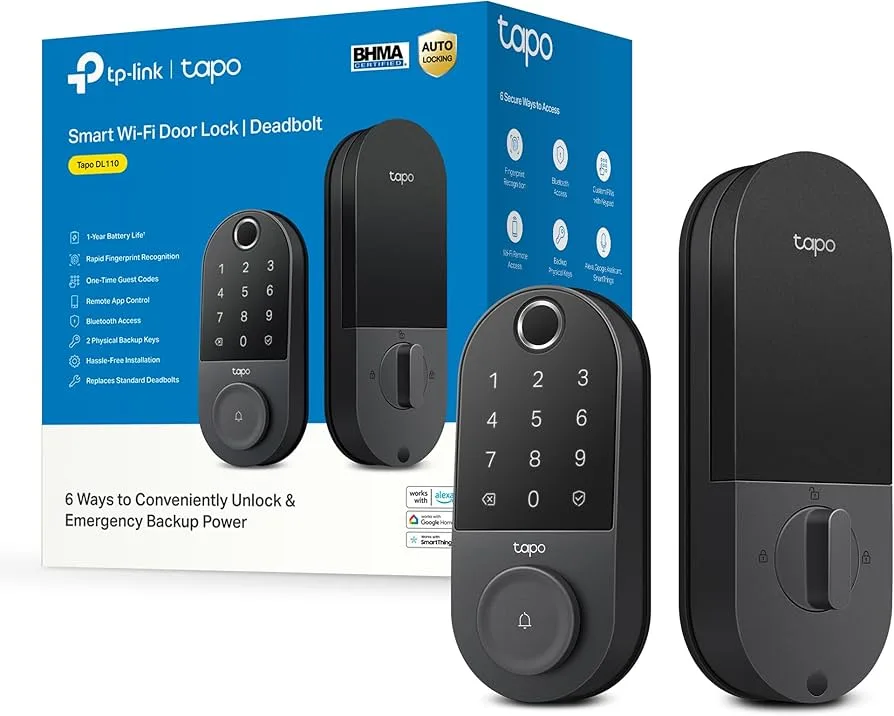
Image courtesy: www.amazon.com
Key Technical Features
Here’s where the rubber meets the road: not all smart locks are created equal. The Tapo model brings several features that turn it into more than just “another lock”.
Six Access Methods – Fingerprint, Keypad, App & More
This lock offers up to six ways to unlock: fingerprint, keypad passcode, the Tapo app via Wi-Fi, Bluetooth (close-range), voice assistant (Amazon Alexa/Google Assistant/SmartThings), and backup physical keys. You’re covered whether your phone’s in your pocket, your hands are full, or you’ve got a visiting guest. Bonus: You can set one-time codes or scheduled codes for other users.
Installation & Compatibility – Fit Your Door, Fit Your Home
The Tapo lock is built to retrofit most standard doors: fits door thickness 35-55 mm (1.38-2.17 in), backsets of 60/70 mm, standard bore sizes. The manufacturer claims “quick & easy installation” with all mounting tools included. That means you don’t necessarily need a whole new door—just a compatible one. Check your deadbolt setup, frame, and space (especially if a screen door or storm door adds thickness) before jumping in.
Smart Home Integration – Wi-Fi, Voice, App Control
Remote access via Wi-Fi means you can lock/unlock while away, monitor activity logs, and receive alerts. The lock supports integration with Alexa, Google Home, and Samsung SmartThings—so you can create automations like “when the lock opens, turn on the hallway light”. It even supports “peek-proof” passcodes (enter digits before/after the real code) for extra stealth.
Security, Durability & Reliability
Alright, the flashy features are fun—but real talk: if the lock doesn’t deliver on security or durability, it’s just a fancy gadget. Let’s see how this one stacks up.
Battery Life, Weather Resistance & Build Quality
Tapo claims up to a 1-year battery life on a single charge (depending on usage) thanks to a built-in rechargeable battery with USB-C support. Exterior part is rated IP65 (so dust and rain don’t scare it), and interior parts are built for the US climate. On build strength, the lock meets BHMA Grade 2 certification—a solid benchmark for residential use.
Encryption, Activity Log & Guest Access Features
Security isn’t just hardware: encryption matters. This lock uses 128-bit AES with SSL/TLS for Wi-Fi, supports WPA2/WPA3 protocols. It tracks activity logs—who locked/unlocked and when—and sends real-time alerts for suspicious attempts. You can generate one-time codes, scheduled codes for visitors, and disable the fingerprint or keypad after multiple failed attempts—all solid features for modern home security.
Why it matters in everyday life
Okay, enough tech talk. Let’s get real: how will this affect your day-to-day life?
Keyless convenience when your hands are full
Picture this: you get home with two grocery bags, a child and a water jug—no time to dig for keys. Your phone pings you’re home, you hit unlock via app or fingerprint—door opens. Magic.
Or better yet: your cleaner or dog-walker needs entry while you’re out. You generate a one-time code, text it, and they’re in—no extra keys floating around.
In a country where keys get lost, stolen or copied—this is a serious upgrade.
Peace of mind while away (travel, office, holiday)
Leaving for a vacation? Worried about whether someone is locked up behind you? The remote activity log gives you visibility.
Working late? Give a neighbour temporary access. Want to check if the maid came and left? You have proof at your fingertips.
These are real-life wins—not just gimmicks.
Weather & power-cut resilience in the local climate
In places like Chakwal and surrounding Punjab, summers get hot and dusty, monsoons hit hard, and power cuts happen. A smart lock that can endure outdoor conditions (IP65) and long battery life? That’s smart thinking.
No wiring to worry about if the lock runs on rechargeable battery (DL110) or AA batteries (DL100). Less vulnerability.
Local door compatibility – what to check
Here’s the “nuts and bolts” you should check before buying:
- Your door thickness needs to fit (for DL110: 35-55 mm).
- Backset (the distance from the edge of the door to the centre of the lock hole) might need to be 60/70mm for DL110.
- Is your Wi-Fi strong at the door location? If the router is far, the connection might drop.
- Is your area experiencing extreme temperature swings? Even top gear slows down under extreme cold/hot warping.
- A short inspection before purchase can save headaches.
Real-World User Experience
Because the proof is in the pudding. The specs look great—but how does it perform day-to-day?
What Users Love – Smooth Setup, Fingerprint Speed, App Control
Customers consistently praise the ease of setup and how fast the fingerprint sensor works. For example, one user said:
“It works exactly how it should, zero issues so far… fingerprint access is next-level.”
Another:
“Installation and setup was easy… best smart lock for the $$.”
Ratings on BestBuy average around 4.8 out of 5 stars for value, quality, and ease-of-use.
Considerations – Compatibility, Mesh Wi-Fi, Usage Limits
No product is flawless. Some users point out that while it promises “6 access methods”, you may not get all enabled simultaneously (for instance, using remote Wi-Fi and Bluetooth at the same time may not be possible). Others mention: if your door frame has heavy weather-stripping or an extra screen door, the deadbolt may bind unless clearance is correct.
.For short-term rental property managers, one review rated it only 4/10 because of limited external app control for codes when integrated with other platforms. So do your homework: check your network, door structure, and how you plan to manage access.
Pros & cons
Strengths
- Covers many unlocking methods (fingerprint, keypad, voice, app) → massive convenience.
- Strong build: Grade 2 durability + weather resistance.
- Excellent battery life (especially DL110) → minimal maintenance.
- Smart-home integration and remote control → powerful features.
- Suitable for a broad range of doors (with compatible specs) → good fit for many homes in Pakistan.
Limitations
- Price may be higher than a standard deadbolt—so ROI depends on how much you value convenience/security.
- If your Wi-Fi is poor, you may not be able to use remote features fully.
- Physical key backup is present, but if you don’t set up codes/fingerprints properly, you may still have to fiddle.
- In some extreme temperature/humidity environments, battery performance may vary.
- For older homes, door/lock geometry may require modifications.
Installation & set-up: what you need to know before you buy
Let’s roll up those sleeves—installing a smart lock is a little more involving than slapping on a new cover, but not scary.
Door size/thickness/backset compatibility
As above: check your existing deadbolt specifications. If your old lock uses non-standard dimensions, you might need adapters or a different model.
If the mounting holes are off-centre or misaligned, the new lock might bind or jam (which is something reviews highlight).
In short: measure first.
Wi-Fi requirements, network security tips
Because it’s smart, the lock communicates via 2.4 GHz Wi-Fi (most likely) and Bluetooth for local access. If your router is weak in the foyer or door area, consider a Wi-Fi extender or repositioning.
And don’t forget the basics: separate your IoT devices on a different network, change default passwords, and keep firmware up to date. A smart lock demands a smart network.
DIY vs professional install, typical time & steps
Many homeowners will find the installation straightforward (remove old deadbolt, mount new assembly, connect batteries, sync with app). The manufacturer says “quick & easy installation with mounting tools included”.
- However, if your door is warped, or you have a metal door with a weird latch, calling a local locksmith might save you sweat. Expect 30-60 minutes if all is smooth.
Common pitfalls and how to avoid them
- Mis-alignment of strike plate → deadbolt binds → jam = not good.
- Weak Wi-Fi signal → lock misses remote commands.
- Not updating firmware → security risk.
- Door material swells/shrinks in humidity → lock may get sticky.
- Take care of these, and you’ll have a problem-free smart door.
Setup Tips & Smart Home Automation Ideas
- Use the Tapo app to register fingerprints and user passcodes. Assign one-time or scheduled codes for guests (cleaner, dog-walker, neighbour).
- In the app’s activity log, periodically review access events (good for security and monitoring).
- Connect the lock to your smart-home routines: e.g., when you leave and lock the door, have the system turn off lights or adjust the thermostat.
- Enable auto-lock feature: set the door to lock automatically after, say, 30 seconds of being unlocked (so you don’t forget).
- Use the USB-C port for emergency power if the battery ever completely dies—better safe than sorry.
Comparison with other smart door locks
If you’re shopping for smart locks, you’ll see budget models (keypad only), mid-range (keypad + app), and premium (fingerprint + full integration). The Tapo casts a wide net.
Budget models vs premium models
A budget option might cost less but lack fingerprint, have shorter battery life, and weaker weatherproofing. For example, the DL100 is a more affordable version of Tapo’s lock line.
If you need keypad access and basic remote unlock, a budget model may suffice.
If you want fingerprint, full smart-home integration, and heavy use, a premium like DL110 makes sense.
What features matter most to you
- Fingerprint: fast, keyless, ideal if you share the home with many people.
- Keypad codes: good for guests, service persons, and occasional users.
- Remote Wi-Fi Control: crucial if you’re often away or want to monitor.
- Weatherproofing: if the lock is outside and exposed.
- Battery life: less maintenance = better value.
- Choose based on your lifestyle.
Cost, availability and suitability in the US market
Typical price range, import/availability issues
While price varies hugely by market, internationally the DL110 retails around US$149 (approx) in some stores.
Sometimes there may be stock issues, or local service centres may be limited.
Warranty/service considerations locally
Smart locks include electronics—and warranty/service matters. Before purchase, ask: is there local support in your locale? Are replacement parts (batteries, sensors) available?
If the vendor is import-only, you may bear full risk.
ROI: Why the investment can pay off
Yes, you’re spending more than a standard lock. But consider: fewer lost keys, fewer lockouts, remote management of access, increased security, and convenience.
If you value time, security, and smart-home integration, this becomes not just a lock, but part of your home ecosystem.
FAQs
Can I control the Tapo Smart Wi-Fi Door Lock remotely from my phone?
Yes – via the Wi-Fi connection and the Tapo app, you can lock/unlock, see the status and view the activity log no matter where you are, provided your home internet and router allow remote access.
Does the lock work with voice assistants like Alexa or Google Home?
Absolutely. The Tapo lock integrates with Amazon Alexa, Google Assistant and Samsung SmartThings, enabling voice commands and smart-home routines that include your door as part of your system.
What if the Wi-Fi goes down—will I be locked out?
No need to worry. The lock supports multiple access methods: fingerprint, keypad code, Bluetooth (close range) and backup physical keys. So you aren’t totally dependent on Wi-Fi to get in.
Is installation something I can do myself, or do I need a locksmith?
In most cases, you can DIY it. The manufacturer includes mounting tools and retails as “quick & easy installation”. That said, if your door frame is non-standard or you have extra weather-stripping, you might want professional help for a perfect fit.
How secure is the Tapo Smart Wi-Fi Door Lock compared to traditional deadbolts?
This lock uses 128-bit AES encryption with SSL/TLS for Wi-Fi communication, supports modern WPA2/WPA3, and holds BHMA Grade 2 certification for physical durability—making it a strong, modern upgrade over many legacy deadbolts.
Conclusion
If you’re ready to stop fussing with keys, worry about whether you locked the door, or hand out spare keys to guests and hope nothing goes wrong—then the Tapo Smart Wi-Fi Door Lock is a smart, practical leap forward. It blends convenience and security with real-world utility: fingerprint access when you have your arms full, voice commands when you’re home, remote control when you’re away, and backup options when tech fails.
Sure, it isn’t perfect for every door or every network setup—but for the US homeowner looking to modernize an entryway without blowing the budget, it hits a sweet spot.
Go ahead: lock smarter, live easier—and enjoy the peace of mind that your front door recently got an upgrade.
