
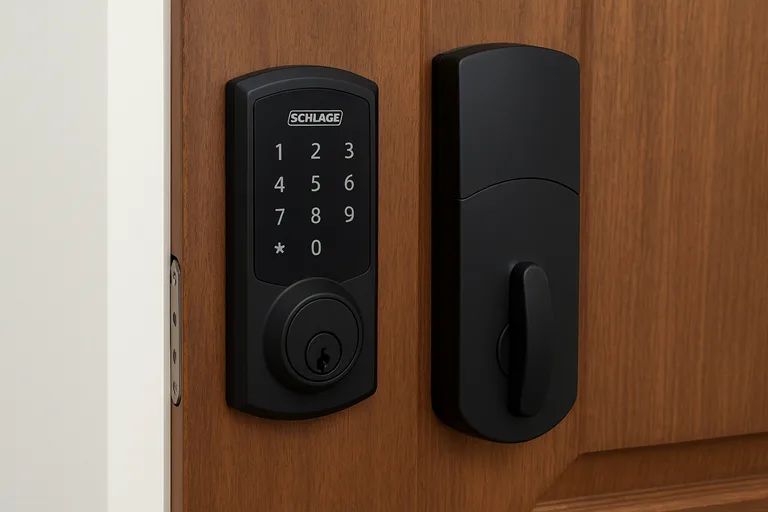
When it comes to securing your home with a modern, intelligent touch, the Schlage smart lock stands out. Imagine you’ve just arrived home: arms full of bags, the key slips from your hand, you fumble in your pockets, maybe you lock the door… or maybe you don’t. That moment of mild panic or frustration is precisely what a smart lock aims to solve.
Smart locks give you keyless entry, remote access, tracking of who came and went, and peace of mind that your front door isn’t the weak link. They also signal that your home is smarter — not just with lights and thermostats, but the one access point that really matters.
That said, not all smart locks are created equal. Some are gimmicks. Some open new vulnerabilities. With the Schlage smart lock, you’re dealing with a brand known for mechanical locks but stepping into the digital age. So let’s understand how well it does the job.
In this article, we’ll dive deep into everything you need to know — from what it does and how it performs, to installation, real-world case studies, and whether it’s worth buying.
What Is the Schlage Smart Lock ?
The Schlage smart lock is a line of locks that combine traditional deadbolt mechanics with smart home connectivity. Over the years, Schlage has evolved from basic electronic keypad locks to WiFi-enabled, hub-free, app-controlled locks. For example:
- The “Encode” WiFi model.
- The “Encode Plus” supports more advanced smart-home features.
Let’s be clear: This is not a simple doorbell-camera substitute. It’s your front-door deadbolt replacement. It still requires power (batteries), installation, and depends on your WiFi / network infrastructure. If you want a “stick on” solution that works with any existing lock without changing the deadbolt, then this may not be suitable. But if you want a serious upgrade for your front door, it’s worth your time.
Key Features & Specifications
Here’s a breakdown of what the Schlage smart lock offers — and what to look out for.
Built-in WiFi & Smart Features
One of the defining features of the Encode model is that it has WiFi built in. You don’t need a separate hub to connect to your network or your phone. That means remote control, notifications, and access scheduling out of the box.
Via its app (such as the Schlage Home app), you can:
- Lock or unlock remotely
- Create unique access codes (for family, guests, service workers)
- Set schedules for when codes are valid
- View a log of who used the lock and when codes.
Keypad + Physical Key Backup
Despite being “smart,” the Schlage lock retains the mechanical key option. Good. Because you never want your smart lock to leave you stranded if the battery dies or the app misbehaves. Another bonus: the keypad means you don’t always need to pull out your phone or key.
Security Rating & Build Quality
Schlage is no newcomer to locks. The Encode model boasts an ANSI Grade 1 rating (the highest rating for residential locks) in testing. That means it can withstand a lot of mechanical stress and is designed for serious security. On installation reviews, they found it “beefy” in feel and build.
Compatibility with Smart Home Systems
Depending on which model you pick, you’ll get compatibility with Amazon Alexa, Google Assistant, and sometimes Apple Home Kit (via Encode Plus). For example, TechRadar noted that the Encode Smart WiFi Lever worked well with Google Assistant and voice control.
Ease of Installation
Thankfully, users report the installation is fairly straightforward (if you’re comfortable with a screwdriver). No special wiring needed in most cases. One tester said it took about 10 minutes to mechanically install and then a few minutes for the app setup.
Potential Limitations
- Some versions lack geofencing (automatic unlock when you approach), which some competitors have.
- Size: The interior battery compartment is bulkier than some might like.
- Price: these are premium locks — expect to pay more for decent build + features.
- As with all smart devices, reliant on WiFi and battery, network downtime or low battery can still cause a headache. We’ll look at that more in the “risks” section.
Installation: Step-by-Step Guide
Now, let’s walk through exactly how you would install a Schlage smart lock. Don’t sweat it — you can handle this. (But pause if you’re uncomfortable with DIY work.)
Pre-Check & Preparation
- Check your door type and deadbolt compatibility. You’ll need a standard deadbolt hole (or, if using lever type, the right fitting).
- Remove the old deadbolt. Unscrew, take off the faceplate, and remove the interior components.
- Ensure you have strong WiFi at your front door (the lock will depend on your home network).
- Get fresh AA batteries (if required) before you start.
- Download the Schlage Home app (or whichever model-specific app) on your smartphone and ensure you have an account ready.
Mechanical Installation
- Place the new lock’s exterior plate (with keypad) on the outside of the door.
- Fit the interior housing and bolt mechanism (usually in three pieces: exterior, bolt/strike, interior).
- Secure screws through the bolt into the interior unit. According to one reviewer: “The tricky part involves doing this while also passing the screws through a bolt … Unless you have an extra set of hands….”
- Install the strike plate on the door frame if needed, ensuring alignment for smooth bolt movement.
- Insert batteries and test the mechanical lock/unlock manually to be sure everything fits.
App & Network Setup
- Open the app; select “Add New Lock”. Some units have a QR code or PIN on the device you point your phone at.
- Name the lock (e.g., “Front Door”).
- Connect to your home WiFi network (2.4GHz or 5GHz, depending on lock spec).
- Set up access codes: create a master code and one or two guest codes. You can assign schedules (e.g., “valid Monday–Friday, 9 am–5 pm”).
- Enable optional features: auto-lock delay (e.g., lock the door automatically after 30 sec), notifications, and voice assistant link.
- Test remote lock/unlock via your phone, keypad entry, and mechanical key.
- Make sure the app shows the status and log of usage (who entered when).
Tips & Challenges
- If your door was installed decades ago, the hole size or backset might differ slightly. As one Reddit user noted: “more difficult to install than I anticipated because the standard lock hole sizes in doors are different.”
- If you have weak WiFi at the door, consider improving the signal (mesh node) or pick a model with robust connectivity.
- Always keep a backup mechanical key and fresh batteries in stock; your entry depends on it.
- App setup: don’t hand out guest codes unless you know how to revoke them easily.
- Relax and take your time aligning the interior/exterior plates; a misalignment can cause jamming.
Performance & Real-World Use
Let’s dive into how this performs in the wild. These stories will help you see beyond specs and marketing.
Case Study 1: Family Home
John and Maria have two kids and live in a suburban house. They installed the Schlage smart lock to replace their traditional deadbolt. The features they use most: setting individual access codes for the kids, and auto-locking after 60 seconds. Maria says: “When I’m in the car and realize I forgot to lock the door, I just tap the app. Game-changer.”
From reviewers: remote access was swift; keypad entry responded almost instantly.
Case Study 2: Airbnb or Rental Property
Samantha manages a vacation rental. She uses the lock’s ability to generate guest codes and schedule them for the duration of the stay. One guest wrote: “The host sent me a code and I walked in – no key drop-off, no stress.”
On forums: “I am currently testing the Schlage Encode deadbolt… it works great.”
Smart locks are especially compelling for hosts because you don’t need to physically hand over keys, reducing logistics and risk.
Strengths (What Users Like)
- Instant responsiveness: The lock responds quickly via keypad or app.
- Strong build quality: Reviewers note the “beefy”, high-quality feel.
- Peace of mind: The log of entries gives you a feeling of oversight.
- Convenience: No more fumbling for keys with groceries in hand.
Limitations (What to Consider)
- Cost: This is on the higher end of smart locks.
- No automatic geofencing unlock (in some models) – you still may need to tap your phone or keypad.
- Size and visual bulk: The interior side can protrude more than simpler locks. Some users noted aesthetic concerns.
- Dependence on WiFi/batteries: As with any smart device, network drop and battery failure possibilities remain.
Security, Privacy & Reliability
You’ve read about features, but how safe is this lock in real life? Let’s examine.
Mechanical Security
With an ANSI Grade 1 rating (for many models), the lock meets rigorous mechanical standards, including resistance to forced entry. That’s a serious plus. It means you’re not just getting a gadget; you’re getting a solid lock.
Smart Security & Privacy — What to Know
Smart locks open up new vectors of vulnerability (WiFi hacks, lost phone, data breaches). The Mozilla Foundation’s “Privacy & Security Guide” on Schlage smart locks observes: “We found no known security breaches with Schlage’s smart locks or the company… That doesn’t mean these locks couldn’t be hacked or vulnerable in the future.”
They also note that while Schlage’s privacy policy is solid (they do not sell personal data), you still need to be careful with third-party integrations (Alexa, Google) and treat your home network like a serious risk zone.
Reliability & Battery Life
In day-to-day use, reviewers found the battery life robust. The Schlage Encode user review after six months said: “Long battery life… AA batteries. Physical key backup. Works from anywhere.”
Still, get into the habit of checking battery status in the app and keep spares. And remember: WiFi outages or power cuts don’t disable the mechanical key. That’s your safeguard.
Integration with Smart Home Ecosystems
Today’s home isn’t just a lock on the door. It’s a network of lights, cameras, thermostats, sensors and more. If you’re building a “smart home”, how well does the Schlage lock play?
Voice & Assistant Compatibility
Depending on the model you pick, you’ll get wide compatibility: voice commands via Google Assistant or Alexa, and sometimes Apple Home Kit (especially in Encode Plus).
Example:
“The keypad entry system worked flawlessly, never dropped WiFi connection… we used Google Assistant…”
Rental or Multi-User Use
For hosts and property managers, being able to generate unique codes and schedule them is a game-changer. You reduce the risk of forgotten keys or unsafe lock-outs. One community thread for Airbnb rental managers sings this praise.
Future-Proofing & Ecosystem Considerations
Smart home standards are evolving (Matter, Thread, UWB). While current Schlage models are good, if you’re heavily into the very cutting edge, you may want to check the latest announcements. (E.g., Schlage has revealed upcoming locks supporting UWB and Matter standards.)
In short: pick a model that fits your ecosystem now, and ensures it won’t feel outdated quickly.
Should You Buy It?
Here’s where we pull it all together and help you decide if the Schlage smart lock is the right investment for you.
Evaluate Your Use Case
- If you have a front door deadbolt and want better security, remote access, keyless entry and guest-code scheduling — yes, this lock is a strong contender.
- If you manage rentals, Airbnb, or have frequent visitors and need dynamic access management, this is especially compelling.
- If your door or setup is unusual (no deadbolt, sliding door, or non-standard size), you might need a different form-factor or adapter.
- If you’re on a tight budget and only need basic keyless convenience (not remote access or smart integration), you might consider less expensive alternatives.
Cost vs Value
You’ll likely pay more for a high-quality smart lock like this than for a basic one. But you’re buying peace of mind, robust security, and smart convenience. As one reviewer put it: “Well worth the money … for anyone looking for a fully-featured smart lock.”
The cost is justified if you value the features, the build and the brand trust.
How It Fits into Your Security Plan
Don’t see the lock as the only security measure. It’s part of a broader home-security system: cameras, motion sensors, door/window locks, and lighting. The Schlage smart lock becomes the anchor at your front door. When used properly (codes, schedules, mechanical backup, network security), it adds significant value.
FAQs
How do I install a Schlage smart lock on my front door with a deadbolt?
You remove the existing deadbolt, fit the Schlage smart lock kit (exterior keypad, bolt mechanism, interior housing), insert batteries, and then use the Schlage app to connect the lock to your WiFi and configure access codes/schedules. As reviewers note, a typical installation takes 10-20 minutes.
Can I give temporary access codes with a Schlage WiFi smart lock for a guest?
Yes. The Schlage smart lock supports creating unique access codes for guests, and you can set a schedule or validity period (e.g., for one day or one week only). This makes it ideal for Airbnb or rental use.
What happens if the WiFi network of the house goes down — will the Schlage smart lock still work?
Yes. The mechanical key still works, the keypad still works, and inside the home, you can manually lock/unlock. Remote features will be disabled until the network is restored, but you won’t be locked out of your home simply because the WiFi is down.
How secure is the Schlage smart lock against hacking or forced entry?
Very secure. The lock has an ANSI Grade 1 mechanical rating, meaning it meets high standards for forced-entry resistance. Smart-feature risks exist in any connected device, but independent reviews found no major known breaches for Schlage to date.
Does the Schlage smart lock require a subscription or hub?
For many models, no. The Encode model connects directly via built-in WiFi, so you don’t need a separate hub. Some advanced features (smart home integration) may have optional subscriptions depending on your ecosystem, but basic lock/unlock and keypad features do not require a paid recurring fee.
How long do the batteries last on a Schlage smart lock?
Battery life varies with usage, WiFi traffic, and environment, but many users report several months of use on full batteries before needing replacement. The key is to keep an eye on the battery status in the app and keep spare AA batteries available.
Conclusion
If you’re looking to elevate your home’s front-door security and convenience into the 21st century, the Schlage smart lock is a serious contender. It blends mechanical robustness (Grade 1 rating), modern smart features (WiFi, keypad, remote access, access-code scheduling), and a brand you can trust.
There’s a certain relief that comes with not worrying whether you locked the door or whether the dog-walker has access. There’s a confidence that your home is protected. And there’s a pride in seeing a clean, sleek lock that integrates with your phone and life.
If you read this article, weighed the features, and felt yourself nodding, “Yes — I want that,” then consider this your moment.
Visit the Schlage website or a reliable dealer to pick a model that fits your front door and smart home setup. Place your order and schedule a weekend or evening for installation.This smart lock is a wise choice that offers comfort, security, and peace of mind. Don’t delay until you can’t find a key or forget to lock the door. Make your front door just as smart as the rest of your home.
Buy the Schlage smart lock today —and turn your door into a welcoming gateway, not a security worry.
