
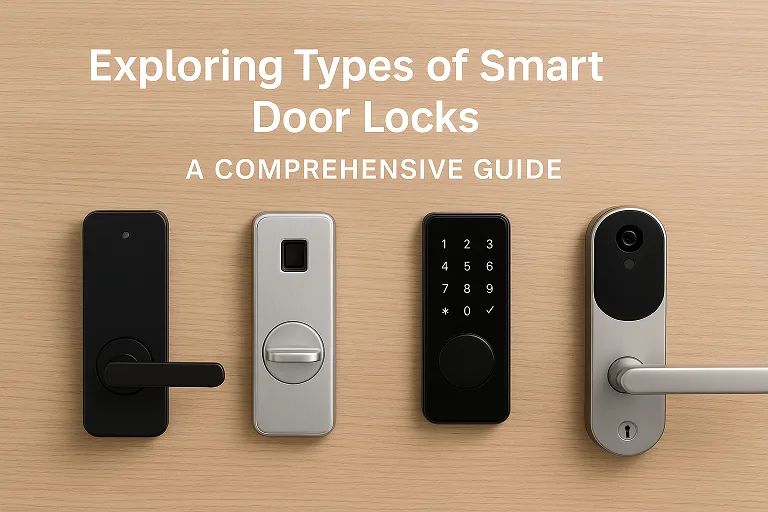
Smart locks are no longer considered a novelty. They’re useful security additions that combine keyless entry simplicity with current home automation. This tutorial discusses the varieties of smart door locks, how they operate, real-world trade-offs, and which models are worth considering. You’ll get clear help choosing the right lock for your door, your household patterns, and your appetite for tech. Where helpful, I link to authoritative sources and manufacturer pages so you can read specs, confirm compatibility, and buy with confidence.
- Why this guide matters now
- How I organized this guide
- Understanding the building blocks: connectivity, authentication, and form factor
- Bluetooth Smart Locks
- Wi-Fi Smart Locks
- Biometric Smart Locks
- Keypad Smart Locks
- Key Card / NFC Smart Locks
- Retrofit Smart Locks
- Hybrid & Multi-Modal Locks
- Locks with integrated video or advanced sensing
- Practical selection criteria: what to evaluate before you buy
- Installation and setup tips (practical, non-technical)
- Troubleshooting common issues
- Quick model notes (representative picks to research)
- FAQ — long-tail questions people actually search
- Conclusion
Why this guide matters now
The market is crowded, and the technologies behind smart locks—Bluetooth, Wi-Fi, biometric, Matter, Apple Home Key, and more—are evolving quickly. Choosing the wrong type wastes money and may weaken security rather than strengthen it. This article focuses on the types of smart door locks themselves, the real-world pros and cons of each, and the features that matter for reliability, privacy, and long-term ownership.
For baseline reading about broad categories and comparisons, Level’s primer on types of smart locks is helpful.
How I organized this guide
I’ll walk you through every major category of smart lock, give clear criteria for selection (security, connectivity, installation, power), point to representative products, and offer practical buying and installation advice. Where I mention specific models—like the Yale Assure Lock 2 Touch, Schlage Encode Plus, August Wi-Fi Smart Lock, Kwikset Halo Select, or Nuki retrofit options—I link to the manufacturer pages and independent reviews so you can verify specifications and pricing.
Understanding the building blocks: connectivity, authentication, and form factor
Before we dive into categories, three building blocks determine how a smart lock behaves:
• Connectivity — how the lock communicates: Bluetooth, Wi-Fi, Thread/Matter, Zigbee, or NFC. Each has a different range, ease of remote access, and integration potential. For a clear breakdown of protocols and what they mean for home automation, see Level’s smart lock explainer.
• Authentication method — how people open the door: biometric (fingerprint, palm, facial), keypad codes, key card or NFC, smartphone credential, physical key, or combinations (hybrid). Each method carries trade-offs in convenience, revocability, and spoof resistance.
• Form factor/installation style — full deadbolt replacement, retrofit add-on that attaches to the interior thumbturn, or an electronic mortise/lever lock. Retrofit models (e.g., Nuki, August) are popular when you want to keep existing keys and external aesthetics.
With that vocabulary in place, let’s examine each type in depth.
Bluetooth Smart Locks
What they are: Bluetooth smart locks use a short-range wireless link to communicate with the owner’s smartphone or a dedicated fob. They typically rely on the phone being physically nearby to unlock (proximity). Level’s taxonomy describes Bluetooth as a common, local-only option—useful when you want keyless convenience without necessarily exposing the lock to the internet.
Why they’re attractive: Bluetooth is power-efficient, preserves privacy (no constant cloud connection), and is often cheaper. Many Bluetooth locks support passive auto-unlock: the door opens when your phone approaches.
Limitations: Range is limited; remote control from outside your home usually requires a separate Wi-Fi bridge or hub. Bluetooth can be susceptible to relay attacks if not paired with secure protocols—so pick locks with encrypted pairing and up-to-date firmware.
Representative models/buys: Several retrofit locks and bolt replacements use Bluetooth as their primary radio. If you want a budget Bluetooth option or a minimal privacy-first setup, check product pages or manufacturer guides for their encryption and auto-unlock behavior. (Search examples: Level Bolt, many Nuki variants.)
Wi-Fi Smart Locks
What they are: Wi-Fi smart locks connect directly to your home network so you can control and monitor them from anywhere, without a separate hub. That immediate reachability is their core selling point. August’s Wi-Fi models and Kwikset’s Halo Select are examples sold specifically around built-in Wi-Fi for remote access.
Why they’re attractive: True remote access, push notifications for activity, cloud-based guest keys, and easy integration with voice assistants like Alexa or Google Assistant. Many Wi-Fi locks support robust app ecosystems and activity logs.
Limitations: The trade-off is exposure: bad network hygiene (weak Wi-Fi password, unpatched router) can create attack vectors. Battery drain is often higher than Bluetooth-only locks because of the constant Wi-Fi radios. For those reasons, look for locks with strong encryption, multi-factor admin controls, and local fallback options.
Representative models/buys: The August Wi-Fi Smart Lock and Kwikset Halo Select (Wi-Fi + Matter support) are mainstream choices that emphasize remote control and interoperability. See their product pages to confirm features like auto-lock timings, guest key management, and Battery expectations.
Biometric Smart Locks
What they are: Biometric smart locks use biological traits—fingerprint, iris, palm vein, or facial recognition—to authenticate. The Yale Assure Lock 2 Touch is an example where fingerprint scanning is a central feature, offering a frictionless unlock experience.
Why they’re attractive: Immediate access without keys or codes; fingerprints are easier than always fumbling for a phone. Multi-factor biometric systems (fingerprint + PIN) add extra security.
Limitations: Sensors can fail if dirty, wet, or cold; some biometric systems have higher false rejection/acceptance rates depending on sensor quality. Also, biometrics are immutable—if biometric data is compromised, you cannot “reset” your fingerprint. Therefore, choose devices that store biometric templates locally and use secure hardware modules rather than cloud storage.
Representative models/buys: High-end residential locks and some commercial models now offer reliable fingerprint sensors. Confirm the manufacturer’s approach to biometric template storage and firmware update cadence.
Keypad Smart Locks
What they are: Keypad smart locks use numeric PIN codes entered on a physical or touchscreen keypad. They offer temporary or time-limited codes for guests, service personnel, and contractors.
Why they’re attractive: No need for a smartphone. Codes are quick to create, share, and revoke. Keypad locks are especially good for short-term rentals and households with frequent visitors.
Limitations: PINs can be observed or shoulder-surfed; frequently used codes leave wear patterns on physical keys. Many modern keypad locks mitigate this via one-time codes, randomized keypad digits, or the option to combine PIN with app validation.
Representative models/buys: Many Wi-Fi and Bluetooth locks offer keypad variants; look for features like temporary guest codes, code history, and customizable expiration. Manufacturer pages will show how code management is handled.
Key Card / NFC Smart Locks
What they are: Key card or NFC locks operate by tapping a card or NFC-enabled device. They’re common in hotels and increasingly in apartment settings for convenient tap-to-unlock behavior.
Why they’re attractive: Very low friction for access, can combine physical cards with mobile NFC keys, and are simple for large properties to manage centrally.
Limitations: Cards can be lost or cloned if low-security standards are used. For homes, NFC works well if you want a “no smartphone required” solution for family members or contractors.
Representative models: Enterprise and hospitality systems dominate this segment, but some residential locks support NFC mobile keys and cards—check the product’s security certifications and support for secure credential revocation.
Retrofit Smart Locks
What they are: Retrofit smart locks attach to the inside of your door and operate the existing thumbturn or deadbolt mechanism. They are designed to preserve the exterior appearance and allow you to keep existing keys.
Why they’re attractive: Minimal installation effort and landlord/renter friendly. Products like Nuki and August make retrofit solutions that work with most single-cylinder deadbolts. They’re ideal when you can’t—or don’t want to—replace the whole lock hardware.
Limitations: Retrofit devices may limit certain advanced features (like Z-wave integration inside the bolt itself), and compatibility must be checked carefully for cylinder type and door thickness.
Representative models/buys: Nuki’s lineup and August’s retrofit modules are widely available; reading the manufacturer’s compatibility guides avoids surprises.
Hybrid & Multi-Modal Locks
What they are: Hybrid locks combine multiple unlocking methods—such as fingerprint + keypad, Bluetooth + keypad + physical key, or Wi-Fi + biometric + Apple Home Key. This category is more about flexibility than a single technology.
Why they’re attractive: If you want the convenience of a phone unlock, the redundancy of a keypad, and the tactile fallback of a physical key, hybrid locks give you it all. Many top models now include multiple modalities to reduce single-point failures.
Representative models/trends: The market trend toward hybrid devices is clear, reviewers testing dozens of locks in 2025 highlight hybrid models as top picks for real homes because they address varied user habits. For example, recent roundups list hybrid-capable locks as leading choices.
Locks with integrated video or advanced sensing
This newer group pairs smart locks with cameras, doorbell functionality, or advanced sensors such as UWB (Ultra Wideband) for secure hands-free unlocking. Lockly’s Vision Prestige (announced at CES and covered in the press) is an example of a hybrid device combining a 2K video doorbell, facial recognition, and multiple authentication modes.
Why they matter: Having video plus lock control lets you verify who’s at the door before granting access—useful for deliveries, Airbnb hosts, and households concerned with package theft.
Limitations: These are pricier, increase surface complexity, and raise privacy questions (where is the video stored? who can view it?). Always verify storage policies and local privacy laws.
Practical selection criteria: what to evaluate before you buy
Buying a smart lock is about trade-offs. Ask yourself the following—and insist on clear answers from product pages and reviews.
- Security model and encryption: Does the lock use industry-standard encryption? Are biometric templates stored locally? Does the cloud provider have a strong track record? (Look for documentation on the product site and independent tests.)
- Power and fail-safe behavior: How long do batteries last? Is there an external power port (USB-C) for emergency power? Can you still open the door with a physical key if the batteries die? Manufacturer pages list battery life and emergency features.
- Installation and compatibility: Does the lock fit your deadbolt, mortise, or rim configuration? Is professional installation required? Retrofit pages usually include compatibility checkers (e.g., Nuki, August).
- Integration and ecosystem: Do you need Apple Home Key, Matter, Thread, Alexa, or Google Assistant? If you use a particular ecosystem, prioritize locks that explicitly support it (e.g., Schlage Encode Plus and Apple Home Key compatibility).
- Guest management and audit logs: For rentals and frequent guests, ask how guest codes are created, whether they are time-limited, and how the lock logs entries.
- Firmware updates and vendor reputation: Locks are IoT devices—vulnerabilities are fixed by firmware. Choose vendors with a proven update cadence and transparent security policies.
Installation and setup tips (practical, non-technical)
Begin by reading the compatibility section on the product page. Most retrofit products include an in-app compatibility checker. Prepare a screwdriver and fresh batteries, and test the mechanical operation of the deadbolt manually before attaching electronics.
During setup:
- Create a secure account with a strong, unique password and enable two-factor authentication if available.
- Reserve one physical key and one admin code for emergencies—store them safely.
- If using Wi-Fi, place the lock within a good signal range, or use a recommended bridge.
- Update firmware immediately after installation.
Product pages (August, Kwikset, Yale, Nuki) have step-by-step installation guides and compatibility details you should review.
Troubleshooting common issues
If your lock loses network connectivity, check the router settings and make sure the lock is in range. To fix problems with biometric readings, make sure the sensors are clean and re-enroll fingerprints from different angles. If the app doesn’t pair properly with the device, remove any old device entries and do a factory reset as told by the manufacturer.
If the issue keeps happening or if it’s something important for safety, reach out to the manufacturer’s support team.
You might also want to use the physical key temporarily until the problem is sorted out. Manufacturer support pages and community forums offer many real-world fixes.
Quick model notes (representative picks to research)
This short list points to current popular options across form factors. Follow the links to confirm the latest pricing and compatibility.
- Kwikset Halo Select — Wi-Fi, Matter support, auto-unlock features.
- Yale Assure Lock 2 Touch — fingerprint biometric deadbolt with Wi-Fi variants.
- Schlage Encode Plus — Wi-Fi deadbolt with Apple Home Key compatibility.
- August Wi-Fi Smart Lock — retrofit, keeps existing keys, built-in Wi-Fi.
- Nuki Smart Lock family — European retrofit leader with multiple models.
For independent lab testing and comparative reviews, the late 2025 Verge roundup of top smart locks is a useful reference.
FAQ — long-tail questions people actually search
Q: What are the main types of smart door locks, and which is best for renters?
A: The main types are Bluetooth, Wi-Fi, biometric, keypad, key card/NFC, and retrofit solutions. Renters often prefer retrofit smart locks (e.g., August, Nuki) because they preserve the exterior hardware and don’t require drilling or landlord approval—check compatibility first.
Q: Are biometric smart locks secure enough for home use?
A: Modern biometric locks can be secure when sensors store templates locally and use secure hardware. However, because biometrics are immutable, choose products with strong local storage policies and firmware update practices. Verify vendor security docs.
Q: Can I use a Wi-Fi smart lock without a hub?
A: Yes—many Wi-Fi models (e.g., August Wi-Fi, Kwikset Halo Select) have built-in Wi-Fi and require no hub. Hubless models are convenient, but ensure your Wi-Fi is secure.
Q: What’s the difference between a full replacement smart deadbolt and a retrofit smart lock?
A: A full replacement swaps the entire deadbolt and may offer integrated hardware features; a retrofit attaches to the interior and uses your existing external lock, so your original key still works. Retrofit is simpler and renter-friendly; full replacement can offer a cleaner aesthetic and different integration options.
Conclusion
If you remember just one thing, let it be this: pick a smart door lock that fits your lifestyle, not the latest news story. Bluetooth or local-only upgrades are great for quiet living and keeping your data away from the cloud. Wi-Fi or hub-connected systems are better for controlling your door from afar and managing visitors. If you want convenience and high security, biometric locks can be transformative—but verify how biometric data is stored and handled.
If you want a balanced, future-proof pick, check locks that support standards such as Matter or Apple Home Key and have a clear update and security policy. Examples worth investigating include the Kwikset Halo Select, Yale Assure Lock 2 Touch, Schlage Encode Plus, and August Wi-Fi—follow the links above to read current specs, confirm compatibility, and purchase.
If you’d like, I can now:
- Draft a product comparison table customized to your door type and automation ecosystem.
- Produce a short, SEO-ready landing page that targets types of smart door locks and related long-tail keywords.
- Build an installation checklist tailored to a specific model you already own.
Ready to pick a lock that fits your life? If you tell me your door type (deadbolt, mortise, rim), your smart home platform (Apple/Google/Alexa/none), and whether you rent, I’ll recommend two models—one budget retrofit and one long-term-proof option—complete with links to buy and an installation plan.
