
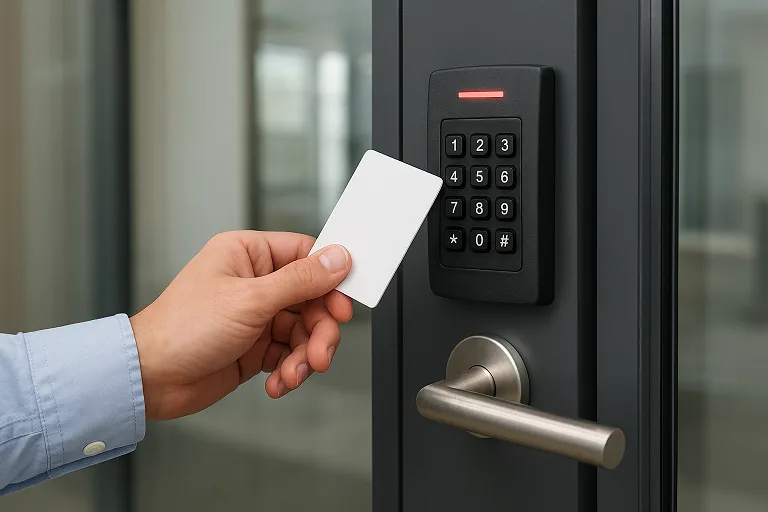
Traditional locks and keys no longer provide sufficient security in today’s fast-changing environment. If you oversee a commercial facility, multi-tenant building, or manufacturing plant, reconsider how a door access control system can secure your facility—today and into the future.
Think for a moment of a high-value zone inside your facility—servers humming, sensitive files stored, equipment worth tens or hundreds of thousands of dollars. Without proper controls, one misused key or copied card can expose you to theft, data loss, or downtime. With a door access control system, every entry is logged, timed, and monitored—so you’re not only locked down but also watching the doors.
In this article, we’ll explore how a door access control system protects your facility—how the components work together, how they deter threats, and how they integrate into your broader security strategy. We’ll examine the shifting threat landscape, the mechanisms of protection, the benefits, and how to pick and implement the right system for your building. If you’re an engineer, facility manager, or operations lead, you’ll come away equipped to make secure decisions—not just for now, but for the evolving future.
- What is a Door Access Control System
- Why Facilities Need Protection
- How Door Access Control Systems Protect Your Facility
- Key Benefits for Facility Protection
- Evaluating & Selecting the Right System for Your Facility
- Real-World Use Cases & Facility Scenarios
- Emerging Trends & The Future of Door Access Control
- Cost-Benefit Considerations & ROI
- FAQs
- Conclusion & Call to Action
What is a Door Access Control System
When you hear the term door access control system, what comes to mind may be a card reader or a keypad by the door. But in fact, the technology is far more than that — it’s a complete framework for managing, monitoring, and enforcing who can enter which doorway, when, under which conditions.
A door access control system goes beyond a simple card reader or keypad—it’s an electronic framework that manages and restricts access to specific areas, ensuring only authorized individuals can enter when permitted.
Traditional Lock-and-Key Versus Access Control
Imagine a facility where dozens of people carry physical keys. Someone leaves the company, but the key remains in circulation. Perhaps a contractor still has access, or a door is accidentally left unlocked. The vulnerabilities accumulate. A key can be copied; you cannot trace who used it.
In contrast, with a door access control system, credentials (cards, fobs, or mobile) can be deactivated at the click of a mouse; policies define when a person may enter or which zone they may enter; the system keeps logs of who and when. This is the shift from “lock + key” to “managed, audible, traceable entry”.
Key Components of the System
The architecture of a system typically includes:
- Credential reader (card/fob/biometric/mobile) — the physical interface by the door.
- Controller or access panel — the brain that checks the credentials against the authorisation list.
- Electronic lock or strike — the mechanism that actually secures/unlocks the door.
- Management software & database — for defining access policies, viewing audit logs, and managing users.
- Wiring/Network or Cloud connectivity (especially if it’s an IP-based system) for remote management and real-time logging.
Deployment Models
You’ll find different deployment models:
- Standalone door systems: a small number of doors, minimal network connectivity, perhaps card readers per door.
- Networked multi-door systems: multiple doors, controllers linked via LAN/WAN, central software management.
- Cloud-based systems: credentials and policy hosted in the cloud; administrators manage via web interface; changes take effect instantly across locations.
Example in Practice
Consider a multi-tenant office building in California. Each tenant has their own floor; service/maintenance crews come after hours; visitors come in with deliveries. A door access control system allows the building manager to issue mobile credentials to contractors with expiry times, configure access hours only for common areas, revoke credentials remotely if a contractor leaves early, and pull a log of access events for compliance or incident investigation. That’s practical protection, beyond just “a locked door”.
Why Facilities Need Protection
It’s not just about locking doors; it’s about who, when, where, why, and how someone enters. The stakes for facilities today are high.
Common Physical Security Threats
- Unauthorized entry – Someone gains entry to a sensitive area simply because a door was unlocked, a key was mis-handled, or a tail-gater followed an authorized user.
- Key duplication / lost keys – Traditional keys can be copied or misplaced; tracking who holds which keys is difficult.
- Insider access abuse – Even authorized personnel may misuse access to sensitive zones, especially if there is no monitoring or role-based partitioning.
- Inactive or ex-employee credentials – If access privileges are not revoked properly, former staff may retain access.
- Tailgating and piggybacking – An attacker or visitor follows an authorized user through a door without credentials.
- Lack of audit trail – Without detailed logs, when an incident occurs, it is harder to investigate who entered, when, and what happened.
Business / Operational Risks
- Theft of assets or equipment – Access to factories, research labs, and warehouses can result in high-value losses.
- Data breach / regulatory compliance – In industries with stringent regulations (healthcare, finance), unauthorized physical access may lead to data exposure.
- Worker safety and liability – If dangerous zones are entered by unauthorized people, health & safety risks escalate.
- Reputational damage – A breach or unauthorized access event can harm your company’s standing, especially if you cannot show how access is controlled.
- Operational disruption – Resetting keys, changing locks, and investigating an incident all cost time and money.
Why Controlling “Who, When, Where” Matters
As one guide puts it, “An Access Control System establishes who is permitted to enter or exit, where they may enter or exit, and when they may do so.”
That triad – who / when / where – is the foundation of physical access control. A modern facility needs more than a locked door; it needs managed entry, traceability, and flexibility. Without that, you’re leaving your facility vulnerable.
How Door Access Control Systems Protect Your Facility
This section dives into the mechanics of protection. If you understand how things work, it’s easier to justify the investment and specify the right components for your facility.
Controlled Credential-Based Access
Putting credentials in place of keys makes a profound difference. When someone presents a key card, fob, mobile credential, or biometric identifier, the system checks whether that credential is valid, authorized for that door, and at that time.
Benefits include:
- Immediate revocation: if an employee leaves or a credential is lost, you can deactivate it remotely rather than re-issuing physical locks.
- Unique identity tracking: each credential is tied to a specific individual (or role), which means you can trace entry logs.
- Elimination of duplicate copies: cards/fobs/mobile tokens are more difficult to duplicate than a physical key.
- Flexibility: You can mix credential types (cards, biometrics, mobile) to match the security level.
For example, if a contractor in your manufacturing plant keeps a card, and you restrict their access to the machine-floor zone only between 7 pm and 11 pm, the credential revokes outside those hours. If the contractor’s status changes, you deactivate the card instead of replacing locks.
Access Permissions
One of the strongest features of modern access systems is granularity. It’s not just “open or closed”; it’s “who gets access to this door at that time because of this role“.
- Role-based access: Employees, contractors, and visitors have distinct permissions (for example, only server room admins may enter the IT room).
- Time-based access: Access may be allowed only during a shift, business hours, or on specific days. This reduces off-hours risks.
- Zone-based access: You segment your facility into zones — public areas, restricted zones, high-security chambers — and apply layered access.
- Multi-factor / biometric: For highly sensitive zones, you may require biometric (e.g., fingerprint, face) plus card.
In effect, this means your facility doesn’t just have “doors”; you have “doors with managed intelligence,” which means you dramatically reduce the chances of the wrong person wandering into a restricted area simply because a key happened to fit.
Audit Trails, Reporting & Real-Time Monitoring
A major differentiator between traditional locks and a full access control system is the ability to track, monitor, and respond. It’s one thing to lock a door; it’s another to know which credential tried to open it, when, and what happened.
- Detailed logs: Systems record entry and exit events — which credential, which reader, time, outcome.
- Alerts & monitoring: Modern systems raise alarms if a door is forced, left open too long, or access is attempted outside permitted hours.
- Investigation support: If a theft or incident occurs, you have audit trails plus potentially video integration (see next sub-section).
- Compliance & reporting: For regulated industries (e.g., healthcare, finance), these logs help demonstrate to auditors that you did control access.
Imagine a scenario: at 2:17 am, someone uses a card to access a restricted lab, the door unlocks, but the system logs show the card belonged to a maintenance vendor whose access time window expired at midnight. The system raises an alert and keeps the log. That’s protection — not just a locked door.
Integration with Other Security Systems & Situational Response
A stand-alone access control system already adds value, but when you integrate it with your broader security ecosystem, you get a real force multiplier.
- Video surveillance integration: When a door opens, the camera records the event; the system correlates the credential event + footage for full context.
- Alarm/intrusion systems: If forced entry is detected, the door lock can auto-lock, the nearby doors can lock down, and notifications can be sent.
- Building management systems (BMS) / IoT: Access control can tie into lighting, HVAC, occupancy sensors — for example, when a zone is empty, lights turn off.
- Remote management: Administrators can lock/unlock doors, revoke credentials, and view logs from any internet-connected device. This is especially valuable if you manage multiple facilities in multiple cities/countries.
When your access control system becomes part of a unified security ecosystem, your facility no longer has “doors that lock” — it has “secure zones that respond, monitor, adapt”.
Scalability, Flexibility & Future-Proofing
Let’s face it: security threats evolve, staffing changes occur, and facilities expand. A good access control system isn’t just for today — it’s for tomorrow.
- Scalability: Adding new doors, users, and zones is much simpler than replacing keyed locks everywhere. Some systems scale from a single door to hundreds.
- Flexible credential technology: As mobile credentials and biometrics become more common, your system should support them without a complete hardware overhaul.
- Cloud-based models: Many systems now allow remote credential updates, less on-site infrastructure, and quicker roll-out.
- Adaptive to evolving threats: For example, tailgating detection, smart analytics, and anomaly detection become more standard.
- Vendor lifecycle & support: Selecting a system with firmware updates and vendor support means you’re protected from obsolescence.
In short: by investing in a well-designed access control system, your facility is not just protected today — you’re laying a foundation to stay ahead of future threats.
Key Benefits for Facility Protection
Now let’s zoom out and look at the concrete benefits your facility enjoys when you deploy a properly configured door access control system.
Enhanced Physical Security
You restrict entry to exactly the right people, at exactly the right time, to exactly the right zones. According to one source, “Access control systems are effective at preventing and dissuading crimes, such as burglaries, package theft, and vandalism, helping you protect your property, workers, and residents.”
By doing so, you reduce unauthorized entry risks, tailgating incidents, and potential theft/damage of equipment and data.
Improved Accountability and Incident Response
Access logs give you a detailed trail of who accessed which door and when. That traceability boosts your ability to investigate incidents, support audits, and show compliance. One guide notes that the ability to log entry events “provides critical information in cases of theft or accidents.”
In a facility environment, that means faster incident resolution and less “finger-pointing”.
Operational Efficiency & Cost Savings
Yes — there’s a business case too. With digital credentials, you spend less time changing locks or replacing keys, have fewer lost-key issues, and require fewer security staff to manage doors manually. According to the research, access control systems allow “streamlined processes for both admins and users.”
By integrating with building systems, you can reduce energy costs (e.g., automated lighting/HVAC) as part of the system’s value.
Visitor & Contractor Management
Facilities often welcome external visitors, vendors, or contractors. Without proper control, these become security weak spots. With access control, you can issue temporary credentials, limit them to certain zones/times, and revoke them instantly. One guide notes that managing credentials makes “protecting your business without a security or technology background” achievable.
Less risk, more controlled access.
Regulatory Compliance and Audit Readiness
For many industries (labs, healthcare, finance, manufacturing), physical access control is part of regulatory compliance — you must show who entered where and when. Digital access control helps you do that efficiently.
Not only does that reduce regulatory risk, but it also strengthens your overall trust and governance posture.
Evaluating & Selecting the Right System for Your Facility
Okay — you’ve seen the benefits. Now the real challenge begins: selecting and setting up a system that works for your place. If the system doesn’t fit, it’s even worse than having none at all.
Assessing Your Facility’s Needs & Threat Profile
Start with a frank assessment:
- Identify zones: public vs semi-public vs restricted/high-security.
- List user types: employees, contractors, visitors, vendors. What access must each have?
- Map timeframes: which doors should be open when? Which closed after hours?
- Examine existing infrastructure: wiring, network capability, and existing locks.
- Understand regulatory or industry requirements: compliance or audit needs specific to your region/country.
Only when you know what you’re protecting can you choose how to protect it.
Key Features & Criteria to Prioritize
When comparing systems/vendors, look for:
- Credential flexibility (cards, mobile, biometrics).
- Fine-grained access control (role/time/zone).
- Logging and audit capability (detailed entries + analytics).
- Integration potential (video surveillance, BMS, alarms).
- Deployment model (cloud vs on-premises) and scalability.
- Cybersecurity of the system: encryption of data, firmware updates, and vendor support.
- Usability & training: Vendor should provide training/documentation so your staff can manage the system effectively.
- Vendor reputation and support: the system is only as strong as the vendor’s lifecycle and service model.
Guides such as the one from Avigilon highlight the importance of checking features like integration, how well the hardware and software work together, and how easily the system can be adjusted.
Common Pitfalls & What to Avoid
Be aware of these traps:
- Choosing the cheapest hardware without regard to long-term support or upgrade path.
- Deploying only “door readers” but failing to connect them to a central management system, you end up with many disconnected components.
- Ignoring the IT side: credentials, networks, software, all must be secure; otherwise, you’re trading physical key risk for digital risk.
- Not establishing credential management policies (such as deactivating ex-staff credentials promptly).
- Ignoring training and change management — a system is only as good as how well it’s used.
- Failing to plan for growth/changes — a system locked down today may become inadequate tomorrow.
Implementation Practices
To ensure effective deployment:
- Pilot the system in a smaller section (e.g., one floor or entrance) before full roll-out.
- Engage both security and IT teams — access control is physical and digital.
- Configure access rights from day 1: define roles, zones, and times.
- Conduct tests: credential issue, revocation, remote management, and after-hours access.
- Schedule regular reviews: audit logs weekly, review permissions quarterly.
- Ensure hardware and software updates are applied; monitor vendor support.
- Create incident-response procedures: e.g., what happens if a card is lost, if there is a forced door opening, or if the system loses network.
By following these best practices, you protect yourself from the hidden risks that come with mis-implemented systems.
Real-World Use Cases & Facility Scenarios
It always helps to illustrate with concrete examples — here are a few scenarios showing how door access control systems protect real facilities.
Commercial Office Building
Picture a multi-story building in New York with tenants from several industries. The building manager installs a networked door access control system. Tenants have their card/fob; after hours, access to core zones is disabled. Visitors are issued temporary mobile credentials via the app. Maintenance crews are only allowed entry after normal business hours and only into designated service areas. Exit logs are reviewed monthly. Results: fewer propped-open doors after hours, reduction in unauthorized entries, and a more professional resident-tenant experience.
Manufacturing Plant / Warehouse
In a heavy-manufacturing plant in Punjab, there are zones where high-value raw materials are stored, and hazardous equipment is used. A door access control system is implemented to segregate staff: only authorized personnel can enter the raw materials storage and machinery rooms, and only during shift times. Data logs show attempts to access outside shift times — alerts triggered. The facility also integrates with CCTV, so any badge-used entry in those zones triggers video capture. The result: improved asset protection, faster incident response, and better staffing control.
Multi-Tenant Residential / Mixed Use Facility
In a new development complex in California, with retail on the ground floor and apartments above, door access control is used for the main gate (residents use mobile credentials), retail tenants have separate access windows, and contractors have time-limited credentials. When residents leave, their credentials are deactivated remotely. Delivery persons have access only to the package room and only within narrow time windows. Residents appreciate security and convenience; building operations appreciate fewer security-staff calls, and management has audit logs for visitor access.
These examples show how the same principle applies across contexts — the key is customizing the solution to your facility’s structure, risk profile, and operations.
Emerging Trends & The Future of Door Access Control
The field of access control is evolving fast. If you want your facility protected not just today, but well into the future, pay attention to the following trends.
Mobile and Biometric Credentials
Smartphones are rapidly becoming access credentials themselves — via Bluetooth/NFC — reducing reliance on cards or fobs. Biometric authentication (fingerprint, face recognition) is becoming more common for high-security zones. These changes heighten both convenience and security.
Cloud-Based Access Control & “Access as a Service”
Many vendors now offer cloud-managed systems: you manage user credentials and access rights via a web dashboard, changes propagate instantly across sites, and there are fewer on-site controllers. Per one report: “Remote door access… allows organizations to maintain flexibility … regardless of where their teams are located.”
IoT, Integration & Smart Building Convergence
Access control is no longer isolated. It’s part of the smart building: doors, cameras, HVAC, fire alarms, and lighting are connected. One example: wireless access control systems integrate with sensors and video to build full-spectrum visibility into building usage.
Analytics, AI & Anomaly Detection
Beyond logs, next-generation systems will use analytics to detect patterns (e.g., repeated failed attempts, tailgating, doors held open) and raise alerts before a full incident occurs.
Regional / Local Adaptation
In the United States more broadly, these trends are being adapted with local constraints in mind: power reliability, network connectivity, mobile-credential penetration, and local vendor support. For example, hybrid cloud/local-controller models suit regions with network instability.
In short, by choosing a forward-looking system today, you position your facility to adapt and stay protected as technology advances.
Cost-Benefit Considerations & ROI
It’s critical to link protection to business value — because budget decisions will always weigh cost versus benefit.
Cost Components
Key costs include:
- Hardware (readers, controllers, locks)
- Installation (wiring/networking/doors)
- Software/licensing (especially for cloud systems)
- Training/staff time
- Maintenance & upgrades
ROI and Value
Value is delivered through:
- Reduced losses (theft and damage)
- Reduced re-keying costs (no need to replace all locks when someone leaves)
- Improved operational efficiency (less manual credential handling).
- Improved compliance and decreased audit risks
- Potentially reduced insurance premiums (because of greater physical controls).
One study noted that replacing lost keys and re-locking doors is not only a security risk but also a repeated cost — with access control, you avoid that recurring overhead.
Building a Business Case
To build a credible business case:
- Estimate the value of assets you’re protecting, and the cost of a breach / unauthorized entry.
- Estimate time/cost savings from improved credential management (less staff time, fewer lock changes).
- Estimate improved compliance benefits (avoid fines, penalties).
- Identify intangible benefits (improved tenant/resident confidence, brand reputation).
While an initial investment is required, the protective advantage often outweighs the cost, especially over a 3-5 year horizon.
FAQs
Q1: What exactly is a “door access control system”?
A door access control system is an electronic security setup that manages which individuals can enter specific doors/areas under certain conditions (credentials, time, zone). It uses hardware (readers, locks, controllers) and software (management platform) to authenticate, authorize, and record access.
Q2: How does a door access control system work?
When a user presents a credential (card/fob/mobile/biometric) to a reader, the reader sends the credential’s ID to the controller. The controller checks if the user is authorized at that time/door, and if yes, signals the lock to open. The event is logged. If not authorized, access is denied.
Q3: What are the main benefits of installing one in my facility?
Benefits include increased physical security, traceability of access events, reduction in lost-key occurrences, role/time/zone-based permissions, interaction with other security systems, improved operational efficiency, and regulatory compliance.
Q4: How do I choose the right door access control system for my facility?
Start by looking at the different areas in your facility, who uses them, and how people access them. Focus on features such as the ability to use different types of credentials, keeping track of access with logs, connecting with other systems, and choosing whether to use cloud-based or on-site solutions. Don’t go for low-cost hardware that doesn’t have good support. Instead, think about how your needs might grow in the future and choose a vendor that offers long-term support.
Q5: Can these systems be integrated with other security systems?
Modern systems connect with CCTV, alarms, building management systems, and IoT sensors. This connection provides complete visibility and efficient security processes.
Q6: What about future-proofing my investment?
Future-proofing involves selecting a system that works with mobile or biometric identifiers, can grow with your needs, supports either cloud-based or mixed setups, and offers vendor assistance for updating the software. Taking these factors into account helps keep your facility secure as new threats appear.
Conclusion & Call to Action
Your facility deserves more than just a lock on a door. It deserves an intelligent, dynamic, traceable, integrated solution — a system built around a door access control system that turns doors into managed security assets.
The protection offered by such a system spans who gets access, when they get access, where they get access, and how they get it — all logged, all manageable, all scalable. From protecting people, data, and equipment, to streamlining operations, to positioning your facility for the future — the benefits are compelling.
If you’re ready to improve the way you protect yourself, now is the time to assess your facility’s zones, evaluate your access threats, choose a system with the right features, and engage a trusted vendor for deployment. Don’t wait for the next unauthorized entry to show you the cost of doing nothing.
Take the first step today: conduct a security audit of your access points, map your user types and zones, and request a demo from a reputable access control vendor. Your facility’s protection starts with the right door access control system — and your peace of mind is just one decision away.

Thanks for sharing. I read many of your blog posts, cool, your blog is very good. https://accounts.binance.com/register-person?ref=IHJUI7TF
Thank you so much for taking the time to read my posts — that really means a lot. I’m glad you’re enjoying the blog! If there’s ever a topic you want me to cover or something you’re curious about, feel free to let me know. I’m always happy to create more content that helps you.
Thank you for your sharing. I am worried that I lack creative ideas. It is your article that makes me full of hope. Thank you. But, I have a question, can you help me?
Thank you so much for your kind words — they truly mean a lot.
And please don’t underestimate yourself. Creativity isn’t something you’re born with; it grows the more you explore, learn, and try new things. The fact that you’re asking questions and looking for inspiration already shows you have it in you.
I’m really glad the article gave you hope.
And yes — I’m always here to help. What’s your question?