
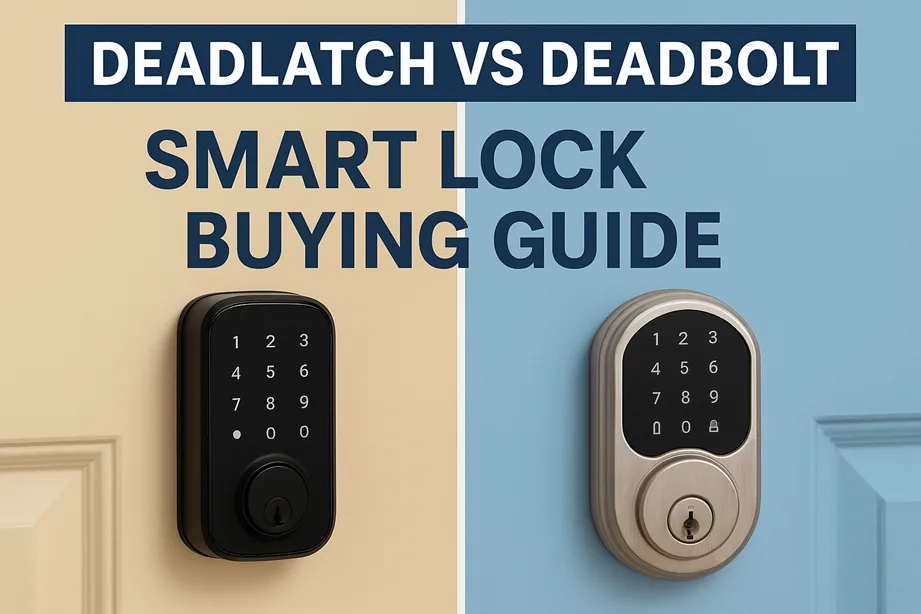
You glance at your front door each morning and evening, trusting that solid block of metal and mechanics to keep you safe. But when you’re moving into the era of smart home security, the choice between a deadlatch and a deadbolt isn’t just mechanical—it can determine whether your smart lock system works reliably, securely, and conveniently.
In this guide, we’ll peel back the layers: we’ll define what deadlatch and deadbolt each mean in both traditional and smart contexts, compare their strengths and weaknesses, examine real smart lock models, and help you pick the right solution for your door, budget, and lifestyle. By the end, you’ll see exactly which lock type fits your setup—and why.
Throughout, I’ll draw on practical experience, standards, and real product examples. Let’s dive in.
- What Is a Deadlatch?
- LOCKWOOD 001TOUCH PLUS SMART DEADLATCH
- What Is a Deadbolt and How Does It Work?
- Deadlatch vs Deadbolt: Mechanical & Security Differences
- Smart Locks & Lock Type Compatibility
- Strength, Safety & Standards: What Security Experts Say
- Which One Is Right for You? Choosing by Use Case
- Real-World Smart Deadbolt & Deadlatch Models
- Installation, Maintenance & Upgrade Tips
- Common Myths & Misconceptions
- FAQs
- Conclusion
What Is a Deadlatch?
A deadlatch is a type of spring-loaded latch that, once the door is closed, automatically engages with the strike plate without needing to throw a bolt manually. You don’t have to twist or turn anything; the latch “clicks in.” Because of that, it is often called a self-locking latch.
Mechanically, a deadlatch uses a sloped cam surface on the latch edge. As the door closes, it glides over the striker and then falls into place. If you then turn a handle or key, the latch retracts. If you leave it alone, it holds closed.
Common use cases for deadlatches include interior doors, apartment entry doors in some regions, office doors, or any location where automatic locking is desired without requiring users to lock manually.
Advantages
- Convenience: You don’t have to remember to lock after closing the door.
- Speed: Ideal in high-traffic environments (e.g., commercial entries).
- Integration: Works well with entry doors where you want auto-lock behavior or want the door always to stay secure when closed.
Limitations
- Security: Because it’s spring-loaded, a deadlatch is more susceptible to latch slipping (force pushing past the latch) or manipulation methods.
- Strength: The latch bolt is usually thinner than a deadbolt, and the mechanical exposure is greater.
- Smart-lock compatibility: Many consumer smart locks are built around deadbolt mechanics and may not support latch mechanisms.
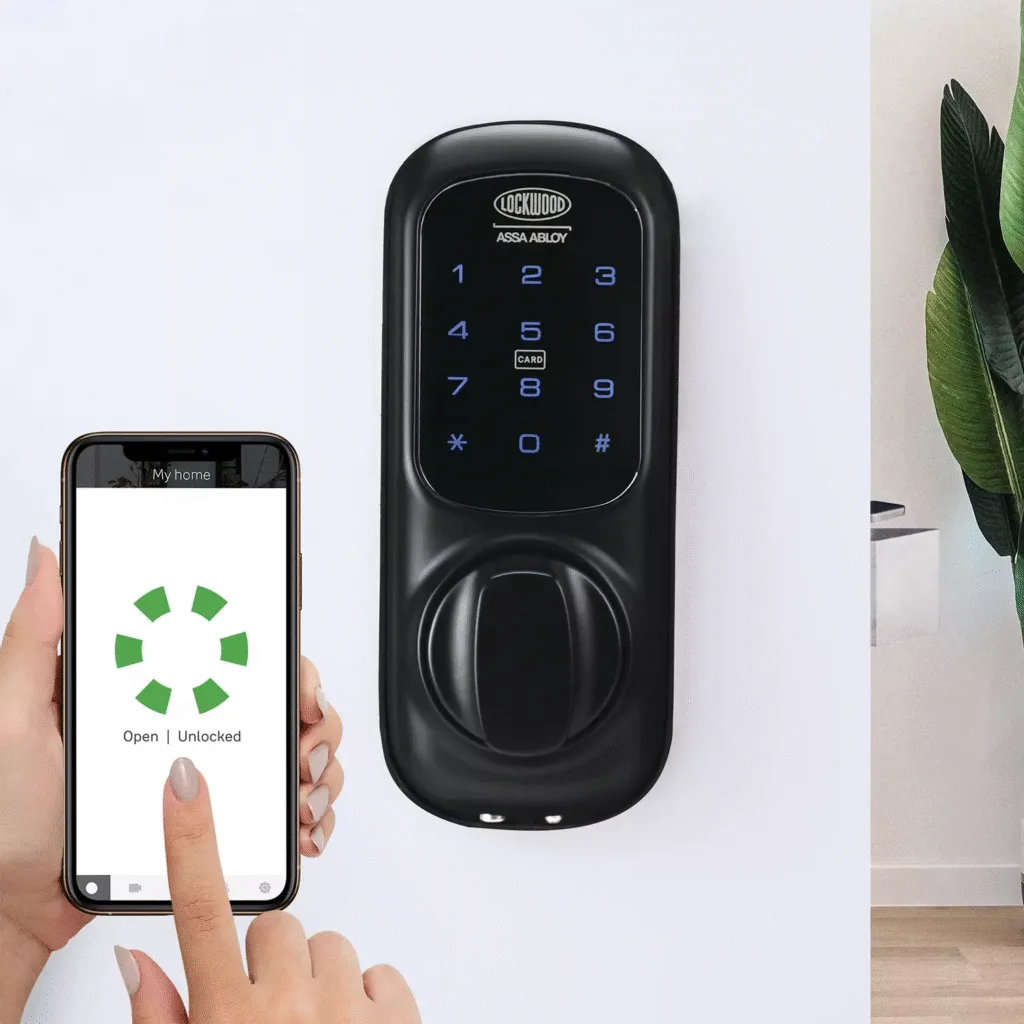
Notably, there are smart deadlatches in certain markets. For example, the Lockwood 001Touch Plus Smart Deadlatch (Australia) upgrades a classic deadlatch to support apps, PIN, auto-unlock, and Yale Home integration.
If you’re in a region where mortise or latch systems dominate, a smart deadlatch can be appealing—but the tradeoffs in security must be understood.
What Is a Deadbolt and How Does It Work?
The deadbolt is perhaps the more “classic” image of a secure door lock. Unlike a latch, it does not spring in; instead, you manually extend a solid bolt into the door frame to lock.
There are several common configurations:
- Single-cylinder deadbolt: a key on the outside, thumb turn inside.
- Double-cylinder deadbolt: key on both sides (no interior thumb turn).
- Keyless/smart deadbolt: electronic motor drives the bolt extension and retraction.
Because you have to engage it intentionally, a deadbolt tends to provide stronger security. The bolt is thicker, engages deeper into the frame, and is resistant to many forms of forced entry.
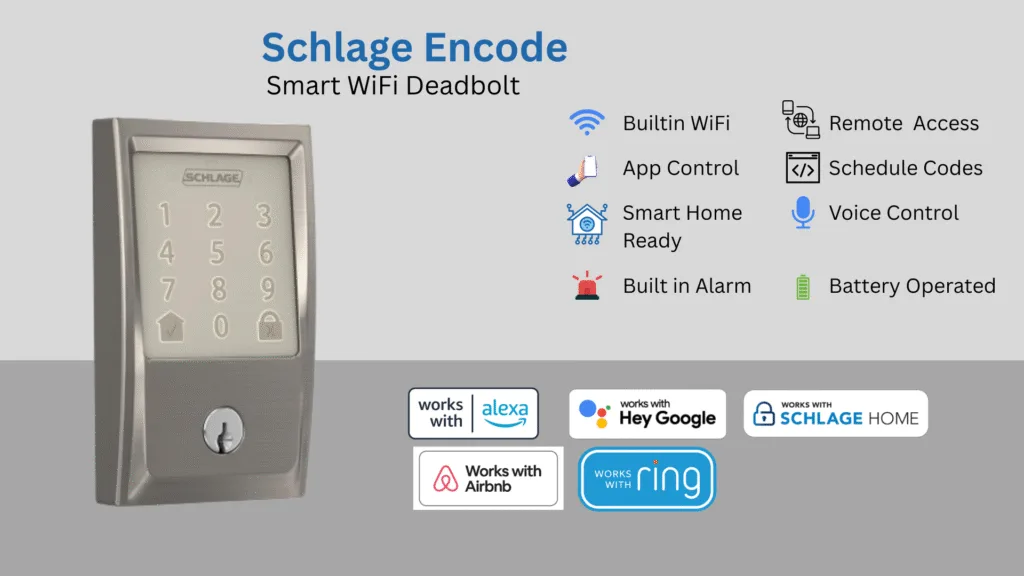
As the smart lock field advanced, deadbolts became the default retrofit target. Many smart deadbolts (Schlage Encode, Yale Assure, August Wi-Fi, etc.) are designed to replace or augment traditional deadbolts. Reviews and buyer guides (e.g., PCWorld) emphasize that most smart locks are built around deadbolt mechanisms.
You won’t find many smart locks that assume a spring latch design—so your decision between deadlatch and deadbolt often determines which smart systems you can use.
Deadlatch vs Deadbolt: Mechanical & Security Differences
Let’s look under the hood, side by side.
| Feature | Deadlatch | Deadbolt |
|---|---|---|
| Locking method | Spring latch — auto engages upon door closure | Manual bolt — you activate to lock |
| Exposure to force | Higher risk of latch slip or prying | More robust against forced entry |
| Bolt thickness | Slimmer, retracting latch | Thick, solid bolt (1” or more) |
| Security rating | Typically lower in standardized tests | Commonly attains ANSI/BHMA Grade 1 or 2 |
| Smart compatibility | Less common, niche or market-specific | Dominant form factor for retrofit smart locks |
| Maintenance | More mechanical parts under spring tension | Simpler internal mechanism, less wear on springs |
In practice, this means: a deadbolt is generally safer and better suited for external perimeter security. A deadlatch is convenient, but it must be reinforced (strong strike plate, robust frame) if used as primary security.
An article from Marks USA even notes that they manufacture both Grade 1 deadlatches and deadbolts and design their systems to accept high-grade cylinders. That shows that deadlatches can be built to high standards—but in consumer markets, deadbolts usually lead in security.
One extra nuance: deadbolts typically have fewer “points of failure.” With a deadlatch, springs, cams, knots, and adjusters can wear or loosen over time—less forgiving when things shift.
Smart Locks & Lock Type Compatibility
This section is critical: you might have a perfectly secure mechanical setup, but if your smart lock can’t function well with it, you’ll face regrets.
Retrofit Smart Locks vs Full Replacement
Most smart locks in the consumer segment are retrofit modules: they install onto the inside side of an existing deadbolt. You keep your exterior key cylinder; the motor handles the interior side. This model works best when you have a standard deadbolt configuration.
Some smart locks, however, are full replacements, meaning they replace the entire lock mechanism (exterior and interior). These are more flexible, but still overwhelmingly assume a deadbolt architecture.
Limitations with Latches
Few mainstream smart locks are engineered to drive a spring latch. Because a deadlatch is spring-biased, the motor must counter that spring force precisely for override, auto-latch, and safety features. That complexity is why many brands don’t support latch systems out of the box.
Where smart deadlatches do exist, they often come from lock manufacturers in markets where latch systems dominate. For example, the Lockwood 001Touch Plus Smart Deadlatch integrates with Yale Home, allowing PIN, auto-unlock, and remote control (with a bridge) while operating in a latch environment.
Another interesting product is the Yale YDME50 RFID Deadlatch Smart Lock, which supports PIN, RFID, and mechanical override. These niche devices are often region-specific.
Practical Compatibility Checklist
Before selecting your smart lock, check:
- Backset (distance from door edge to center of latch/bolt)
- Door thickness and handing
- Strike plate alignment and mortise cut
- Whether the smart lock supports deadlatch or deadbolt configurations
- Smart home integration (Wi-Fi, Bluetooth, Z-Wave, Matter)
- Power and battery requirements, plus mechanical fallback
- Whether the system supports DoorSense / open/close sensor, auto-lock, auto-unlock, etc.
If your door currently uses a deadlatch and you wish to adopt a mainstream smart lock, you may need to convert to a deadbolt or choose from regional smart latch options.
Strength, Safety & Standards: What Security Experts Say
You want more than marketing claims—you want real security benchmarks. That’s where ANSI/BHMA grades and forced-entry tests come in.
ANSI/BHMA Lock Grading
Deadbolts and latch systems are often rated under the ANSI/BHMA A156.5 standard. The grades are:
- Grade 1: Highest grade (heavy duty)
- Grade 2: Residential/commercial moderate use
- Grade 3: Basic residential
A deadbolt that attains Grade 1 is typically capable of withstanding higher torque, impact, and cycle testing. Deadlatches rarely achieve Grade 1, but quality models may reach Grade 2.
Manufacturers like Marks USA offer both Grade 1 deadlatches and deadbolts intended for high durability.
Forced Entry Resistance & Vulnerability Modes
- Kick-in / impact: A thick deadbolt into a reinforced strike plate resists brute force better than a latch.
- Latch slipping: A tool or credit card can be used in weak setups to force the latch open.
- Lock picking/bumping: Depends on cylinder quality more than latch vs bolt.
- Smart hacking: Electronic attacks (signal replay, vulnerability in firmware) apply to both, so security must be holistic.
- Wear & alignment: Over time, door settling, humidity, and misalignment affect latch performance more than bolt systems.
Pro tips from experienced locksmiths: use 3” screws in the strike plate to bite into the stud behind the jamb, reinforce your frame, and ensure precise alignment. Even a Grade 1 bolt with poor installation can be defeated.
What’s the Final Word?
If security is your priority—especially for exterior doors—the deadbolt is the safer bet. If you choose a deadlatch, ensure you use premium hardware, reinforcement, and verify whether your smart lock supports it.
Which One Is Right for You? Choosing by Use Case
Let’s match the scenario to the solution.
Front Doors & External Entryways
For a front door exposed to weather, opportunistic intruders, and heavy use, a smart deadbolt tends to be the default. It balances security and automation. Devices such as Schlage Encode, Yale Assure, or August Wi-Fi Smart Lock are designed with this in mind. (Note: many are sold as retrofit modules.)
If your region or building favors latch systems (e.g., some apartments or older constructions), consider a smart deadlatch like Lockwood’s 001Touch Plus, but ensure you reinforce the rest of your door assembly aggressively.
Apartments, Condos & Shared Entryways
In these settings, deadlatches often dominate because of auto-lock convenience. But security is still important—so if you’re choosing a smart lock, prefer a smart deadlatch or a customizable latch/bolt hybrid. Just be sure it supports your local standards.
Commercial / Multi-Tenant Offices
High throughput, multiple users, and scheduled access favor smart deadlatches or interconnected systems. The automatic closure, ease of access, and control make deadlatches beneficial. But always pair with a mechanical fallback in case of system failure.
High-Security Zones (Safes, Server Rooms)
Here, you can combine multiple layers: an inner Grade 1 smart deadbolt, bolted edges, and an external mechanical deadbolt. For these, deadlatch alone is rarely trusted.
Mixed Approach
Some savvy homeowners use a deadlatch during the day for convenience, and engage the deadbolt at night or when away. It’s not elegant, but it gives you strength when you need it and speed when you don’t.
Real-World Smart Deadbolt & Deadlatch Models
Here’s a brief look at real devices in the field today—so you can see how products map to theory.
- Lockwood 001Touch Plus Smart Deadlatch (Australia) – Upgrades a deadlatch into a smart device with PIN, mobile app, auto-unlock, and Yale Home support.
- Yale YDME50 RFID Deadlatch – A smart latch lock that supports RFID card, PIN, and mechanical override. Useful where latch systems predominate.
- Schlage Encode / Schlage Encode Plus – Widely deployed smart deadbolt models supporting Wi-Fi, built-in connectivity, and, in newer versions, NFC/Home Key. (Schlage’s history shows its shift into smart deadbolt space).
- Kwikset models – Their smart locks (e.g., Halo, Wi-Fi models) are designed primarily for deadbolt retrofits. Their comparison charts explicitly say “easily replaces any deadbolt.”
- Consumer Reports top picks – In their 2025 smart lock reviews, models like Yale Assure Lock, August Wi-Fi, and Schlage Encode appear. They note: “Two of our picks are retrofit smart locks, which replace only the part of the lock that’s on the interior side of a door.”
- PCWorld’s smart lock review methodology – They evaluate how easy it is to set up, how the lock behaves over time, and how it integrates with smart home systems.
These real examples illustrate: smart deadbolts are mainstream. Smart deadlatches are niche, regionally constrained, and often require more diligence in selection.
Installation, Maintenance & Upgrade Tips
You’ve picked your smart lock—now make sure it works well long term.
Installation Differences
- Deadbolts often require drilling a cylindrical hole and mortising a strike. Retrofits lead easily into this geometry.
- Deadlatches require proper alignment with the door juts, a correct slit mortise, and latch dimensions.
- If converting a deadlatch door to a deadbolt, you may need to reposition hardware, reinforce framing, or re-bore holes.
Smart Lock Steps & Tips
- Mount the interior module tightly (no wiggle).
- Ensure strike plate alignment—fine-tune screws so latch or bolt closes without binding.
- Calibrate automatic locking/unlocking features carefully (time delays, sensor sensitivity).
- Firmware updates: keep your lock’s software current to patch vulnerabilities.
- Backup access: preserve mechanical key override or fallback in case batteries die.
- Monitor battery levels and replace before the lock fails.
- Periodic maintenance: clean latch/bolt paths, tighten screws, and realign if the door shifts with humidity/temperature.
If any step makes you feel uncertain—especially when dealing with high-security access points—consult a professional locksmith. A poorly done installation can weaken even the strongest Grade 1 lock.
Common Myths & Misconceptions
Let’s address a few ongoing misconceptions.
Myth 1: All latches are weak
This isn’t accurate. Some high-quality deadlatches are well-designed, although they usually don’t match the strength of deadbolts. The weakness is in many consumer-grade latches, not the concept itself.
Myth 2: Smart locks eliminate the need for mechanical strength
A smart lock’s electronics don’t resist force—they control a motor or drive. If the underlying bolt or latch is weak, smart features won’t help much.
Myth 3: Deadbolts can’t be automated
They certainly can. Most smart locks are built around deadbolts. Automation doesn’t favor latches; deadbolts are the baseline in most markets.
Myth 4: A smart lock automatically makes your home safe
Your door frame, strike plate, hinge pins, and masonry all matter. A strong lock on a weak frame is still vulnerable.
Myth 5: You don’t need a fallback method
Always have a mechanical override (key or physical action). Batteries fail; software bugs happen.
FAQs
Here are common user questions (and honest answers).
Is a deadlatch as secure as a deadbolt?
Not generally. While some high-quality deadlatches can be strong, a deadbolt typically offers greater resistance to forced entry thanks to deeper engagement and thicker construction.
Can a smart lock work with a deadlatch?
Rarely in consumer markets. Most smart lock modules expect a deadbolt. Some region-specific smart deadlatch products exist (e.g., Lockwood 001Touch Plus).
Which lock is better for an apartment door—deadlatch or deadbolt?
If your building allows it, a deadbolt (especially a smart deadbolt) gives more security. But if the door system is designed around auto-latching, a high-quality smart deadlatch with proper reinforcement may suffice.
What’s the main difference between deadbolt and deadlatch mechanisms?
A deadlatch auto-engages via spring when the door closes; a deadbolt must be manually thrown (or motor-driven in a smart lock) to lock.
Are smart deadbolts hard to install?
Not much, especially if your door already has a regular deadbolt. Retrofitting is usually easy. However, getting it aligned, calibrated, and installed properly is still very important for it to last and work reliably.
Do smart locks make mechanical locks obsolete?
No. Smart locks enhance convenience and control—but the mechanical components remain essential for resistance to physical threat. A good smart lock is a blend of electronics and solid mechanical design.
Conclusion
When you weigh deadlatch vs deadbolt in the context of smart lock buying, the decision often comes down to tradeoffs between automatic convenience and robust security.
A deadbolt, especially a smart deadbolt, is the safe default for exterior doors, combining strong mechanical resistance with modern automation. Meanwhile, a deadlatch (or smart deadlatch) makes sense only when your building design or usage patterns demand auto-locking—but you must accept some compromises and reinforce smartly.
If you’re ready to move forward:
- Audit your door (thickness, backset, frame reinforcement).
- Decide whether to convert to a deadbolt or stay with a latch system.
- Choose a smart lock that explicitly supports the mechanism type.
- Ensure backup access, strong installation, and firmware security.
Your home deserves both peace of mind and modern convenience.
Why not explore the top options today?
Consider Schlage Encode Plus (smart deadbolt) or check whether a Lockwood 001Touch Plus (smart deadlatch) works in your region. Start with reputable sources, compare their features carefully, and always validate compatibility before you buy.
Let me know if you’d like a side-by-side product comparison, install guide, or local buying options.
