
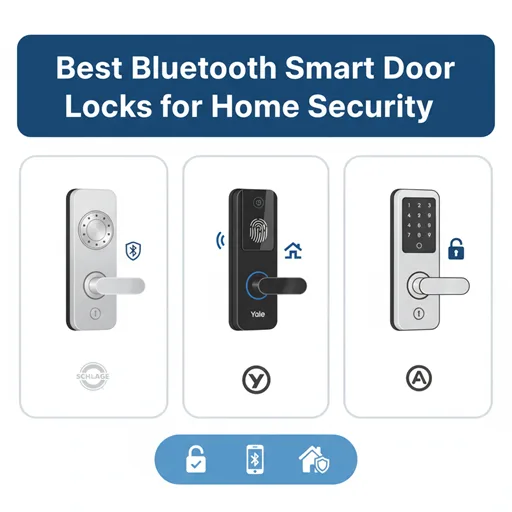
In today’s smart home era, securing your home’s entryway is more important than ever. In fact, nearly one in three US burglaries begins at the front door. Upgrading a typical deadbolt to a Bluetooth smart door lock allows you to use your smartphone or other authorized device as a digital key, increasing home security and convenience. These smart locks allow you to lock or open your door using a wireless app or voice assistant, frequently without the need for a physical key. This guide will explain how Bluetooth smart locks work, their key benefits (and drawbacks), and highlight some of the top models to consider for keeping your home safe and secure.
Concretely, Bluetooth smart locks use short-range wireless tech to talk to your phone or fob. When an approved device is nearby (usually within a few dozen feet), the lock automatically unlocks or locks itself. These locks are typically battery-powered, so they work even during power outages and don’t rely on home Wi-Fi. Many models also offer PIN code keypads, fingerprint scanners, or physical key backups as fallbacks. As a result, a Bluetooth lock can combine keyless entry and advanced encryption (typically 128- or 256-bit AES) to raise your security above a standard deadbolt. We’ll explore all this in detail below, but first, let’s define what makes a lock “smart” and how Bluetooth plays into it.
- What Are Bluetooth Smart Door Locks?
- Advantages of Bluetooth Smart Locks
- Drawbacks and Considerations
- Bluetooth vs. Wi-Fi Smart Locks
- Key Features to Consider
- Top Bluetooth Smart Door Locks for Home Security
- Other Notable Bluetooth Locks
- Installation, Setup, and Smart Home Integration
- FAQs
- Conclusion
What Are Bluetooth Smart Door Locks?
A smart lock is essentially an electromechanical lock that locks or unlocks itself when it receives a command from an authorized device. Unlike a traditional key-and-tumbler, a smart lock contains an electronics module, radio, and motor inside. For Bluetooth smart locks, the module speaks Bluetooth Low Energy (BLE) so your smartphone, smartwatch, or a dedicated key fob can act as the key. When you approach the door, your phone’s Bluetooth signal is recognized, verified (usually with encryption), and the lock’s motor turns the bolt – often automatically opening with a simple tap.
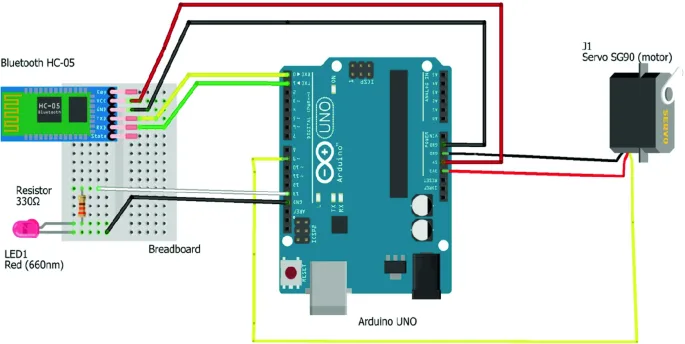
Image credits: springer.com
Importantly, Bluetooth locks typically work within a short range – most say about 25 feet or so. This means you generally have to be near the door for your phone to command it. But that also means they can operate without Internet or power: as soon as the Bluetooth signal reaches the lock, it works, and since virtually all have internal batteries, they’ll even function in a power outage. In practice, setting up a Bluetooth lock is like replacing only the interior part of your deadbolt. You keep your exterior hardware (sometimes even the original key cylinder) and attach the smart lock module behind it. Then you pair the lock with the vendor’s app on your phone, authorize your devices, and the door is ready to go.
For example, Lockly notes that Bluetooth smart locks are typically paired to a smartphone and often unlock automatically when the paired device is nearby. Most also allow tapping a phone or entering a code on a keypad to lock or unlock from indoors or a short distance away. And since they use BLE, their batteries (usually AAs) can last many months without needing replacement.
While “smart lock” can involve Wi-Fi or Z-Wave, we focus here on pure Bluetooth smart locks. These lock types typically do not rely on your home Wi-Fi network – they communicate directly with your phone. That simplifies things: no router or hub is needed to use the basic lock/unlock function. And because they consume very little power (Bluetooth is low-energy), most of these locks advertise battery lives of six months to a year on a set of AAs. Many also support manual backup – for example, a keypad code, fingerprint reader, or even a physical key (see below) – so you’re never stranded if your phone or the battery dies.
In short: A Bluetooth smart door lock is a wireless deadbolt that you control with your phone (or authorized device). It replaces or augments your existing lock and auto-unlocks when your phone is near. Most models keep working without Internet and allow manual overrides. We’ll now look at the pros and cons of using Bluetooth locks for your home.
Advantages of Bluetooth Smart Locks
Bluetooth smart locks pack several conveniences that enhance home security and everyday living. Here are some major benefits:
- Keyless Convenience: No more fumbling for keys. With a Bluetooth lock, your smartphone or a paired key fob becomes the key. For many models, simply approaching your door with the phone in hand will automatically unlock it (often after a quick tap). Locksmiths point out that this proximity-based opening is a huge convenience: as you walk up with groceries or kids in arms, the door unlocks hands-free. And since there’s no physical key to lose, you avoid lockouts unless your phone or battery fails.
- Better Access Control: You decide who gets to enter and when. Nearly every smart lock has an accompanying app where you can grant, revoke, and track access. You can create temporary PIN codes or e-keys for guests, service workers, or Airbnb renters. For instance, some models allow scheduling codes so a cleaner’s code only works during office hours. The lock keeps a log (viewable on your phone) of every lock/unlock event. In short, you know exactly who is entering your home. This digital access is far safer than hiding keys under the mat.
- Battery-Powered Reliability: Since Bluetooth locks are battery-powered, they work even if the electricity goes out. In a storm or outage, your door remains functional. Many models use 4 AA batteries (or even two AA) and advertise many months of use per set. For example, SafeHome’s review notes that the Wyze Lock Bolt gets “great battery life” on just two AA batteries. And unlike some Wi-Fi locks that require constant radio communication, Bluetooth locks only use power during active operation, extending lifespan.
- Enhanced Security: Digital locks aren’t just convenient; they often add security features. Many Bluetooth locks use strong AES-128/256 encryption to secure the wireless signal, making remote hacking extremely difficult. With no physical key, risks like lock picking or bumping are eliminated. Some locks even include sensors: for example, tamper detection alerts you if someone tries to force the lock, and auto-lock settings re-lock the door automatically if you forget. You can also set up two-factor authentication (2FA) in some apps, requiring both your phone and a code for access, adding another layer of protection.
- Integration with Smart Home: Although Bluetooth locks don’t connect to the internet by themselves, many models can pair with smart home systems for voice or remote control. For example, as Security.org notes, the Kwikset Kevo line can work with Amazon Alexa, letting you say “Alexa, lock the front door”. August Smart Locks similarly integrate with Alexa, Google Assistant, or Siri via a hub. These integrations allow you to include your lock-in routines or to check status by voice. You can also often pair multiple locks in one app alongside cameras and alarms, for a unified home security ecosystem.
Each of these advantages makes Bluetooth smart locks a compelling upgrade. They combine hands-free access with encryption-backed security, and they usually work fine when Wi-Fi or power fail. Of course, there are some trade-offs, which we cover next.
Drawbacks and Considerations
No technology is perfect. Bluetooth smart locks have a few limitations you should weigh:
- Limited Range: By design, Bluetooth is short-range. Most locks only talk to your phone when it’s within 20–30 feet. This means remote unlocking (from work, say) is not possible without extra hardware. In contrast, Wi-Fi locks can be controlled from anywhere. With a Bluetooth lock, you must be near the door to operate it (or use a smart home hub that bridges to Wi-Fi).
- No Remote Access (Without Bridge): Since most Bluetooth locks lack built-in Wi-Fi, you can’t use them from outside the home unless you add a bridge or hub. If you need to unlock the door for someone while away, you’ll either rely on a separate hub (like August’s Wi-Fi Connect) or stick to SMS/email keys. Some find this limiting.
- Device Dependency: Your phone or fob is the key. If you leave your phone at home or its battery dies, you’ll need an alternate entry method. Most locks address this with backups (e.g. keypad or mechanical key), but it’s a factor. KeyPlus warns that you should always have a secondary entry, because “if the battery dies, you may be locked out”. So always check that your lock has a backup method (many do).
- Vulnerabilities: While modern Bluetooth locks are very secure, theoretical attacks exist. For example, hackers could attempt Bluetooth spoofing or relay attacks (recording and extending your phone’s signal). These necessitate proximity and specialized equipment, and they are difficult to defeat when up against well-designed locks. Nonetheless, it is a reason to choose trustworthy businesses that use strong encryption. Keep your firmware updated, and some experts even suggest turning off auto-unlock in high-traffic areas to be extra safe.
- No Extra Features: Bluetooth locks typically lack advanced features that Wi-Fi locks have, like video doorbells or notifications from outside the range. Many Bluetooth models focus on locking/unlocking. If you want real-time alerts or remote monitoring, you may need a Wi-Fi model instead.
- Cost: Smart locks, including Bluetooth models, are more expensive than a basic deadbolt. You’re paying for the convenience and technology. But many consider the trade-off worth it for added security and ease of use.
Overall, Bluetooth smart locks excel in situations where you value battery life, simplicity, and offline reliability. They may not replace all features of a full Wi-Fi system, but for front-door security and keyless access, they can be an ideal middle ground. Next, we compare them briefly to Wi-Fi locks, and then look at some of the specific models on the market.
Bluetooth vs. Wi-Fi Smart Locks
Often, the question arises: Bluetooth or Wi-Fi? The answer depends on your priorities:
- Range and Remote Control: Wi-Fi locks can be controlled from anywhere (as long as you have internet) and can send push notifications. If you need to unlock your door while travelling or get instant alerts, Wi-Fi is better. In contrast, Bluetooth locks only work when your phone is within range (typically 25–30 ft). Without a Wi-Fi bridge or hub, a Bluetooth lock won’t let you lock/unlock from the office.
- Power Consumption: Bluetooth locks have a clear edge on battery life. For instance, eufy notes that Bluetooth smart locks use “less battery power compared to Wi-Fi locks, with a longer battery life”. In practice, many Bluetooth locks last a year on standard AA batteries, whereas Wi-Fi locks (with always-on connectivity) may need recharging every few months. Lockly confirms this: “Bluetooth locks sip less power… battery will last significantly longer” than Wi-Fi locks.
- Setup and Complexity: Bluetooth locks are usually simpler to install (pair your phone). Wi-Fi locks often require connecting to your home network or adding a hub. However, once set up, Wi-Fi locks integrate more deeply with smart home systems, enabling features like remote code sharing, Amazon Echo routines, etc.
- Security Considerations: Paradoxically, because they stay offline, Bluetooth locks are often considered more secure against remote hacking. Without the Internet, hackers can’t attack from afar. Bluetooth-only locks still use encryption, but they are exposed only to local attacks (which are difficult, though possible via relay devices). Wi-Fi locks open a door to remote access (and thus remote hacks) if not properly secured.
- Feature Set: Wi-Fi locks generally support more bells and whistles: app alerts, integration with cameras, family account management, etc. Bluetooth locks keep to the essentials: local unlock, codes, and basic app logs. For many users, the trade-off is acceptable: choose Bluetooth for simplicity and battery, or Wi-Fi for max connectivity.
In summary, Bluetooth smart locks are best if you want excellent battery life and offline reliability without needing to rely on the Internet. Wi-Fi locks are better if you value remote access and real-time alerts. Some newer locks try to give the best of both worlds by including Bluetooth for local use plus an optional Wi-Fi bridge. (For example, August’s locks include a Wi-Fi module so you can unlock anywhere, yet they still use Bluetooth for local door sensing.)
Key Features to Consider
When shopping for a Bluetooth smart lock, here are crucial factors to keep in mind:
- Door Compatibility: Check your door’s thickness (most US doors are 1⅜” to 1¾”). Many locks fit standard doors out of the box. For instance, Kwikset notes the Kevo models fit doors in that 1⅜″–1¾″ range. Also confirm backset (the distance from the edge of the door to the centre of the lock hole) and handle clearance. If you have an unusually thick door, ensure the lock kit includes adapters or spacers. For example, August’s Smart Lock Pro comes with multiple adaptors so it can retrofit nearly any deadbolt.
- Power Source: Most Bluetooth locks run on AA batteries. Some use 4 AAs, others 2. Check battery life claims – 6–12 months is common. See if the lock gives a low-battery warning via the app or on the lock itself. Also note if the lock offers an emergency power option (e.g., plugging in a 9V battery under a cover) for backup. SafeHome notes the Wyze Lock Bolt has “great battery life” on two AAs.
- Backup Entry: Your Bluetooth lock should have an alternative way to unlock. Keypads (PIN codes) are common and very handy if your phone is dead. Fingerprint readers are also available (e.g., the Wyze Lock Bolt adds fingerprint entry). If the lock is truly “keyless,” make sure it still offers some manual override (Wyze, for example, provides emergency passcode support even though it has no physical key slot). If you must keep a physical key (say for a landlord or insurance), look for a retrofit model like Kwikset Convert that lets you retain your existing key cylinder.
- Connectivity Options: Some Bluetooth locks can optionally connect to Wi-Fi (via a bridge) or to smart hubs (Zigbee/Z-Wave). Decide if you need that. If you do want remote features, pick a model that includes a Wi-Fi module or sells an add-on hub. (For example, August sells a Wi-Fi Connect bridge, and Yale and August offer Wi-Fi-enabled versions of their locks.) Otherwise, a pure Bluetooth lock will be simpler but limited to local use.
- Smart Home Integration: If you use Alexa, Google Home, or Apple HomeKit, check compatibility. As mentioned, some Bluetooth locks work with voice assistants (Kwikset Kevo with Alexa, August with Alexa/Google/Siri). For Apple users, HomeKit support is rarer, but some Assa Abloy (Yale) locks do support HomeKit natively. Even if the lock itself doesn’t connect to Wi-Fi, it may pair with a hub like Samsung SmartThings or Wink to give you more automation options.
- Security Features: Look at the lock’s encryption and tamper protection. Reputable brands will explicitly say they use AES encryption. Some locks have extra sensors (DoorSense, alarms) that notify you if the door is ajar or if the lock is forced. You may also see features like auto-lock (automatically re-lock after a set time) or two-factor authentication. Keyplus suggests enabling 2FA if available for extra security.
- Ease of Installation: Most smart locks claim DIY install. Generally, you replace just the interior thumbturn assembly. Check if your lock uses the same screw pattern as your old deadbolt. Security.org notes that the locks we mentioned above are easy to install. Be prepared with a screwdriver and follow the included instructions carefully. In many cases, you keep your existing front plate and strike plate, so installation is non-destructive. For example, the August lock installs on the inside of your door and doesn’t require any new drilling, leaving your outside hardware untouched.
- Price and Warranty: Smart locks range in price from around $70 (for budget devices such as Wyze) to $300 or more for luxury versions. Consider which aspects are most important. Many firms provide one to three year warranties; cheaper knockoffs may not. Reading user evaluations on reliability can also be helpful.
By evaluating these aspects – door fit, power, backup, connectivity, integration, and security – you can determine the best Bluetooth lock for your needs. To demonstrate these points, we will look at some of the most popular models.
Top Bluetooth Smart Door Locks for Home Security
While we won’t cover every product, here are examples of notable Bluetooth-enabled locks and why they stand out:
Kwikset Kevo (Contemporary/Traditional)
Kwikset is a long-time lockmaker, and its Kevo series is often praised for convenience. Security.org calls the Kevo “the best Bluetooth smart lock line” with military-grade encryption. The Kevo locks (available in contemporary or traditional styling) unlock with a touch: when your paired smartphone or fob is within range, you literally tap the lock and it opens—no codes or keys needed (unless you want them) – just an authorized device. The Kevo uses 4 AA batteries, which should last many months. It also supports backups: Kevo offers the Kevo Convert kit that lets you keep your existing key cylinder and still add smartphone control. (This is great if you can’t drill a new hole.)
Beyond Bluetooth, Kevo locks can integrate with smart homes: an optional Kwikset bridge adds Z-Wave to work with many platforms, or you can tie it to Alexa for voice locking. The Kevo app allows creating guest eKeys and tracking access. In short, the Kevo delivers secure keyless entry with the familiarity of tapping your phone. The trade-off is that it doesn’t have built-in Wi-Fi, so remote unlocking requires an add-on. But for local control and strong encryption, it’s a solid pick for home security.
August Smart Lock Pro (3rd Gen)
The August Smart Lock Pro is another popular choice. This lock sits on the inside of your existing deadbolt (no rekeying needed) and uses Bluetooth to talk to your phone. One highlight is its flexibility: you keep your original keys and hardware on the outside, and attach August to the inside, using included adaptors. For renters or homeowners with nice keysets, that’s a win. August’s app lets you issue unlimited one-time or permanent digital keys to friends or guests – perfect for Airbnb or service workers.
The Pro is often sold bundled with a Wi-Fi Connect Bridge, turning it into a hybrid. With the Bridge, you get true remote access and voice control via Alexa/Google/Siri. (Without the Bridge, it’s pure Bluetooth). It auto-locks and can send you notifications via the Internet. Powered by two AA batteries, it’s reported to last 4–6 months under typical use – less than some purely Bluetooth locks, but still respectable. Consumers like that August was “really easy to install” with many adapters included. Overall, August Pro is a feature-rich option, especially if you want a Wi-Fi add-on later.
Wyze Lock Bolt
Consider the Wyze Lock Bolt if you want to stay within your budget. At roughly $70, it includes a Bluetooth smart lock and a built-in fingerprint scanner. SafeHome’s evaluation scored it a “SecureScore™” of 8.7, citing its combination of fingerprint and code input. The drawback is that it’s Bluetooth-only (no Wi-Fi), so it won’t unlock your door from a distance. However, it performs admirably in everyday situations. The Lock Bolt’s advantages: “great battery life” on two AAs, automatic locking, and even remote PIN code generation for emergencies. Its cons include only local Bluetooth control and an occasionally finicky fingerprint sensor.
The Wyze Bolt is ideal if you want smart entry on a tight budget. It covers the basics (auto-lock, keypad, fingerprint) and integrates with Wyze’s ecosystem (like their video doorbells now). If you don’t need Wi-Fi and can overlook occasional fingerprint glitches, the Wyze Bolt is an impressive value.
Yale Assure Lock 2 (Bluetooth Enabled)
Yale (part of Assa Abloy, same parent as Kwikset) offers the Assure Lock 2, a modern touchscreen deadbolt. The Assure 2 comes in versions with Bluetooth built in (and some support Wi-Fi or Z-Wave via optional modules). It features a sleek keypad, auto-lock, and DoorSense (notifying you if the door is closed properly). Like other Yale smart locks, it can work with voice assistants (for example, the HomeKit-compatible version works with Siri) and uses encryption to secure the signal. We cite Yale’s site that these locks are “smart locks with Matter”, Bluetooth, and Wi-Fi enabled. (The new Matter standard means it’ll play nicely with future home platforms.) Yale locks are also known for their build quality and 3rd-party integration.
In practical terms, the Assure is a good all-rounder: the touchscreen means no keys or fingerprint needed (unless you get a variant with a fingerprint). Its Bluetooth will auto-unlock as you approach and lock behind you. The downside is that, like others, you need a bridge for remote operation. But Yale’s support for multiple ecosystems (Alexa, HomeKit, etc.) makes it flexible.
Other Notable Bluetooth Locks
Lockly Secure Pro (now called KeyWe Smart Lock): Lockly’s high-end model has Bluetooth plus fingerprint, but it’s primarily a Wi-Fi lock with Bluetooth app access. It’s very feature-rich (OLED keypad, encryption, auto-lock) and can serve as both a Bluetooth and Wi-Fi lock if you want.
- Ultraloq U-Bolt Pro: This lock offers 6-in-1 entry (Bluetooth app, code, fingerprint, auto-unlock, shake-to-open, key). By default, it’s Bluetooth with an optional Wi-Fi bridge. It’s praised for its versatility, though some users note the app can be quirky.
- Schlage Connect/Sense: Schlage’s smart deadbolts aren’t pure Bluetooth; they typically use Z-Wave or Wi-Fi. Still, Schlage locks like the Encode or Sense include smart features and can integrate digital credentials. (We mention Schlage because they’re a major brand, but their primary connectivity is Wi-Fi or Z-Wave, not Bluetooth.)
- Eufy Security Smart Lock: Eufy (Anker) makes a smart lock that can use Bluetooth or Wi-Fi (with included Bridge). It supports fingerprint and integrates with voice assistants. Their Verge lock was well-reviewed for decent battery life and ease of use, though availability has varied.
When choosing, focus on compatibility with your door and ecosystem. As long as the lock advertises Bluetooth connectivity, you’ll be in the right category. The models shown above are common choices: Kwikset and Yale for reputable names, August for variety, and Wyze for affordability. All of systems can considerably increase your home security, if installed and managed effectively.
Installation, Setup, and Smart Home Integration
Getting a Bluetooth smart lock up and running is usually a straightforward DIY job. In most cases, you remove the interior part of your existing deadbolt and attach the smart unit in its place. Many instructions emphasize making sure the lock is snug and aligned. For example, Kwikset instructs that the Kevo modules “only fit doors 1-3/8″ to 1-3/4″ thick”, so you should confirm your door thickness before buying. August’s Smart Lock Pro includes a set of nine adapters, allowing it to retrofit almost any cylindrical deadbolt. These adapters and calibration steps mean you can often keep your original deadbolt on the outside and upgrade the inside mechanism. This is especially handy for renters or situations where you can’t change the exterior hardware.
Battery installation is usually quick: most locks take AA batteries inserted into a compartment on the interior side. Some locks power the keypad or motor differently (Eufy’s app mentions “built-in keypad, no additional wire needed” on certain models), but the vast majority are battery-only. After installing batteries, the next step is pairing with the mobile app. Typically, you download the lock’s official app (e.g. Kwikset, August Home, Yale Access, Wyze, etc.), create an account, and put the lock into pairing mode (often by pressing a button on the interior). The app will find the lock via Bluetooth and guide you through naming it and setting access credentials. Once paired, you can configure user codes, fingerprints, auto-lock timing, and any integrations (like voice assistant linking or bridge setup).
Note that while Bluetooth locks do not require Wi-Fi to lock/unlock, some do offer optional Wi-Fi integration via a hub. If you want remote control or voice assistant use, you may plug in a bridge (often powered via USB) to bring the lock online. For example, August’s Wi-Fi Connect plugs into a router and lets you use Wi-Fi features through the August app. If you skip the Bridge, you’ll still control the lock locally via Bluetooth only.
Once set up, integrating with your smart home is the fun part. Many Bluetooth locks support common ecosystems. You can add them to Alexa routines, use Google Assistant to check lock status, or even Apple HomeKit (if supported by the model). For example, the Yale Assure Lock 2 is listed as compatible with Amazon Alexa, Google Assistant, Apple HomeKit, etc. In practice, this means you could ask, “Alexa, is the front door locked?” and it would respond. You could lock the door using Siri on your iPhone if it’s HomeKit-enabled.
Another integration angle is combining your Bluetooth lock with security cameras or other sensors. For instance, you might set a rule that when your smart lock is unlocked, your home security camera starts recording the entryway. Platforms like SmartThings or IFTTT can tie these devices together. Even if a lock is Bluetooth-only, the fact that it’s on your phone means you can still manually trigger other devices from your smartphone at the same time.
Just remember: proper setup and integration make a big difference. Enable features like auto-lock, set strong passcodes, and keep the app updated. Check user permissions regularly (remove old guest codes). Always save a backup key or code somewhere safe in case of an emergency.
FAQs
Q: Are Bluetooth smart door locks really secure?
A: Yes, if selected wisely. Modern Bluetooth locks use robust encryption and frequently include security features such as tamper warnings. Because Bluetooth signals only travel a few dozen feet, hackers would have to be physically near your door to attack it. Also, Bluetooth locks lack Internet connectivity, so they cannot be hacked over the network from far away. According to Keyplus, most use 128- or 256-bit AES encryption, which is considered military-grade. To be extra safe, only buy locks from reputable brands (Kwikset, Yale, August, etc.) that promise firmware updates. Remember, no system is invulnerable, so use extras like auto-lock and two-factor authentication if available. But in general, a Bluetooth smart lock is as secure – if not more so – than a traditional deadbolt, because it can’t be picked or bumped like a mechanical lock and it prevents forgotten locked doors by auto-locking itself.
Q: What happens if the Bluetooth lock’s battery or my phone dies?
A: Good locks offer backups. In practice, you should always have at least one other entry method. Many Bluetooth locks include a keypad, fingerprint scanner, or even an emergency physical key. For example, the Wyze Lock Bolt lets you generate a one-time PIN in case your phone is unavailable. If the batteries die, some locks let you temporarily power them (for example, by touching a 9V battery to terminals under a cover). Still, it’s wise to periodically check your lock’s battery level (most apps will alert you when it’s low). KeyPlus explicitly warns that “if the battery dies, you may be locked out” unless a backup is present. So don’t ignore low-battery warnings and consider keeping a small backup power supply or key just in case.
Q: Which Bluetooth smart door lock is best for an apartment or rental property?
A: For homeowners, retrofitting ease and flexibility are critical. You want a lock that will not damage the door or require new keys. Two locks stand out: the August Smart Lock Pro and the Kwikset Kevo Convert. Kevo Convert attaches to your current lock without replacing the outside hardware, allowing you to maintain your old key. It still includes Bluetooth unlocking and a passcode on the inside. August installs entirely inside your door and comes with various adapters so it fits almost any deadbolt; your front door looks unchanged. Both allow unlimited digital keys for guests, ideal for Airbnb or roommates. Neither requires drilling if your deadbolt is standard. Just be sure to check door thickness and hand (left vs. right). These models are highly recommended for apartments because they balance strong home security with renter-friendly install.
Q: How far can I unlock a Bluetooth smart lock from?
A: Generally, not very far – usually within about 25–30 feet. Bluetooth Low Energy is a short-range protocol. In practice, you need to be on or just outside your porch to unlock. Some newer BLE 5.0 locks claim longer range (up to ~100–150 feet in open space), but thick walls and interference can reduce that. If you need a truly remote unlock (e.g. from the office), look for a lock with an accompanying Wi-Fi bridge or hub. Otherwise, plan to walk to the door (or use a key/code) to engage the lock.
Q: Do I need Wi-Fi or a hub to use a Bluetooth smart lock?
A: No – basic operation only needs Bluetooth. Your phone talks directly to the lock. No Wi-Fi means you can lock/unlock without any Internet connection. However, for features like remote control or integration, some locks use a separate Wi-Fi bridge or smart home hub. Without those, you won’t be able to lock or unlock the door from far away. But for most people who mainly use their phone on-site, pure Bluetooth is fine. It actually simplifies security (fewer points of failure). So if you want simplicity and great battery life, you can skip Wi-Fi. If you want cloud access and Alexa commands from anywhere, look for the bridge-enabled version.
Conclusion
Upgrading to a Bluetooth smart door lock can dramatically boost your front-door security while removing the hassle of keys. These locks use your phone or a key fob to unlock automatically when you approach, and they often let you share digital keys and monitor entry logs from an app. Because they rely on Bluetooth, they have excellent battery life and keep working even if the power or Internet goes out. At the same time, they employ strong encryption to keep hackers at bay. The models we highlighted – from Kwikset to August to Wyze – represent the best of what Bluetooth smart locks have to offer in 2025.
Which one is right for you? If you need convenience and robust security, a top pick like the Kwikset Kevo (with optional key backup) might be ideal. For renters or Airbnb hosts, the August Smart Lock Pro lets you keep your existing keys and issue unlimited temporary codes. If you’re on a budget, the Wyze Lock Bolt offers fingerprint and app access at a fraction of the price (though without Wi-Fi). In any case, installing one of these locks will transform your home entryway.
Imagine never having to look for keys again: unlock the door with a single tap or even your fingerprint, all while your family sleeps soundly inside. This is the peace of mind that Bluetooth smart door locks provide. Ready to upgrade? When choosing a model, consider the sort of door you have and your home ecosystem. Check out retailers or the manufacturers’ sites for current deals (many locks are available at Home Depot, Amazon, and hardware stores).
By choosing a quality smart lock, you’re not only adding convenience but also taking an active step to protect your home. These devices pair the best of modern tech with solid security features. As one expert put it, keyless smart locks “eliminate the risk of lock picking” and can grant access only when the authorized key (your phone) is present. That’s a big advantage for staying safe.
So don’t wait – secure your home today. Pick a Bluetooth smart door lock that fits your door and your needs, and enjoy the convenience and protection it brings. Your door – and your peace of mind – will thank you. Stay safe out there!
