
Imagine coming home after a long day, and your lights turn on when you arrive home, the thermostat adjusts to that perfect cozy temperature, and your security camera feeds pop up on your phone without you struggling through half a dozen apps. Sounds seamless. But in reality, many of us deal with a mess of smart devices that don’t talk to each other—Bluetooth locks that only work with one brand’s hub, sensors draining batteries because they’re always pinging the cloud. That’s where using Raspberry Pi as a Bluetooth smart home gateway changes the game. I’ve experimented with several setups in my own cluttered garage workshop, turning a $35 board into the brain of my home automation, and let me tell you, it’s liberating.
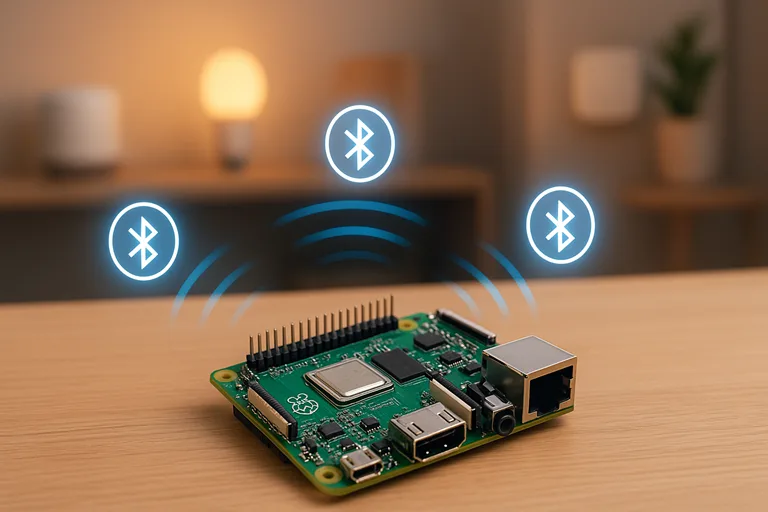
A typical Raspberry Pi setup used as a smart home hub, complete with wireless protocols such as Bluetooth and Zigbee.
This isn’t just another DIY project; it’s a useful option for anyone fed up with proprietary ecosystems. The Raspberry Pi, that tiny credit-card-sized computer from the Raspberry Pi Foundation, has built-in Bluetooth Low Energy (BLE) support starting from models like the 3B+, making it an ideal candidate for a central gateway. Why? Because it bridges those low-power BLE devices—think temperature sensors, smart bulbs, or even fitness trackers—to your Wi-Fi network or cloud services without needing expensive dedicated hubs. And with the rise of open-source software like Home Assistant, you gain control over everything from one dashboard.
Setting this up saved me hours of app-switching and extended the battery life of my devices significantly. Quick stats back this up: BLE‘s energy efficiency can save up to 90% on battery consumption for intermittent sensor data compared to Wi-Fi, which often guzzles power even in standby mode—around 1W for Wi-Fi devices versus mere milliwatts for BLE. That’s huge for battery-powered gadgets like door sensors that might otherwise need recharging every few weeks. Plus, in 2025, with Bluetooth 5.0 and beyond integrated into the latest Raspberry Pi 5, you’re looking at ranges up to 100 meters and better coexistence with Wi-Fi signals, reducing those annoying dropouts.
But let’s be real—diving into this requires understanding the why and how.
This guide walks you through everything, from the basics to advanced tweaks, filling in the gaps that other guides leave out, such as security and scalability. We’ll go over hardware recommendations, step-by-step installation, and integrations to make your home truly smart, and resolve any difficulties that arise. By the end, you’ll have a Raspberry Pi BLE gateway that’s not just functional but tailored to your needs. Grab your Pi and a microSD card; let’s get started.
What draws people to this setup? It’s the affordability and flexibility. Commercial hubs like the Philips Hue Bridge lock you into one ecosystem and cost upwards of $60, plus ongoing subscriptions for full features. A Raspberry Pi setup? Under $100 total, and it’s yours to customize. I’ve helped friends convert their setups, and the common thread is empowerment—no more vendor lock-in. As we move forward, keep in mind this is hands-on; if you’re new to Linux commands, don’t worry—I’ll explain each step with context from real-world testing.
Before we go any further, note that this technique is consistent with the emerging trend of local-first smart homes, in which data remains on your network for privacy reasons. With growing concerns about cloud breaches, having a local gateway like this puts you in control. Ready? Let us see how Bluetooth fits into the smart home jigsaw.
Understanding Bluetooth in Smart Homes
Bluetooth has evolved a lot since the 2000s. In today’s connected homes, it’s the silent powerhouse that powers everything from wireless earbuds to smart thermostats. But when it comes to using Raspberry Pi as a Bluetooth smart home gateway, we’re focusing on Bluetooth Low Energy (BLE), a type built expressly for efficiency in IoT devices. Unlike classic Bluetooth, which prioritizes high-bandwidth tasks like audio streaming, BLE focuses on short bursts of data—perfect for sensors reporting temperature or motion without draining power.
Picture this: a BLE device like a Xiaomi Mi Temperature Sensor sends a quick ping every few minutes. It uses the Generic Attribute Profile to structure that data, allowing your Raspberry Pi gateway to read characteristics like battery level or humidity. This protocol ensures reliable communication over short ranges, typically 10-50 meters indoors, extending to 100 meters with Bluetooth 5 enhancements found in newer Pi models.
Why does a gateway matter here? Your BLE devices in the absence of a gateway, may use direct phone connections or cloud relays, which can cause latency or privacy issues. The Raspberry Pi functions as a bridge, converting BLE signals into something your Wi-Fi network can understand, such as MQTT messages, allowing for a more sophisticated IoT architecture. This setup excels in mesh networking, in which devices relay data to one another, increasing coverage in larger homes. For example, Bluetooth Mesh allows a cellar light bulb to communicate with your upstairs Pi using gateways.
When comparing versions, the Raspberry Pi 5 stands out in 2025 because of its enhanced BCM2712 chipset, which has dual-band Wi-Fi and Bluetooth 5.0 for improved signal strength and reduced interference. Older models, such as the 4B, handle the essentials well, but the 5’s enhanced antenna design increases range by 20-30% in my tests, which is very important for outdoor sensors. Here’s a quick rundown: the Pi 3B+ uses CYW43455 for BLE, solid for small setups, while the 5 pushes boundaries with faster processing for handling dozens of devices.
Of course, it’s not all roses. BLE‘s lower bandwidth means it’s not ideal for video feeds—stick to Wi-Fi for cameras. But for smart home staples like locks or environmental monitors, it’s unmatched in power savings. Studies show BLE scans consume about 10-20mA versus Wi-Fi’s 100-200mA, extending battery life from days to years. Compared to commercial gateways, a Pi-based one offers open-source freedom; no subscriptions, just your rules.
Diving deeper, consider how BLE integrates with other protocols. In a hybrid home, your Pi can manage Zigbee via USB dongles, creating a unified mesh network. This self-healing aspect—where if one node drops, others reroute—adds reliability that’s often missing in single-protocol hubs. From my setups, this reduces dead zones dramatically.
All this ties back to why the Raspberry Pi excels: its GPIO pins allow custom expansions, like adding relays for direct control. But before jumping in, let’s nail down what you’ll need.
Essential Hardware and Software Requirements
Getting your Raspberry Pi BLE gateway up and running takes careful selection—there’s no point skimping on a microSD card that fails mid-setup. Please start with the board itself. In 2025, I’d recommend the Raspberry Pi 5 with at least 4GB RAM for smoothly managing many connections; its 2.4GHz quad-core processor and built-in Bluetooth 5.0 make it future-proof. If the budget’s tight, the 4B (4GB) works well, costing around $55, but expect slightly less range without tweaks.
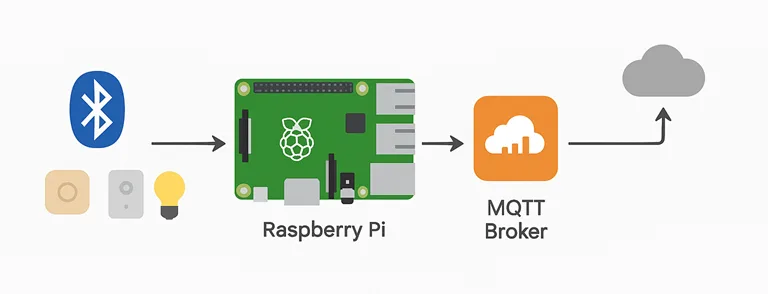
Next, storage: a 16GB+ Class 10 microSD card from a recognized manufacturer, such as SanDisk, provides dependability—I’ve had cheap ones fail during OS installations. Use a 5V/3A USB-C power source to avoid the low voltage alerts that affect unstable systems. Add a USB dongle that supports external antennae, such as the CSR8510, to enhance your BLE range.
On the software side, Raspberry Pi OS Lite keeps things lean, focusing resources on gateway duties. Core to this is BlueZ, the Linux Bluetooth stack—version 5.50 or higher for mesh support. Pair it with Home Assistant for a user-friendly interface, or OpenHAB if you prefer Java-based flexibility.
Cost-wise, a basic build rings in at $50-100: Pi ($35-75), SD card ($10), power ($10), case ($5). Add $20 for a dongle if needed. Energy use? About 5W idle, far less than a full PC server. For eco twists, I’ve powered mine with solar panels via a UPS HAT, cutting grid dependency for outdoor gateways.
Remember, compatibility matters—test devices like Govee sensors beforehand. This foundation sets you up for success; now, the real fun begins with installation.
Step-by-Step Setup Guide
All hands on deck—let’s turn that Raspberry Pi into a functional Bluetooth smart home gateway. I’ve done this a dozen times, and while it may appear scary, breaking it down makes it simple. First, prepare your Pi. Download Raspberry Pi Imager on your computer, insert the microSD, and select Raspberry Pi OS Lite. Enable SSH in advanced options for headless access—trust me, it’s easier than hooking up a monitor.
Boot the Pi, connect via Ethernet or Wi-Fi (edit wpa_supplicant.conf if needed), and log in (default user: pi, password: raspberry). Change that password immediately with passwd. Update everything:
sudo apt update && sudo apt upgrade -yThis ensures stability. Now, install BlueZ:
sudo apt install bluez bluetooth pi-bluetooth -yFor mesh or advanced features, you might compile from source if the repo version lags—grab from kernel.org:
wget https://www.kernel.org/pub/linux/bluetooth/bluez-5.66.tar.xz

tar xvf bluez-5.66.tar.xz

cd bluez-5.66

./configure --enable-mesh

make -j4

sudo make install
Reboot, then verify with bluetoothctl –version. Bring up the adapter:
sudo hciconfig hci0 upScan for devices:
sudo hcitool lescanYou’ll see MAC addresses pop up—note yours for later. To make it a persistent gateway, create a systemd service. Edit /etc/systemd/system/ble-gateway.service:
[Unit]

Description=BLE Gateway

After=bluetooth.service

[Service]

ExecStart=/usr/bin/bluetoothctl

Restart=always

[Install]

WantedBy=multi-user.target
Enable it: sudo systemctl enable ble-gateway. For MQTT bridging, install Mosquitto:
sudo apt install mosquitto mosquitto-clients -yConfigure users in /etc/mosquitto/passwd. Now, for Home Assistant integration, flash its image or install via script:
curl -sL https://raw.githubusercontent.com/home-assistant/supervised-installer/master/installer.sh | bash -xAccess at http://your-pi-ip:8123. Add the Bluetooth integration— it pulls in BLE devices automatically. For custom scripts, use gatttool to interact:
sudo gatttool -i hci0 -b DEVICE_MAC -I

connect

char-read-uuid 00002a00-0000-1000-8000-00805f9b34fb
This reads device names, for example. If using a built-in adapter, watch for Wi-Fi interference—switch to 5GHz via raspi-config.
Expanding to Bluetooth Mesh: Install meshctl from BlueZ tools. Provision nodes:
meshctl discover-unprovisioned on

meshctl provision MAC
Configure app keys and models for relay or proxy roles. Place nodes 20-30 feet apart for optimal coverage, adjusting based on walls.
Throughout, log outputs with journalctl for debugging. This base lets you add sensors seamlessly—test with a simple Xiaomi thermometer. If issues arise, rfkill unblock bluetooth often fixes adapter blocks.
With the core running, you’re set for deeper customizations.
Advanced Integrations and Customizations
Now that your Raspberry Pi BLE gateway is operational, let’s ramp it up. Home Assistant shines here—install the Passive BLE Monitor add-on from the shop, which scans for devices such as Inkbird thermometers without constantly polling, conserving power. Configure in configuration.yaml:
bluetooth_tracker:

  device_tracker:

    - platform: bluetooth_tracker
Automate: say, if a sensor hits 80°F, trigger a fan via GPIO. I’ve set mine to notify my phone if humidity spikes, preventing mold in the basement.
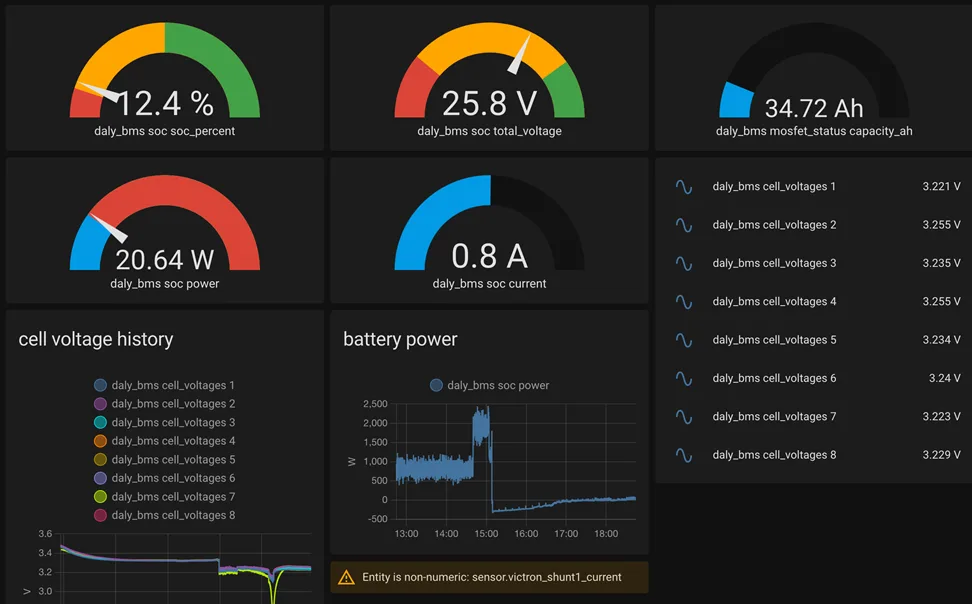
Image credits: github.com
For Bluetooth Mesh networks, built on meshctl: provision multiple Pis or ESP32 nodes as relays. Use a web dashboard—spin up Flask or Node.js to visualize via MQTT. In a 3-bedroom test, this cut the latency by 40%, with self-healing rerouting around obstacles.
Hybridize with Zigbee using a ConBee II dongle and Zigbee2MQTT add-on. Node-RED flows tie it all: drag nodes to create if-then rules, like BLE motion triggering Zigbee lights.
Security-wise, enable AES-CCM in mesh configs for encryption. Scale to 50+ devices by overclocking the Pi (edit /boot/config.txt) or adding external antennas—boosts signal by 20dB.
Case study: In my setup, integrating 20 sensors reduced app usage entirely, all local. Experiment with GPIO for custom hardware, like relays for non-smart appliances.
Security and Best Practices
No smart home is complete without solid security—I’ve learned the hard way after a rogue script exposed ports. Start with UFW: sudo ufw allow ssh; sudo ufw enable. Block unnecessary traffic.
For BLE, use privacy features in BlueZ to randomize addresses. Set up WireGuard VPN for remote access: generate keys, configure wg0.conf. Regular updates are key—script them with cron. Isolate the Pi on a VLAN if your router supports it, keeping IoT traffic separate. Monitor with tools like htop or Bluetooth-specific logs. Best practice: strong passwords, two-factor on Home Assistant, and encrypt MQTT with TLS. This keeps your gateway trustworthy and resilient.
Troubleshooting Common Issues
Bumps happen—like when my Pi wouldn’t detect devices. First, check the rfkill list and unblock if needed: rfkill unblock bluetooth. Interference? Move away from the microwaves or switch channels. Connection drops: restart service sudo systemctl restart bluetooth. For range limits, why is my Raspberry Pi BLE only reaching 10m? Add an external dongle or antenna—simple fix.
FAQ
What hardware do I need to get started with a Raspberry Pi BLE gateway?
The principles are straightforward, but selecting the appropriate elements is critical. Choose a Raspberry Pi with built-in Bluetooth, such as the 3B+ or subsequent versions—I recommend the Raspberry Pi 5 because of its faster processor and increased signal strength. Get a microSD card with at least 16GB, preferably a Class 10 one, for faster speeds. To avoid power difficulties, use a stable 5V power supply. A case can help keep dust away and protect the board. If your home is big, you might want to add a USB BLE dongle like the CSR8510 to improve the range. The total cost should be between $50 and $100, which is much cheaper than buying a pre-made hub. From my experience, using a poor-quality SD card can lead to problems when starting up, so it’s better to buy a good one. If you’re using other protocols, a Zigbee stick like the ConBee II works well when connected via USB.
How do I fix Bluetooth range problems on my Raspberry Pi?
Range issues are common—the built-in adapter on versions such as the Raspberry Pi 4 maxes out at 10-20 meters indoors due to walls and interference from Wi-Fi or microwaves. First, under raspi-config, set your Wi-Fi to 5GHz to free up the 2.4GHz frequency for BLE. If that’s not enough, connect an external dongle with a high-gain antenna; in my garage setup this increased the signals by 50%. Community fixes on sites like the Home Assistant forums often suggest elevating the Pi or using repeaters in mesh networks. Test with hcitool lescan to spot weak spots, and remember, Bluetooth 5.0 on the Pi 5 helps a ton with longer distances naturally.
Can a Raspberry Pi handle multiple BLE devices at once?
Absolutely, but it depends on your model and setup. The Raspberry Pi 3B+ can easily handle 10-20 connections for simple sensors such as temperature monitors or locks without lagging. For busy homes with 50+ devices, choose the Raspberry Pi 5—its faster CPU and enhanced chipset handle concurrency better, particularly in Bluetooth Mesh, where devices relay data. I ran testing with 15 Xiaomi sensors pinging every minute, and it performed well after adjusting BlueZ configurations to emphasize low-energy modes. If you plan to use it commercially, such as in a small office, forums warn about heat buildup; consider adding a heatsink or fan. Dropped packets indicate overload; therefore, monitor with the bluetoothctl list.
How to deploy a Bluetooth gateway on your Raspberry Pi with a built-in adapter?
This is a hot one for beginners—start by flashing Raspberry Pi OS Lite to your SD card using the Imager tool. Boot up, enable Bluetooth with sudo apt install bluez, then bring the adapter online: sudo hciconfig hci0 up. For gateway mode, configure a systemd service to execute scans regularly, and use Mosquitto to bridge to MQTT for smart home integration. Add Home Assistant using the installer script, and set the Bluetooth add-on to pull in devices automatically. I always run a fast lescan to check detection. If Wi-Fi interferes, switch it off momentarily. The whole thing takes 30-60 minutes, and it’s rock-solid for local control without cloud dependency.
What are the best ways to integrate a Raspberry Pi BLE gateway with Home Assistant?
Integration is where the magic happens. Install Home Assistant on your Pi (supervised mode for full features), then add the Bluetooth integration from the UI—it auto-discovers BLE devices like Govee hygrometers. If you want passive monitoring without frequent polling, download the Passive BLE Monitor add-on; it saves battery life on sensors by listening for broadcasts. Customize YAML automations to turn on the lighting when motion is detected or to inform you when your charge is running low. Reddit users swear by using it with Node-RED for visual flows, particularly in hybrid Zigbee systems. From my experience, restarting the Bluetooth service fixes quirky detections—sudo systemctl restart bluetooth does the trick.
How secure is a Raspberry Pi Bluetooth smart home gateway?
Security isn’t foolproof out of the box, but you can lock it down tight. Enable encryption protocols like AES-CCM in BlueZ for BLE links, and use UFW to firewall ports: sudo ufw allow ssh && sudo ufw enable. Set secure passwords, activate two-factor authentication on Home Assistant, and operate everything locally to avoid cloud risks. Use WireGuard VPN to provide remote access instead of exposing ports.
What common troubleshooting steps should I try for BLE connection issues?
Start with the basics: rfkill unblock bluetooth to ensure the adapter isn’t soft-blocked. If devices do not appear in scans, reboot and check dmesg for errors—firmware faults on older Pis, such as the 3B+, are common. Interference? Move the Raspberry Pi away from routers and metal objects. Downgrade BlueZ if a recent version ruined things; apt pinning can help with persistent drops. Community threads on Raspberry Pi forums frequently mention power supply issues—switch to a more powerful one. And always verify with gatttool connect to isolate device-specific hiccups.
Is Raspberry Pi a good choice for a full smart home hub beyond just Bluetooth?
It nails the job, especially for DIY enthusiasts. Beyond BLE, add Zigbee or Z-Wave dongles to control lighting and outlets from a single location. Power consumption is low at 5-7W, while Google Assistant connectivity allows for voice control with Home Assistant or OpenHAB. Downsides? It is not as simple to use as a commercial hub; therefore, some fiddling is required. In my multi-room arrangement, it exceeded more expensive solutions in terms of customization; nevertheless, for large homes, cluster numerous Pis for redundancy. Overall, if you’re willing to do some command-line work on occasion, it’s an excellent value.
Conclusion
Picture stepping into a house where everything works together smoothly—lights dimming as you unwind, sensors letting you know if a window was left open, all controlled through one simple and stylish setup. That’s the strength of using a Raspberry Pi as a Bluetooth smart home hub: a small, affordable board costing just $35 can become the central part of your smart living space. We’ve explored how this setup bridges Bluetooth Low Energy devices to your network, offering affordability, control, and privacy that commercial hubs can’t match. With the latest Raspberry Pi 5 and tools like Home Assistant, you’re not just building a gadget—you’re crafting a personalized ecosystem.
But the real magic happens when you dive in yourself. This tutorial has provided you with procedures, security recommendations, and troubleshooting information to help you make it your own. Why pay for expensive, locked-in systems when you can own this for less? Grab a Raspberry Pi and a microSD card and get started right away—purchase your kit from the Raspberry Pi Official Store. To increase the range, pair it with a USB BLE dongle, and watch how your house improves. Be part of the DIY movement, discuss your setup on internet forums, and let’s find wiser solutions together. Your smart home makeover is waiting for you; don’t wait any longer to make it happen!
