
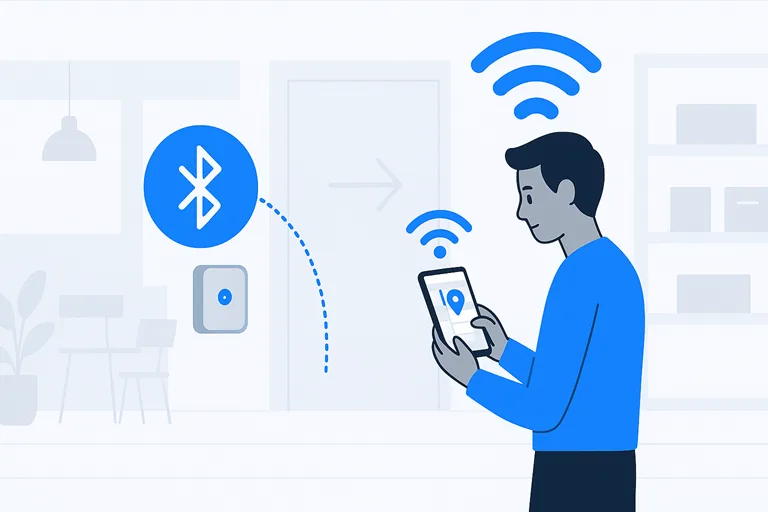
Smart spaces used to be the stuff of science fiction—now they quietly nudge us through airports, help stores serve the right offer at the right moment, and let hospital nurses find an important pump in five seconds. At the heart of many of these systems sit tiny, inexpensive radio devices called Bluetooth beacons. They do one simple thing well: broadcast a short signal that tells nearby phones, gateways, or servers “I am here.” From that modest capability springs a surprising amount of value: room-level automation, wayfinding, location analytics, and asset tracking that save time and money.
This article walks you—step by step—through what beacons are, how indoor positioning with beacons actually works, where they shine (and where they don’t), and how to plan a deployable pilot that yields measurable results. I’ll give you practical templates (including a ready-to-copy beacon planner table), an easy test protocol you can run this afternoon, and privacy and ROI checklists so your project is useful and compliant. No jargon-heavy lectures—just clear, human explanations and concrete guidance so any implementation team can start with confidence.
- What are Bluetooth beacons?
- Common beacon protocols: iBeacon / Eddystone
- How beacon positioning works
- Quick glossary
- Why BLE beacons matter for smart interiors: real use cases and value
- Practical deployment guide
- Beacon Inventory — Deployment Planner
- Accuracy benchmarks, testing results, and how to measure performance
- System architecture and integration choices
- Privacy, security, and compliance
- Cost, procurement, and return on investment (ROI) checklist
- Short case studies
- Useful tools, templates and downloadable assets
- FAQs
- Conclusion
What are Bluetooth beacons?
Beacons are small battery-powered devices that broadcast a short packet of data over Bluetooth Low Energy (BLE). That packet usually contains a unique identifier and optional telemetry (battery level, temperature, etc.). When a smartphone or a fixed receiver picks up the packet, it can translate that signal into presence, proximity, or position. That simple broadcast model makes beacons cheap, easy to install, and well-suited to many indoor navigation and automation tasks.
Most beacons come as little tags or puck-like enclosures you can stick to walls or ceilings; many promise months or years of battery life depending on broadcast interval and transmit power. In real projects, battery life is a trade-off: more frequent advertising and higher TX power improve responsiveness and range, but shorten life. For quick pilots, most teams choose a medium-power, 1–2 second advertising profile to get immediate feedback without constant battery swaps.
Beacons are also software-friendly: mobile SDKs and cloud platforms read beacon IDs and translate them into meaningful actions—turn lights on when a person enters a corridor, show a blue dot on an indoor map, or trigger a proximity coupon in a store. This simplicity is the reason so many venue owners adopt BLE beacons as the first step toward richer indoor experiences.
Common beacon protocols: iBeacon / Eddystone
iBeacon (Apple’s format) and Eddystone (Google’s open frames) are the two familiar families you’ll see. iBeacon is widely used in iOS ecosystems and sends a stable UUID/Major/Minor trio; Eddystone offers multiple frame types (UID, URL, TLM) and can support ephemeral IDs for privacy. Which one you choose depends on your ecosystem and privacy needs—many teams pick a vendor that supports both to keep their options open.
How beacon positioning works
There are four common ways beacons are used to determine where someone or something is.
- Presence/proximity — the simplest use: a device detects a beacon and knows someone is “near.” This is binary and very useful for triggers (e.g., “door opened, turn the light on”).
- RSSI-based distance estimates + trilateration — devices measure the RSSI (signal strength) from multiple beacons and convert that to approximate distance, then compute position from intersecting circles. It’s simple but brittle—signal strength varies with people, furniture, and walls, so expect errors.
- Fingerprinting — this method maps a space: you record signal patterns at many known spots (a “radio map”), then compare live signals to that map to estimate position. It takes more setup but often yields better, more stable accuracy when combined with machine learning.
- Direction-finding (AoA/AoD) — introduced in Bluetooth 5.1, direction finding uses antenna arrays to measure the Angle of Arrival or Angle of Departure, enabling far tighter location estimates and even sub-meter performance in controlled setups. This is a game changer when real precision matters because it addresses one of RSSI’s fundamental weaknesses—multipath and inconsistent signal strength.
A practical way to think about these options: proximity triggers are cheap and reliable; RSSI trilateration is low-effort but noisy; fingerprinting demands upfront work yet rewards with better consistency; direction finding yields the best accuracy but needs specialized hardware and careful calibration.
Quick test idea: set up three beacons in a 10 × 10 m grid, walk a 1-meter sampling path, and log RSSI values at each position. That dataset is enough to try a basic fingerprint and compare the median error between trilateration and fingerprinting.
Quick glossary
- RSSI — Received Signal Strength Indicator; weaker signals generally mean farther distance, but not always.
- Fingerprinting — Building a database of signal patterns for fixed locations; we match live readings to the closest pattern.
- AoA / AoD (Angle of Arrival / Departure) — Physical direction measurements that let a system know not just how strong a signal is, but where it’s arriving from—important for sub-meter accuracy.
Why BLE beacons matter for smart interiors: real use cases and value
Every practical technology question boils down to: what problem does this solve, and why does it matter? For Bluetooth beacons, the answers are immediate and tangible.
Retail and hospitality
Stores use beacons for wayfinding in complex malls, to guide shoppers to products, or to trigger contextual offers when a customer lingers by a display. The result is better conversion and a more personalized in-store experience.
Airports and large transit hubs
Beacons can provide turn-by-turn indoor directions, help passengers find gates, and support operational workflows (e.g., baggage cart location tracking). In large terminals, even a small reduction in lost-way incidents improves throughput and passenger satisfaction.
Healthcare
Hospitals track movable equipment, monitor staff response times, and help caregivers find patients faster. A common use is tagging infusion pumps or wheelchairs with beacon tags so staff can locate them in seconds—time saved that translates to better patient care. Research prototypes and pilot deployments have shown promising results for BLE-based systems in healthcare settings.
Offices & buildings
From meeting room booking automation to HVAC/LIGHT zoning by occupancy, beacons enable room-level context without an expensive retrofit. For building managers, the benefit shows up in energy savings and better occupant comfort.
Location analytics & asset tracking
Beyond immediate automation, beacons feed location analytics platforms with movement patterns and dwell times. These insights inform layout changes, staffing, or merchandising decisions.
Why choose beacons over other options?
Compared with Wi-Fi, beacons are cheaper to deploy and easier to maintain at a small scale; compared to UWB, beacons are less precise but far lower cost. For many projects, BLE beacons hit the sweet spot of price, battery life, and acceptable accuracy. That said, the best fit depends on your precision requirements and environment.
Where beacons are not the best fit
BLE beacons struggle in very metal-dense environments, inside freezer rooms, or where sub-0.5 m precision is mandatory. If you must track sub-30-centimeter asset positions or operate in heavy RF clutter, consider UWB or hybrid approaches. Also, systems that require continuous high-frequency polling (e.g., real-time motion capture) may be better served by technologies designed for that use case. In short, beacons are versatile and low-cost, but they are not a one-size-fits-all solution.
Practical deployment guide
This is the hands-on section—your field guide to getting beacons working reliably.
Rules of thumb (starter densities)
Below are starting points you can use before a full site survey. These are practical guidelines—actual spacing should be tuned by testing.
| Space type | Suggested density (starter) |
| Retail aisles / store sections | 1 beacon per 25–50 m² |
| Open office / coworking | 1 beacon per 40–80 m² |
| Hospital wards / corridors | 1 beacon per 20–40 m² |
| Airport concourse / terminal | 1 beacon per 50–100 m² |
These numbers are conservative starting points. In narrow corridors or spaces with many partitions, expect to increase density.
TX power & advertising interval presets
- Low power (battery max) — advert 2–5s, low TX: great for presence-only use and long battery life.
- Medium (pilot mode) — advert 1–2s, medium TX: good balance for testing and most wayfinding pilots.
- High (tight tracking) — advert 200–500 ms, high TX: improves responsiveness but may drop battery life to months instead of years.
Mounting & orientation
- Mount beacons on ceilings where possible; ceiling mounting reduces line-of-sight obstruction.
- Keep them several centimeters from metal surfaces and away from HVAC ducts.
- Label each beacon physically and in your inventory (Beacon ID ↔ Location) so that troubleshooting is fast.
- Record installation height in your planner.
Sample Beacon Deployment Planner
Beacon Inventory — Deployment Planner
| Beacon ID | Location | Floor | X (m) | Y (m) | Mount Type | TX Power | Adv. Interval (ms) | Battery % | Installed Date | Last Maintenance | Expected Life (months) | Firmware Ver | RSSI Mean (dBm) | RSSI StdDev | Assigned Asset ID | Replace Thresh % | Status | Notes |
|---|---|---|---|---|---|---|---|---|---|---|---|---|---|---|---|---|---|---|
| B001 | Main Entrance – Ceiling | 1 | 2 | 1.5 | Ceiling | Medium | 1000 | 98% | 10/3/2025 | 10/3/2025 | 24 | 1.2.0 | -58 | 2.4 | 20% | Active | Covers main doorway; tilt 5° away from metal frame | |
| B002 | Store Aisle 3 – Wall | 1 | 5.5 | 9 | Wall | Medium | 1000 | 100% | 10/3/2025 | 10/3/2025 | 24 | 1.2.0 | -64 | 3.1 | 20% | Active | Mount at 2.2 m; avoid shelving metal | |
| B003 | ER Corridor A – Ceiling | 2 | 10 | 3.5 | Ceiling | High | 500 | 96% | 10/3/2025 | 10/3/2025 | 18 | 1.2.1 | -52 | 1.8 | 25% | Active | High TX for corridor coverage; record battery telemetry weekly | |
| B004 | Pharmacy Storage – Wall | 2 | 3 | 12 | Wall | Low | 2000 | 100% | 10/3/2025 | 10/3/2025 | 36 | 1.1.9 | -70 | 4.0 | 25% | Active | Low TX to preserve battery; behind glass cabinet | |
| B005 | Open Office – Centre | 3 | 15 | 10 | Ceiling | Medium | 1000 | 95% | 10/3/2025 | 10/3/2025 | 24 | 1.2.0 | -60 | 2.9 | 20% | Active | Map to desk clusters A/B | |
| B006 | Meeting Room 2 – Wall | 3 | 18.5 | 7.5 | Wall | Low | 1500 | 99% | 10/3/2025 | 10/3/2025 | 30 | 1.1.9 | -66 | 3.3 | 20% | Active | Also used for occupancy triggers | |
| B007 | Gallery Zone B – Ceiling | 1 | 22 | 4 | Ceiling | Medium | 1000 | 97% | 10/3/2025 | 10/3/2025 | 24 | 1.2.0 | -61 | 2.7 | 20% | Active | Mount central to zone; avoid spotlights | |
| B008 | Airport Gate A2 – Ceiling | 1 | 30 | 18 | Ceiling | High | 800 | 94% | 10/3/2025 | 10/3/2025 | 18 | 1.2.2 | -54 | 2.1 | 25% | Active | Gate guidance and boarding notifications | |
| B009 | Loading Dock – Wall | 0 | 5 | 25 | Wall | High | 1000 | 92% | 10/3/2025 | 10/3/2025 | 18 | 1.2.1 | -50 | 2.5 | Asset-TRK-01 | 25% | Active | Tagged forklifts pass frequently; monitor interference |
| B010 | Storage Rack A5 – Wall | 2 | 8.5 | 14 | Wall | Low | 2000 | 100% | 10/3/2025 | 10/3/2025 | 36 | 1.1.8 | -72 | 3.8 | Asset-INV-157 | 25% | Active | Low-power for long battery life; tied to inventory RFID |
| B011 | Corridor West – Ceiling | 1 | 12 | 6 | Ceiling | Medium | 1000 | 96% | 10/3/2025 | 10/3/2025 | 24 | 1.2.0 | -59 | 2.6 | 20% | Active | Used for wayfinding; test during peak hours | |
| B012 | Test Grid Node G5 – Floor | 0 | 4 | 4 | FloorMount | Medium | 1000 | Active |
Site survey checklist
- Walk a grid and collect RSSI samples at fixed points.
- Note interference sources (metal shelves, machinery).
- Document permission/consent requirements for staff tracking.
- Confirm battery reporting via telemetry.
- Run a quick sanity check of the end-to-end flow: beacon → receiver/app → action (light or notification).
A downloadable Beacon Deployment Planner (CSV/Google Sheet) is a high-value asset for projects; include it in your pilot package and make it the anchor for maintenance scheduling and ID management.
Quick test protocol (RSSI fingerprinting test)
- Lay out a 5 × 5 m test grid with 1 m spacing; mark positions.
- Place at least three beacons around the perimeter; note their Beacon_IDs.
- At each grid point, record 10 RSSI samples from each visible beacon and log average and variance.
- Build a simple fingerprint database: each grid point gets an average vector of RSSI values.
- Run live tests: stand at known points and record the position predicted by trilateration and by fingerprint matching.
- Calculate median error and 75th percentile error for both approaches.
- Iterate: adjust TX power/advertising interval or add beacons where mistakes are high.
- Repeat during different occupancy levels (empty vs busy) to understand performance under load.
This protocol is small, repeatable, and gives a meaningful comparison between RSSI trilateration and fingerprinting approaches.
Accuracy benchmarks, testing results, and how to measure performance
Accuracy is the single technical metric clients ask about most. The honest answer: it varies with environment and method.
- RSSI trilateration: Typically ~2–5 m in many indoor settings. It’s simple and inexpensive, but will show jitter and outliers in cluttered spaces.
- Fingerprinting (with ML post-processing): Typically ~1–2 m after a careful survey and model tuning; it handles multipath better because it learns patterns rather than assuming signal decays smoothly.
- Direction finding (Bluetooth 5.1 AoA/AoD): Under controlled conditions, direction-finding setups can approach sub-meter accuracy; expect the best results in line-of-sight, calibrated deployments.
How to measure performance:
- Use median error (in meters) as your primary metric—median is robust to occasional spikes.
- Also, report the 75th percentile error to show tail behaviour (how often users see large mistakes).
- Log sample counts and observe variance across times of day; human density often changes signal patterns, especially in retail hours.
A/B test plan: roll out a small area with two approaches—(A) trilateration setup and (B) fingerprinting—collect at least 100 validation points per approach, and compare median and 75th percentile errors. That will tell you whether the upfront investment in fingerprinting pays off in your environment.
Academic and industry evaluations consistently show that fingerprinting plus ML improves median accuracy versus raw RSSI trilateration; direction-finding hardware narrows the gap further, but at a hardware and calibration cost. Use these numbers as planning guidance, not a guarantee—field testing remains the ultimate arbiter.
System architecture and integration choices
Two architectural models dominate beacon deployments.
Client-based positioning (phone-centric). The mobile device receives beacons, computes position locally (possibly with an SDK), and reacts or reports to the server. Pros: good privacy control (raw location can remain on device), lower server load, and lower infrastructure cost. Cons: results depend on device model and OS behaviour.
Server-based tracking (infrastructure-centric). Fixed gateways or receivers listen for beacon transmissions and report readings to a central server that computes positions.
Pros: consistent hardware behaviour, good for asset tracking where tags move and aren’t attached to phones.
Cons: more hardware and management required. infsoft
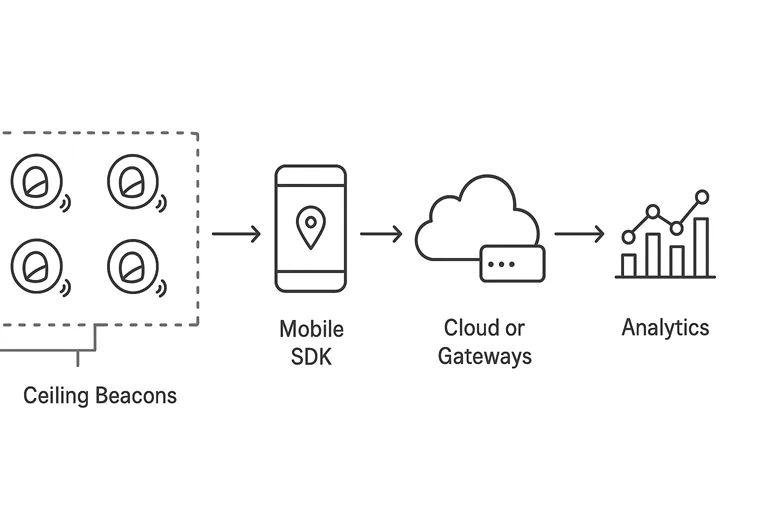
Integration touchpoints (common stack):
- Mobile SDK — for blue-dot wayfinding and app triggers.
- Gateway API / Cloud — to collect telemetry and compute server-side positions.
- GIS / Mapping platform — to visualize positions on floor plans (ArcGIS IPS is one such platform that integrates BLE, Wi-Fi, and maps). Esri
Security & telemetry to collect: Protect beacon identity mappings, collect only what you need for analytics, and instrument for battery/failure alerts. A minimal telemetry set: timestamp, beacon_id, rssi, gateway_id (if server-based), and inferred position.
Privacy, security, and compliance
Location data is sensitive. Design with privacy first, and you’ll reduce legal risk and earn user trust.
- Ephemeral IDs (EID): Some modern beacon protocols use rotating IDs to stop long-term tracking by third parties. If your use case requires anonymous proximity rather than identity, favour ephemeral ID patterns or server-side tokenization. EID protects users and reduces data retention risk.
- Consent patterns: explicit consent is the cleanest model—ask users before gathering location data and explain benefits clearly. For employee or asset tracking, document policies and consent steps for staff.
- Data minimization & retention: store only what you need and for as short a time as necessary. For analytics, aggregated dwell-time and heat-maps are often sufficient; avoid storing raw, identifiable location traces for long periods.
- Security basics: secure beacon inventories (who can rename/move IDs), rate-limit APIs, and monitor for anomalous activity. Practical privacy-by-design reduces compliance headaches (GDPR or local regulations) and is an easy win in procurement conversations.
Cost, procurement, and return on investment (ROI) checklist
Estimate the major cost buckets for a pilot:
- Hardware — beacons and optional gateways. Beacons cost from a few USD to $30+, depending on features. Gateways and enterprise-grade tags cost more.
- Installation & site survey — hours for survey, mounting, and inventory.
- Cloud / SDK fees — many providers charge for platform access or SDK licensing.
- Maintenance — battery replacements, firmware updates, and occasional recalibration.
- Integration — engineering work to connect beacon events to apps, dashboards, or building systems.
Quick ROI formula:


Typical pilots aim for a 6–12 month payback for retail and healthcare use cases, depending on measured efficiencies and conversion lifts.
Short case studies
Retail (wayfinding + offers): A mid-size mall installed beacons in corridors and near anchor stores, delivering in-app directions and targeted coupons. Over a 3-month pilot, they reported a 7% lift in time-spent-in-target-sections and a noticeable bump in coupon redemption. The low hardware cost and positive customer feedback justified a rollout.
Hospital (asset tracking): A community hospital tagged infusion pumps and transport ventilators, allowing staff to locate devices in under a minute. The project reduced time spent searching for equipment by an estimated 40% and shortened equipment downtime—ultimately improving patient throughput.
Airport (passenger guidance): A regional airport used beacons in concourses to provide turn-by-turn guidance to gates and restroom facilities. Passenger feedback improved, and ground staff reported fewer “lost passenger” incidents during peak hours.
These short stories show how small deployments deliver immediate operational wins when designed around clear problems and measurable KPIs.
Useful tools, templates and downloadable assets
- Beacon Deployment Planner (CSV/Google Sheet) — mapping, PIN numbers, battery logs, and installation dates (see sample CSV earlier).
- Beacon Calculator — quick math to estimate how many beacons per m² based on your chosen spacing.
- Mobile SDKs & sample code — look for SDKs that support both iBeacon and Eddystone to avoid lock-in.
- Survey templates — standardized grids and CSV formats for the RSSI fingerprint tests described above.
If you include a download button for the planner on your page, it’s a high-conversion asset and excellent for lead capture during pilot outreach.
FAQs
Q1: How long do beacon batteries usually last, and how does the advertising interval affect life?
Battery life varies by model and settings. With conservative settings (advertising every 2–5 seconds and low TX power), many beacons last 18–36 months. Boost advertising frequency to 200–500 ms and increase transmit power, and life drops to months rather than years. For pilots, use medium profiles (1–2 second interval) to see realistic responsiveness without frequent battery swaps. Also, choose beacons that report battery telemetry so you can schedule replacements before failures. Regular inventory and the deployment planner make maintenance predictable.
Q2: Do beacons work through walls, and what affects their accuracy most?
Signals pass through most walls but are affected by material: drywall and glass are relatively transparent, while metal, concrete, and water (including people) attenuate or reflect signals. That’s why RSSI trilateration shows variable accuracy in real spaces. The biggest real-world accuracy drivers are physical obstructions, human density, and multi-path reflections. Fingerprinting and direction-finding techniques mitigate some of these issues, but the single most effective strategy is on-site testing and iterative tuning.
Conclusion
Bluetooth beacons are a cost-effective, widely adopted element of modern smart interiors. They excel at presence detection, zone-level automation, wayfinding, asset tracking, and feeding location analytics. For teams starting, the recommended path is a small, instrumented pilot using medium TX/advertising settings, a simple fingerprinting grid, and clear success metrics (median error, 75th percentile, and operational time savings). Direction-finding hardware is right for high-precision cases; otherwise, fingerprinting + ML often gives the best balance of cost and performance.
Ready to move from idea to impact? Download the Beacon Deployment Planner (copy the CSV snippet above into a spreadsheet), run the 8-step RSSI test this week, and measure median error. If you want, I can generate a tailored beacon layout for your floor plan—share a simple map and I’ll return a placement plan with starter TX settings and a parts list.
