
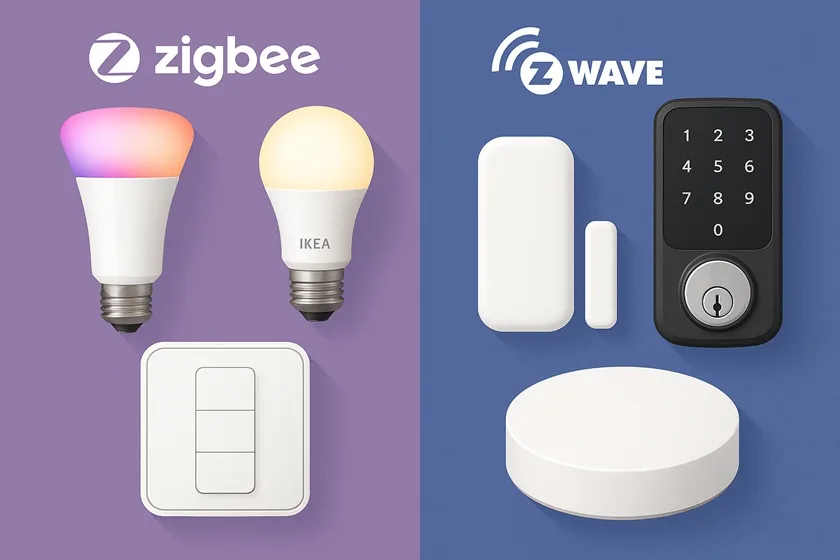
Modern smart home networks rely on mesh-based wireless standards like Zigbee and Z-Wave to link lights, locks, sensors, and more. These two protocols were both born in the early 2000s to solve the same problem – making devices talk to each other reliably while using very little power. Zigbee (an open IEEE standard 802.15.4, managed by the Connectivity Standards Alliance) was first ratified around 2004–2005. Z-Wave, developed by Danish company Zensys in 1999, was introduced into the smart home market in the mid-2000s. Over time, both have grown into large ecosystems, with millions (Zigbee) or tens of millions (Z-Wave) of devices worldwide.
In this guide, we’ll compare Zigbee and Z-Wave in depth – from frequencies and range to security, compatibility, and device ecosystems – so you can decide which protocol suits your home. We’ll also highlight benefits and trade-offs, give real product examples (like Philips Hue lighting for Zigbee and Aeotec hubs for Z-Wave), and walk you through a step-by-step process to choose the right one. In the end, we’ll recommend some starter products too. (Quick heads-up: Zigbee runs at 2.4GHz while Z-Wave uses sub-1GHz, which can affect interference and range).
- How Zigbee and Z-Wave Mesh Networks Work
- Wireless Frequency and Range
- Data Rates and Power Consumption
- Compatibility and Device Ecosystems
- Security and Reliability
- Benefits and Trade-offs
- Zigbee vs Z-Wave — Key Differences
- Which Should You Choose? (Step-by-Step Guide)
- Product Examples
- Recommendation
- Frequently Asked Questions
- Conclusion: Product Recommendation
How Zigbee and Z-Wave Mesh Networks Work
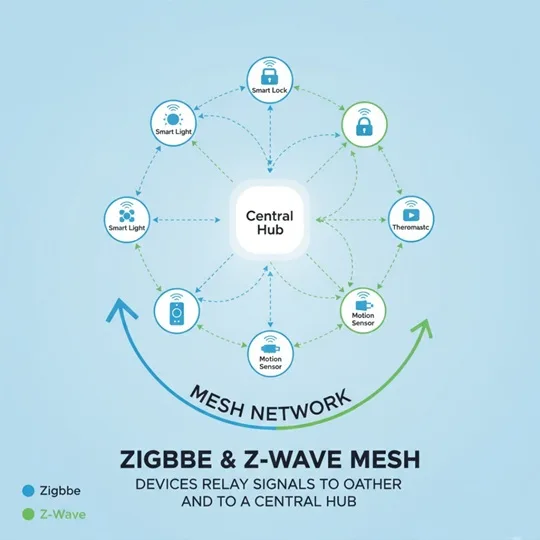
Both Zigbee and Z-Wave use mesh networking to extend range and reliability. In a mesh, devices relay signals to each other. For example, a Zigbee smart bulb can “pass along” a command to another device farther away. This makes the network self-healing and scalable. The Connectivity Standards Alliance notes that Zigbee’s mesh is “scalable to thousands of nodes”. Z-Wave also uses mesh routing: its standard mode supports up to four hops between devices, while its newer Z-Wave Long Range (LR) mode can connect up to 4,000 nodes on one network. In practical terms, typical home networks (usually under a few hundred devices) are well within both systems’ limits.
Mesh comparison: Unlike a star network, a mesh has no single point of failure. Zigbee’s mesh is slightly more flexible: it supports an unlimited number of hops and can handle huge networks (the theoretical limit is over 65,000 devices). Z-Wave’s mesh tops out at 232 devices on a standard network (though Z-Wave LR bumps that to 4,000). In day-to-day use, most homes won’t exceed either limit. However, if you have an unusually large or device-dense setup, Zigbee’s higher node capacity can give it an edge. Both protocols require a hub or gateway (controller) in the center. Hubs like Samsung SmartThings or Wink can support both Zigbee and Z-Wave at once, so you’re not forced to pick one, but individual devices only speak one protocol. As Reolink notes, “Z-Wave uses the 900MHz band,” while “Zigbee uses 2.4GHz,” so they’re not directly interchangeable.
Wireless Frequency and Range
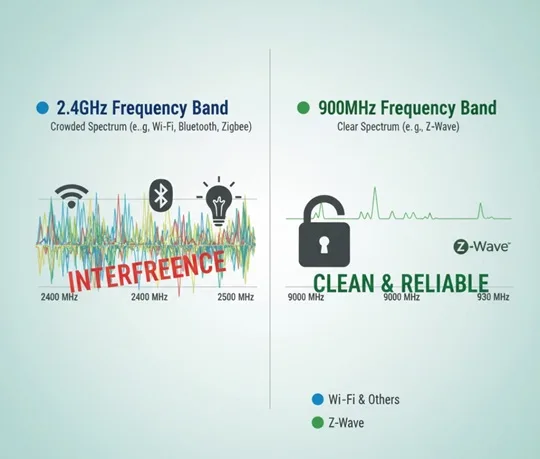
One of the biggest differences is the radio band each uses. Zigbee mainly runs at 2.4 GHz (ISM band) worldwide. It can also use sub-GHz bands (902–928 MHz in North America, 868–870 MHz in Europe), but those offer lower data rates. In contrast, Z-Wave uses a sub-1 GHz band – about 908–916 MHz in the US, 868–869 MHz in Europe. Because 2.4GHz is a “crowded” band (Wi-Fi, Bluetooth, microwave ovens, etc.), Zigbee is more prone to local interference, whereas Z-Wave’s lower band “avoids interference with Wi-Fi” and Bluetooth.
Range: On a per-hop basis, Z-Wave has a longer range. Typical line-of-sight for Z-Wave is ~50 meters (160 ft) indoors and ~200 meters (650 ft) outdoors. Zigbee ranges from about 10–20 meters (33–66 ft) indoors at 2.4GHz, and up to ~100 meters (328 ft) in ideal outdoor conditions. In practice, walls and obstructions shrink those numbers – for example, “Zigbee’s range falls between 33 and 66 feet” and “Z-Wave is ~100 feet” indoors, according to GearBrain.com. The mesh helps mitigate range limits: each non-battery device can act as a repeater. Notably, Zigbee supports unlimited hops, so a signal can traverse many nodes (Gearbrain even uses a football field analogy. Z-Wave traditionally allows only four hops, so very large homes might need more Z-Wave devices (or use Z-Wave LR, which can go up to 4,000 nodes).
Data Rates and Power Consumption
In terms of bandwidth, Zigbee is faster. Zigbee’s data rate tops out at 250 kbps on 2.4GHz, whereas Z-Wave maxes around 100 kbps. (In real use, smart home data is tiny – just commands or sensor readings – so neither speed is a practical bottleneck.) Reolink explains Zigbee “transmits data at 250 kbps compared to Z-Wave’s 100 kbps,”.
Power usage is low on both. They’re meant for battery devices. Zigbee is typically slightly more energy-efficient on paper, thanks to efficient 802.15.4 hardware. Z-Wave is also very low-power and often sleeps until needed (allowing some Z-Wave sensors to run for years on coin cells). In practical terms, both can run on batteries for 1–5 years, depending on usage. As CSA notes, Zigbee is “optimized for low power consumption to extend battery life”, while Z-Wave devices usually spend most of the time in a power-saving mode. For homeowners, both mean you can put door/window sensors, locks, and remotes on batteries without worrying about daily charging.
Compatibility and Device Ecosystems
Interoperability: A key difference is openness. Zigbee is an open IEEE-based standard, so many chip makers and companies (Philips, Samsung, Amazon, etc.) build Zigbee products. Z-Wave started proprietary (only Sigma Designs/now Silicon Labs) but has since become a managed standard. Both use a certification process: Zigbee devices must be Zigbee Certified, Z-Wave devices Z-Wave Certified. In theory, any two certified devices of the same protocol should work together. In reality, Z-Wave’s stricter control means all certified Z-Wave devices are designed to “talk to any other Z-Wave component,” even across brands. Zigbee has had multiple profiles (e.g., Zigbee Light Link, Home Automation, now unified in Zigbee 3.0), so some older devices might not always interoperate perfectly. Security.org notes that “all Z-Wave devices work with each other,” whereas Zigbee has “different variants” that can lead to compatibility issues.
Device selection: Both protocols have large ecosystems. According to the Zigbee Alliance, over a billion Zigbee chipsets have been sold, and “millions of Zigbee products already deployed in smart homes”. The Z-Wave Alliance reports millions of devices as well, and over 4,000 certified Z-Wave products worldwide. Real examples: Zigbee is common in smart lighting. The popular Philips Hue bulbs and IKEA Tradfri lights use Zigbee (via the Hue Bridge or Tradfri Gateway). Many smart plugs, sensors, and switches from companies like Sengled, GE (Jasco), and Leviton are Zigbee. Z-Wave is popular in security and HVAC: many smart locks (Yale, Kwikset, Schlage), thermostats (Honeywell, Ecobee’s Z-Wave edition), and sensor brands (Aeotec, Fibaro, Dome) use Z-Wave. Hubs illustrate this: the Aeotec Smart Home Hub (Samsung SmartThings V2) supports Z-Wave (and Zigbee too), while the Philips Hue Bridge is strictly Zigbee. As CSA notes, major platforms like SmartThings, Amazon’s Echo Plus, and Signify (Hue) are built on Zigbee.
One big device factor: regional compatibility. Z-Wave frequencies are region-specific. A US Z-Wave device won’t work with EU Z-Wave networks. Zigbee’s global 2.4GHz use means a Zigbee bulb bought anywhere is generally interoperable (though you still must use the same hub/bridge). So if you travel or move countries, Zigbee devices are more portable than Z-Wave ones.
Security and Reliability
Security is critical for any wireless protocol. Both Zigbee and Z-Wave use AES-128 encryption to protect communications. Both have evolving security frameworks (Zigbee’s latest 3.0 spec and Z-Wave’s S2 security standard). Reports of large-scale hacks on either are rare; issues have usually been due to flawed product implementation rather than the protocols themselves. In practice, both are considered very secure for home use. For example, Security.org notes that vulnerabilities (like the famous 2018 “Z-Shave”) were manufacturer faults, not flaws in the Z-Wave specs. So whether you use Zigbee or Z-Wave, you’ll get robust encryption. Z-Wave’s controlled ecosystem gives it a uniform security model across all certified devices, while Zigbee relies on each manufacturer to implement the spec. But Zigbee 3.0 has tightened defaults (network keys, install codes) to enhance security.
On reliability, both protocols perform well. Because they’re local (mesh) networks, they don’t suffer from internet outages. Z-Wave’s sub-GHz band often yields fewer dropouts in radio-noisy homes. Zigbee’s 2.4GHz band can clash with Wi-Fi or microwave ovens, but having many channels (16 channels in 2.4GHz) helps avoid congestion. In a typical home, neither should drop out under normal conditions. It’s often said that Z-Wave’s lower-frequency signals penetrate walls a bit better, but Zigbee’s multiple channel options can compensate. Ultimately, network design (good mesh topology, distance between nodes) matters more. Both protocols allow device inclusion/removal with a button press to “heal” the network if something moves or fails.
Benefits and Trade-offs
- Zigbee pros: Faster data rate (250kbps), very large network size (65K+ nodes), cheap and open (no licensing fees), and used by many mainstream brands (Hue, SmartThings, etc.). Its 2.4GHz signal is global. Zigbee devices tend to be slightly less expensive. Its mesh can span very far via many hops.
- Zigbee cons: Uses crowded 2.4GHz band (possible interference). Device interoperability can be uneven (different Zigbee profiles, manufacturer variations). Slightly shorter per-hop range (~30–60 ft) than Z-Waveen.wikipedia.org.
- Z-Wave pros: Uses the sub-GHz band (fewer competing signals). Excellent interoperability (all certified devices, even from different brands, work together). Longer per-hop range (~100 ft), and proven performance in home security applications. The network is tightly controlled for compatibility.
- Z-Wave cons: Slower data rate (100kbps), and smaller max network (232 devices, unless you use the new LR spec). Devices often cost more (licensing adds to cost),.Frequency differs by region, so that US devices won’t work in the EU. It’s proprietary (though now managed by a standards body), meaning fewer chip vendors than Zigbee.
Zigbee vs Z-Wave — Key Differences
| Feature | Zigbee | Z-Wave |
|---|---|---|
| Range | Shorter per device (~30–60 ft indoors). Relies on a denser mesh of repeaters for coverage. | Longer per device (~100–150 ft indoors). Better raw penetration through walls for larger homes. |
| Speed (Data Rate) | Faster (~250 kbps). Ideal for lighting and quick-response devices. | Slower (~100 kbps) but perfectly adequate for sensors and security devices. |
| Frequency | 2.4 GHz (global). Shares band with Wi-Fi/Bluetooth — possible interference. | Sub-1 GHz (908/915 MHz in U.S.) — typically less crowded and less prone to Wi-Fi interference. |
| Compatibility & Ecosystem | Widely adopted for lighting (Philips Hue, IKEA Tradfri) and many budget devices; Zigbee 3.0 improved interoperability. | Strong in locks, sensors and security gear (Yale, Fibaro, Ring). Tighter certification often means predictable compatibility. |
| Cost | Generally more affordable with many budget-friendly options and many chipset vendors. | Often slightly more expensive due to certification/licensing and a smaller (but focused) vendor base. |
Note: Distances are approximate and may vary depending on wall materials, interference, and device placement.
Which Should You Choose? (Step-by-Step Guide)
- Check Your Devices and Ecosystem: Inventory what you have or want. If you already own hubs or devices (e.g., a Philips Hue Bridge, SmartThings Hub, Aeotec USB stick), see which protocol they support. For example, Philips Hue lights require Zigbee. If many of your planned devices are Zigbee-only (like some IKEA lights or Hue bulbs), Zigbee might be an easy choice. If you have (or want) security devices like smart locks and sensors from brands known for Z-Wave (Yale, Fibaro, Kwikset, Ring Alarm), consider Z-Wave.
- Consider Range and Home Size: In a small apartment or condo, range differences likely won’t matter much either way.
- Evaluate Interference: If your home’s Wi-Fi or other 2.4GHz devices often seem jammed, a Z-Wave network (900MHz) will avoid that. If you already have robust Wi-Fi or don’t mind channel planning, Zigbee (2.4GHz) works fine.
- Think About Power (Battery) Needs: Both protocols are low-power. If you plan many battery-powered sensors and want the absolute lowest power use, Zigbee has a slight edge. But realistically, both allow years of battery life.
- Future-Proof & Matter: Both Zigbee and Z-Wave products are being adapted for the new Matter standard. Zigbee’s successor profile, and Z-Wave’s S2 security, are evolving. If you want a system likely to coexist with future Matter devices, both protocols are in the mix.
- Check Product Availability: Look for the products you want (smart locks, lights, plugs, sensors). Determine whether they’re Zigbee, Z-Wave, or both. Make sure your chosen protocol supports the primary device kinds you require. Smart hubs such as the Samsung SmartThings Hub (V3) accept both standards, providing maximum flexibility.
- Budget and Support: Zigbee devices are often slightly cheaper. Z-Wave gear sometimes comes with premium features/certification. Also consider manufacturer support and warranty.
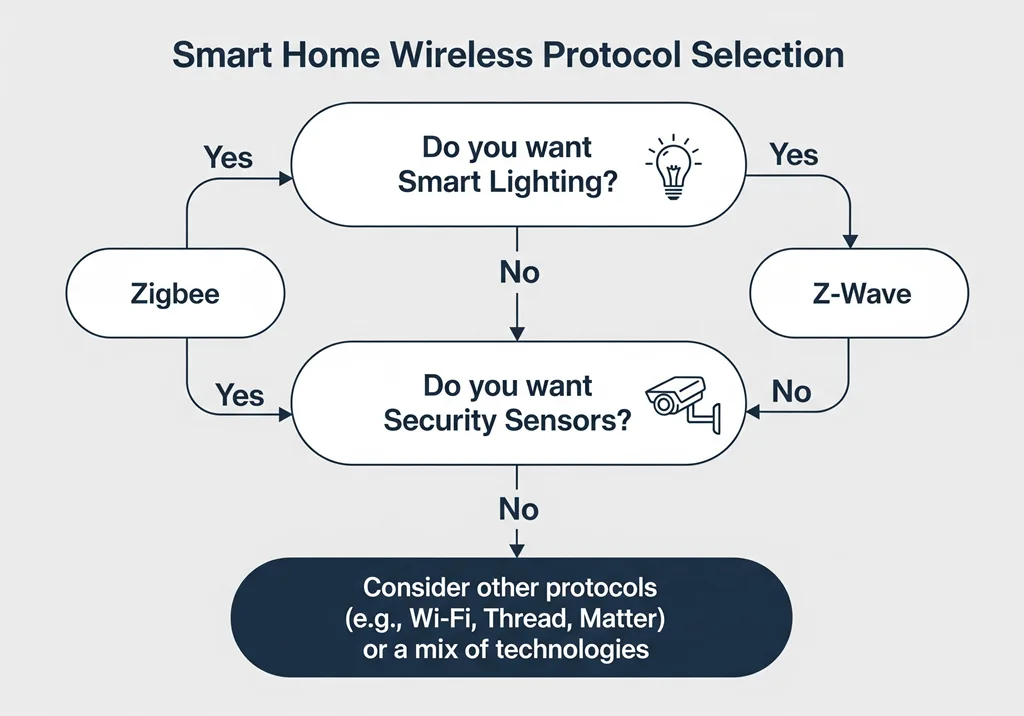
By weighing these steps, you’ll know which protocol aligns best with your specific home. Neither is strictly “better” in all cases; each has trade-offs. Your decision might even be: use both! Many homeowners run a hub that supports both Zigbee and Z-Wave simultaneously for maximum choice.
Product Examples
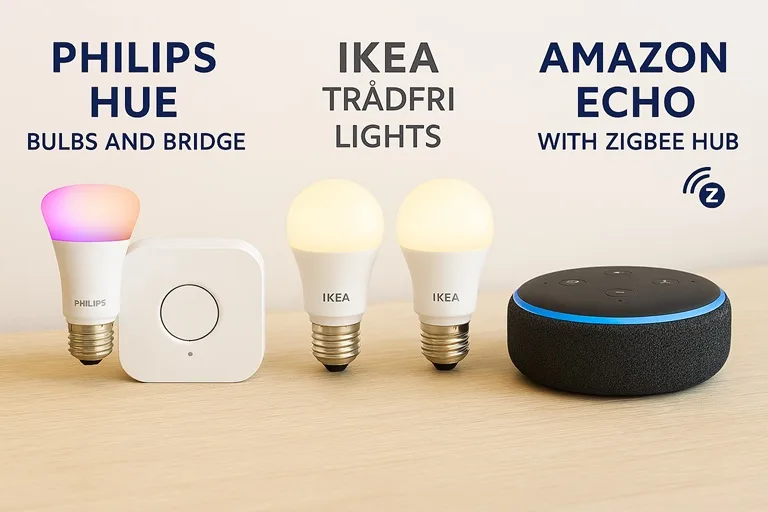
- Zigbee: Philips Hue Bridge & bulbs – A flagship Zigbee lighting system. Hue sensors, plugs, and switches also use Zigbee. Amazon Echo (4th Gen) – contains a built-in Zigbee hub for lights/sensors (if you’re okay with mentioning it). IKEA Tradfri – affordable Zigbee bulbs and remotes. Samsung SmartThings (V2 hub) – works as a Zigbee controller.
- Z-Wave: Aeotec Smart Home Hub (formerly SmartThings Gen 2) – an all-in-one hub for Z-Wave (and Zigbee/Matter) devices. Aeotec Z-Stick – a USB Z-Wave stick for DIY setups. Ring Alarm – Ring’s security system uses Z-Wave sensors. Yale Kwikset Smart Locks – many smart locks use Z-Wave. Fibaro sensors (leak, motion, etc.) – Z-Wave. GE/Leviton Z-Wave switches and outlets for lighting control.
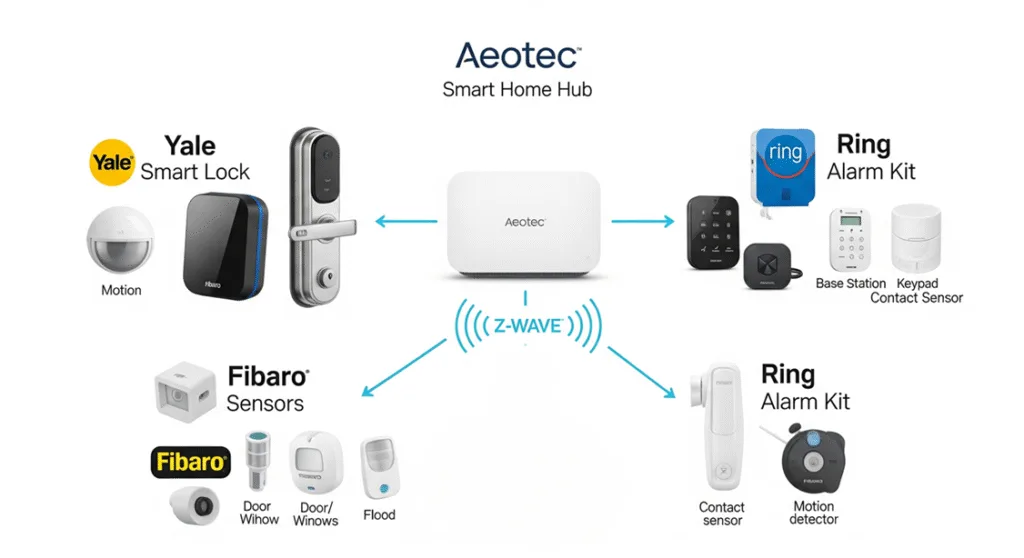
This is not an exhaustive list, but it illustrates each protocol in action. When shopping, look for the “Zigbee” or “Z-Wave” logo on boxes, or check the manual/specs.
Recommendation
For a new smart home build, choose the protocol that best matches your key devices and house layout. If most of your planned gadgets are smart lights and plugs (like Hue, Sengled, Ikea, WeMo), lean toward Zigbee. If you’re focused on locks, sensors, and value strong wall penetration, lean Z-Wave. Many users opt for a combo: for example, a Samsung SmartThings or Aeotec hub (which supports both) plus a Philips Hue Bridge for advanced lighting.
Our pick for starters: If you already have a preference, go with that. Otherwise, a neutral option is the Samsung SmartThings Edge or Aeotec Smart Home Hub, which supports both Zigbee and Z-Wave (and Thread/Matter). That way, you can mix devices and don’t commit to a single protocol. If forced to pick one, we suggest Zigbee for lighting-centric builds (Hue systems, IKEA bulbs, etc.) and Z-Wave for security-focused builds (locks, cameras, sensors) – keeping in mind the regional frequency issue with Z-Wave.
Remember to ensure any hub/controller you buy works with the protocol you choose. For example, pair Philips Hue bulbs with a Hue Bridge (Zigbee), or use a dedicated Z-Wave hub like the Aeotec for door locks and sensors.
Frequently Asked Questions
Conclusion: Product Recommendation
For most beginners, we recommend starting with a versatile dual-protocol hub and one ecosystem to grow. For example, the Aeotec Smart Home Hub (Samsung SmartThings V3) supports both Zigbee and Z-Wave, Wi-Fi, Thread, and Matter. Add a handful of devices in one category (like a Philips Hue Bridge with Zigbee bulbs for easy lighting) plus a Z-Wave lock or sensor. This gives you hands-on experience with both Zigbee and Z-Wave.
If you prefer to commit to one, pick based on your needs: for full-featured smart lighting, try Philips Hue (Zigbee) or IKEA Tradfri (Zigbee) bundles. For robust security devices, consider a Z-Wave starter kit (like Aeotec or Ring Alarm). In either case, make sure the hub/controller explicitly supports that protocol.
